Allow or prevent custom script
No restrictions to types of files added to SharePoint
Recent improvements in SharePoint in Microsoft 365 and SharePoint Server 2019 have removed the limitations on types of files that can be added. There are currently no known types of files that cannot be added.
Note on custom script file extensions
The following types of files can be uploaded to SharePoint in a web browser or using the sync app, but they won't work unless the site allows you to run custom script. By default, custom script is blocked on user-created sites that have Microsoft 365 groups. If you're a global admin or SharePoint admin in your organization, see Allow or prevent custom script to learn how to change the custom script settings.
| File extension |
File type |
| .aspx |
ASP.NET Active server page |
| .asmx |
ASP.NET web services source file |
| .ascx |
ASP.NET wep user control file |
| .master |
ASP.NET master web page |
| .xap |
Windows phone installation |
| .swf |
ShockWave Flash |
| .jar |
Java archive |
| .xsf |
Office InfoPath form definition file |
| .htc |
HTML Component file |
If your admin allows custom script on a site, you need "Add and Customize Pages" permission (part of the Design and Full Control permission levels) to run the script in the file types listed above.
For the list of file names restricted by the sync app, see Invalid file names and file types in OneDrive and SharePoint.)
Blocked file types for SharePoint Server 2016
There are certain types of files that you can't upload to a list or a library on SharePoint Server 2016. By default, SharePoint blocks these file types. For example, if .asp is on the list of blocked file extensions, a file called "newpage.asp" is blocked.
Variations of a file extension are also blocked. The following list shows different ways of representing the same file, all of which are blocked if the .hta extension is on the list of blocked file extensions.
- filename.hta
- filename.hta.
- filename.hta.{3050F4D8-98B5-11CF-BB82-00AA00BDCE0B}
- filename.hta::$DATA
Note
These lists are the standard files that SharePoint blocks. Administrators can add more types of files to block. If you find file types that aren't listed here, but are blocked, speak to your SharePoint admin or manager.
These are the default blocked file types for new SharePoint Server 2016 deployments.
To learn how to change or add file see Add or remove file types.
| File extension |
File type |
| .ashx |
ASP.NET Web handler file. Web handlers are software modules that handle raw HTTP requests received by ASP.NET. |
| .asmx |
ASP.NET Web Services source file |
| .json |
JavaScript Object Notation file |
| .soap |
Simple Object Access Protocol file |
| .svc |
Windows Communication Foundation (WCF) service file |
| .xamlx |
Visual Studio Workflow service file |
Filenames that include braces (for example, filename.{doc}) are blocked automatically.
Add or remove blocked files to SharePoint Server 2016
If you have farm administrator permissions, you can add or remove blocked file types.
Open SharePoint Central Administration.
Click Security, and then click Define blocked file types.
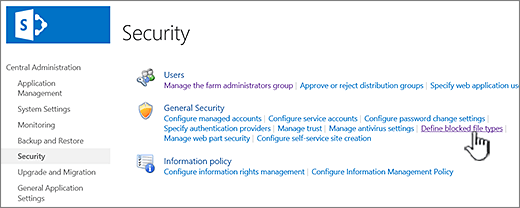
To change the web application, click the link next to Web Application: and then click Change Web Application.
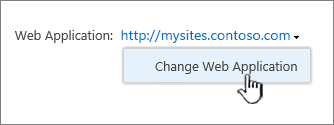
In the Select Web Application dialog, click an app.

On the Blocked File Types page, do one of the following:
To add a file to block, type a file extension (with the period), one per line.
To stop blocking a file, select the file extension and press the Del key.

If you delete the wrong file by accident, press CTRL + Z to undo.
Note
You do not have to type a file name extension in the list in alphabetical order. The next time that you open the list, the file name extension you added will be correctly sorted in alphabetical order.
Click OK.

