Download 3D-printable designs to customize your Microsoft Business Pen and Microsoft Classroom Pen 2. You can download individual designs or all available designs.
3D-printable pen grip designs for Microsoft Business and Microsoft Classroom Pen 2
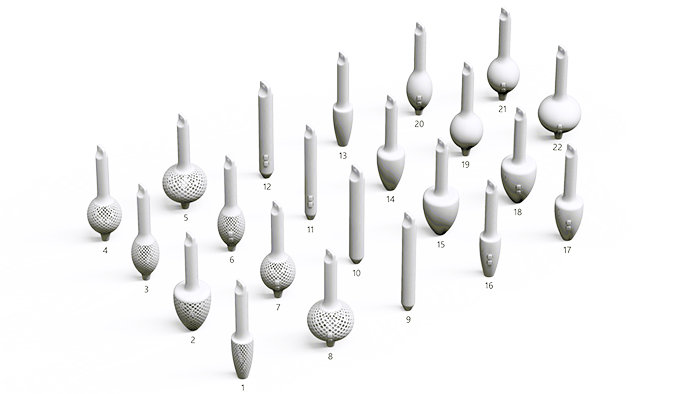
| Legend number | Design name | File name | File size | Description |
|---|---|---|---|---|
| 1 | Small Textured Cone Grip (No Button) | tex_con_pen_grp_nobtn_sml.stp | 9.5 MB | Small cone shape, textured, no button. |
| 2 | Large Textured Cone Grip (No Button) | tex_con_pen_grp_nobtn_lrg.stp | 9.3 MB | Large cone shape, textured, no button. |
| 3 | Small Textured Bulb Grip (No Button) | tex_bulb_pen_grp_nobtn_sml.stp | 9.6 MB | Small bulb shape, textured, no button. |
| 4 | Medium Textured Bulb Grip (No Button) | tex_bulb_pen_grp_nobtn_med.stp | 9.4 MB | Medium bulb shape, textured, no button. |
| 5 | Large Textured Bulb Grip (With Button) | tex_bulb_pen_grp_nobtn_lrg.stp | 9.3 MB | Large bulb shape, textured, no button. |
| 6 | Small Textured Bulb Grip (With Button) | tex_bulb_pen_grp_btn_sml.stp | 11.0 MB | Small bulb shape, textured, with button. |
| 7 | Medium Textured Bulb Grip (With Button) | tex_bulb_pen_grp_btn_med.stp | 11.1 MB | Medium bulb shape, textured, with button. |
| 8 | Large Textured Bulb Grip (With Button) | tex_bulb_pen_grp_btn_lrg.stp | 10.7 MB | Large bulb shape, textured, with button. |
| 9 | Medium Smooth Cylindrical Grip (No Button) | smooth_marker_pen_grp_nobtn_med.stp | 585.1 KB | Medium cylindrical shape, smooth, no button. |
| 10 | Large Smooth Cylindrical Grip (No Button) | smooth_marker_pen_grp_nobtn_lrg.stp | 882.4 KB | Large cylindrical shape, smooth, no button. |
| 11 | Small Smooth Cylindrical Grip (With Button) | smooth_marker_pen_grp_btn_sml.stp | 1.6 MB | Small cylindrical shape, smooth, with button. |
| 12 | Large Smooth Cylindrical Grip (With Button) | smooth_marker_pen_grp_btn_lrg.stp | 1.5 MB | Large cylindrical shape, smooth, with button. |
| 13 | Small Smooth Cone Grip (No Button) | smooth_con_pen_grp_nobtn_sml.stp | 767.0 KB | Small cone shape, smooth, no button. |
| 14 | Medium Smooth Cone Grip (No Button) | smooth_con_pen_grp_nobtn_med.stp | 794.1 KB | Medium cone shape, smooth, no button. |
| 15 | Large Smooth Cone Grip (No Button) | smooth_con_pen_grp_nobtn_lrg.stp | 772.0 KB | Large cone shape, smooth, no button. |
| 16 | Small Smooth Cone Grip (With Button) | smooth_con_pen_grp_btn_sml.stp | 1.9 MB | Small cone shape, smooth, with button. |
| 17 | Medium Smooth Cone Grip (With Button) | smooth_con_pen_grp_btn_med.stp | 1.9 MB | Medium cone shape, smooth, with button. |
| 18 | Large Smooth Cone Grip (With Button) | smooth_con_pen_grp_btn_lrg.stp | 1.9 MB | Large cone shape, smooth, with button. |
| 19 | Medium Smooth Bulb Grip (No Button) | smooth_bulb_pen_grp_nobtn_med.stp | 708.4 KB | Medium bulb shape, smooth, no button. |
| 20 | Small Smooth Bulb Grip (With Button) | smooth_bulb_pen_grp_btn_sml.stp | 2.0 MB | Small bulb shape, smooth, with button. |
| 21 | Medium Smooth Bulb Grip (With Button) | smooth_bulb_pen_grp_btn_med.stp | 2.0 MB | Medium bulb shape, smooth, with button. |
| 22 | Large Smooth Bulb Grip (With Button) | smooth_bulb_pen_grp_btn_lrg.stp | 2.0 MB | Large bulb shape, smooth, with button. |
| N/A | All Microsoft Business and Microsoft Classroom Pen 2 Designs | MAA_ALL_3D_Business_ClassroomPen2_designs.zip | 23,475 KB |
3D-printable cap designs for Microsoft Pen
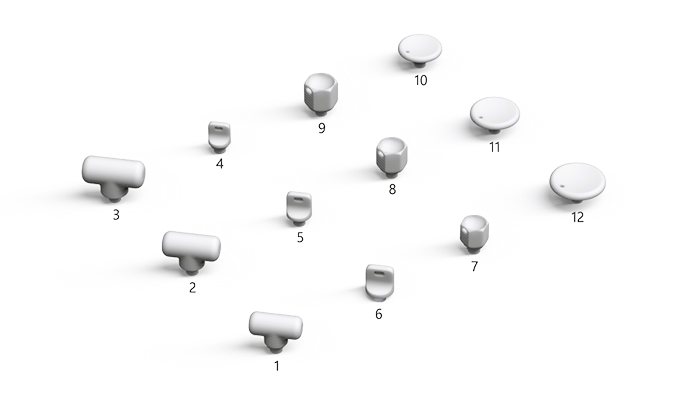
| Legend number | Design name | File name | File size | Description |
|---|---|---|---|---|
| 1 | T-Shaped Pen Cap (Small) | t_cap_small.stp | 472.9 KB | A small T-shaped cap for Microsoft Pen, designed for easy removal with minimal grip and anti-roll functionality. |
| 2 | T-Shaped Pen Cap (Medium) | t_cap_med.stp | 464.6 KB | A medium T-shaped cap for Microsoft Pen, offering ergonomic handling and preventing rolling on flat surfaces. |
| 3 | T-Shaped Pen Cap (Large) | t_cap_large.stp | 462.3 KB | A large T-shaped cap for Microsoft Pen, designed for easy opening with minimal grip and maximum anti-roll protection. |
| 4 | Pincher Style Pen Cap (Small) | pincher_cap_small.stp | 214.4 KB | A small pincher-style cap for Microsoft Pen, featuring a hole for lanyard attachment and secure grip. |
| 5 | Pincher Style Pen Cap (Medium) | pincher_cap_med.stp | 206.8 KB | A medium pincher-style cap for Microsoft Pen, designed with a lanyard hole for portability and firm handling. |
| 6 | Pincher Style Pen Cap (Large) | pincher_cap_large.stp | 204.2 KB | A large pincher-style cap for Microsoft Pen, offering enhanced stability and a hole for lanyard attachment. |
| 7 | Hexagonal Pen Cap (Small) | hex_cap_small.stp | 228.8 KB | A small hexagonal cap for Microsoft Pen, featuring a geometric design for anti-roll performance and a lanyard hole. |
| 8 | Hexagonal Pen Cap (Medium) | hex_cap_med.stp | 220.7 KB | A medium hexagonal cap for Microsoft Pen, designed for stylish anti-roll functionality and easy lanyard attachment. |
| 9 | Hexagonal Pen Cap (Large) | hex_cap_large.stp | 218.2 KB | A large hexagonal cap for Microsoft Pen, providing maximum anti-roll protection and a hole for lanyard use. |
| 10 | Disk Pen Cap (Small) | disk_cap_small.stp | 409.3 KB | A small disk-shaped cap for Microsoft Pen, designed to be removed using pressure from different body parts without the use of fingers. |
| 11 | Disk Pen Cap (Medium) | disk_cap_med.stp | 400.2 KB | A medium disk-shaped cap for Microsoft Pen, offering a flat design for removal without finger grip, using alternative pressure points. |
| 12 | Disk Pen Cap (Large) | disk_cap_large.stp | 400.0 KB | A large disk-shaped cap for Microsoft Pen, providing maximum surface area for easy removal without fingers, using body pressure. |
| N/A | All Microsoft Pen Cap Designs | MAA_ALL_3D_MicrosoftPenCapDesigns.zip | 1,031 KB |
Need more help?
Technical support

For technical support, open the Surface app or web browser, describe your problem and select Get Help.
Community support

Communities can help you ask questions, and hear from experts with rich knowledge. Ask the Community.
Other support

If you can't use your Surface or have a question about something else, open Get Help to get other support online.