
Microsoft Teams uses AI-powered, context-aware detection to protect users from potential phishing and social engineering activity.
Availability
For worldwide users, this type of detection is available on mobile, desktop, and web. It uses conversation context in one-on-one chats and group chats to detect phishing-related behaviors from new external first-time contacts. Users may see a warning when phishing is detected and help them make more informed decisions before continuing the chat.
For mobile users in China, additional phishing and fraud protection may apply to both external and in-tenant conversations. This expanded coverage is designed to protect recipients from region-specific fraud patterns.
Note
Phishing content detection isn’t used to train AI models or for conversation summarization, productivity insights, user monitoring, advertising, or other non-security purposes.
What to do when you see the banner
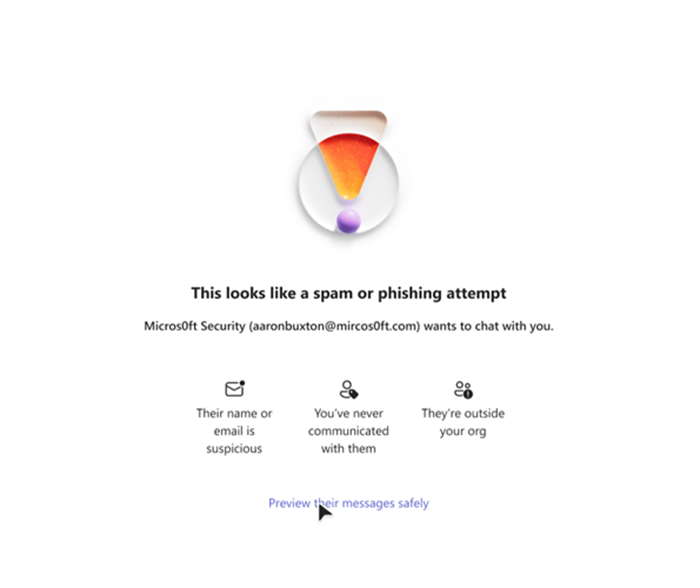
Verify information
If Teams identifies a potentially harmful message, a warning will appear in the chat.
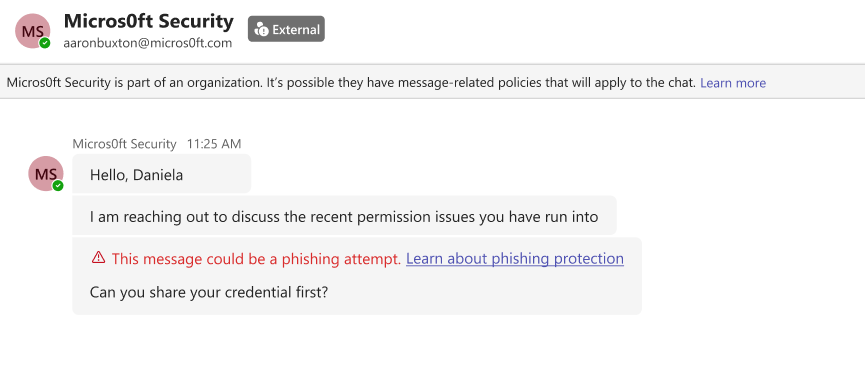
- Review the identity of the sender and their email address for potential impersonation. Also, review their message for any high-risk behavior, such as asking for money or requesting personal information.
If phishing is confirmed, don't engage with the user. Block and report the user from their contact card.
If phishing was triggered by mistake for a trusted user, go to the flagged message. Under More options, choose Report as not a concern.
Protect your information
Don't share:
Passwords
Verification codes
Financial information
Sensitive information
Related topics
Prevent spam or phishing attempts from external chats in Microsoft Teams | Microsoft Support
High-risk warning banner in Microsoft Teams | Microsoft Support