Outlook'a çoğu hesap türünü eklediğinizde, iletileriniz varsayılan olarak Konuşmalar'da görüntülenir. Bir konuşma, aynı yazışmada yer alan ve konu satırı aynı olan tüm iletileri içerir.
Kullandığınız Outlook sürümü için aşağıdaki sekme seçeneklerinden birini belirleyin.
Hangi Outlook sürümüne sahibim?
Not
Bu Yeni Outlook sekmesinin altındaki adımlar ekranınızla eşleşiyorsa, henüz yeni Windows için Outlook'u kullanmıyor olabilirsiniz.
Klasik Outlook'u seçin ve onun yerine bu adımları izleyin.
Yeni Outlook'ta iletileri konuşmaya göre gruplandırılmış olarak görüntüleme
Sayfanın üst kısmında Ayarlar >Posta>Düzeni'ni seçin.
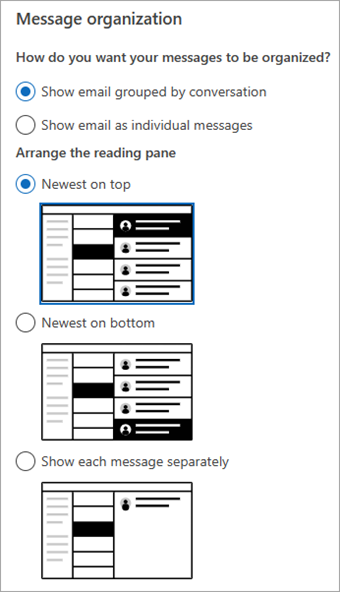
İleti organizasyonu altında, e-postayı konuşmaya göre gruplandırılmış olarak mı yoksa tek tek iletiler olarak mı göstermek istediğinize bağlı olarak seçeneklerden birini belirleyin.
-
E-postayı konuşmaya göre gruplandırılmış olarak göster'i seçerseniz, Okuma bölmesini düzenle'nin altında aşağıdaki seçeneklerden birini belirleyin:
En yeni üstte, En yeni altta veyaHer iletiyi ayrı göster.
Klasik Outlook'ta Konuşma görünümünü kullanma
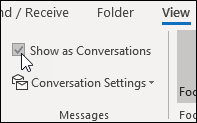
- Herhangi bir posta klasöründe, örneğin gelen kutunuzda, Konuşma görünümünü açmak veya kapatmak için Konuşma>Olarak Göster'i seçin.
-
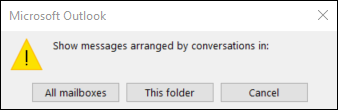
Tüm posta kutularını veya Bu klasörü seçin.
- Birden çok ileti içeren konuşmalar, ileti listesinde üçgen bir genişletme/daraltma simgesiyle tanımlanır
 . Konuşmayı genişletmek veya daraltmak için seçin.
- Her Konuşmada iletiler, en yeni ileti en üstte olacak şekilde sıralanır. Bu sıralama düzenini değiştiremezsiniz.
- Konuşmanın parçası olan yeni bir ileti aldığınızda, Konuşmanın tamamı ileti listenizin en üstüne taşınır.
- Okunmamış iletiler içeren tüm Konuşmaların konu başlığı kalın yazıyla gösterilir ve okunmamış iletilerin sayısı konunun yanında görüntülenir. Konuşma'yı genişlettiğinizde, okunmamış tüm iletilerin kalın başlık gösterilir.
Klasik Outlook'ta Konuşma seçeneklerini değiştirme
Değiştirebileceğiniz birkaç konuşma seçeneği vardır.
Herhangi bir e-posta klasöründe, örneğin gelen kutunuzdaKonuşma AyarlarınıGörüntüle'yi> seçin

Mevcut seçeneklerden herhangi birini seçin.
-
Diğer Klasörlerdeki İletileri Göster Konuşmada başka klasörlere taşınmış iletilerin yanı sıra Gönderilmiş Öğeler klasörünüzde depolanmış olarak gönderdiğiniz iletileri de görüntülemek için bu seçeneği kullanın.
-
Gönderenleri konunun üstünde göster Bu seçenek belirlendiğinde, konuşmanın üst kısmında konuşma konusu yerine gönderen adları gösterilir.
-
Seçili konuşmayı her zaman genişlet Bu seçenek yalnızca seçili durumdaki konuşma için geçerlidir. Bu kutuyu işaretlediğinizde seçilen konuşma her zaman genişletilmiş olarak görünür.
-
Klasik girintili görünümü kullanma Klasik girintili görünüm, konuşmadaki iletileri, konuşmadaki konumlarına göre girintili olarak gösterir.
Web üzerinde Outlook veya Outlook.com'da iletileri konuşmaya göre gruplandırılmış olarak görüntüleme
Sayfanın üst kısmında Ayarlar>Posta>Düzeni'ni seçin.
İleti organizasyonu altında, e-postayı konuşmaya göre gruplandırılmış olarak mı yoksa tek tek iletiler olarak mı göstermek istediğinize bağlı olarak seçeneklerden birini belirleyin.
-
E-postayı konuşmaya göre gruplandırılmış olarak göster'i seçerseniz, Okuma bölmesini düzenle'nin altında aşağıdaki seçeneklerden birini belirleyin:
En üstte en yeni, en yeni altta ya daHer iletiyi ayrı göster.
İlgili makaleler
TMac için OutlookMac için Outlook'da e-posta iletilerini konuşmaya göre görüntüleme
