Set up an Outlook account on the iOS Mail app

应用对象
Microsoft 365 专属 Outlook Microsoft 365 Mac 版专属 Outlook Outlook 2024 Office 2024 Outlook 2024 for Mac Office 2024 for Mac Outlook 2021 Office 2021 Outlook 2021 for Mac Office 2021 for Mac Outlook 2019 Office 2019 Outlook 2016 Office 2016 Microsoft 365 家庭版 Office 365 小型企业版 Microsoft 365 管理员 由世纪互联运营的 Office 365 - 小型企业管理员版 Outlook.com 新的 Outlook for Windows 适用于 Exchange Server 2016 的 Outlook 网页版 Outlook Web App

If you're trying to sign in to Office with your Microsoft account, you may get a message asking you for parental permission or to verify your age.

For more information about why you're seeing this and how to resolve it, see Parental consent and Microsoft child accounts.

Set up a Microsoft 365, Exchange, or Outlook email in the iOS Mail app

Step 1
                 Image of a grey line
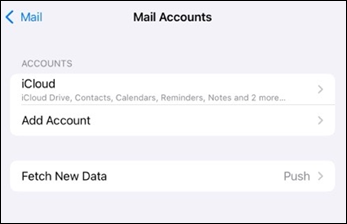
Go to your iPhone or iPad's Settings > scroll down and tap Apps > Mail > Mail Accounts >Add Account.

Outlook mobile mail app add account on iOS

Step 2
                 Image of a grey line
Select Microsoft Exchange.

Outlook mobile mail add account provider options

Step 3
                 Image of a grey line
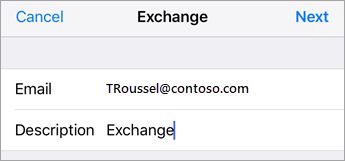
Enter your Microsoft 365, Exchange, or Outlook email address and a description of your account. Tap Next.

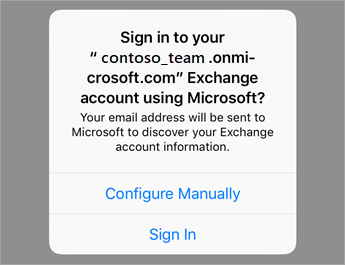
Exchange Sign In

Tap Sign In.

Tap Sign In if using O365 or tap Configure Manually if you have your organizations server settings.

Note

Tap Configure manually if you need to enter server settings.

Step 4
                 Image of a grey line
Enter the password associated with your email account. Tap Sign in or Next.

Enter your O365 work or school account password.

Step 5
                 Image of a grey line
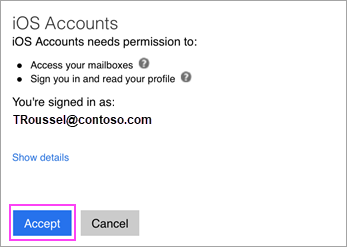
The Mail app may request certain permissions. Tap Accept.

Tap Allow if prompted to give permission.

Step 6
                 Image of a grey line
Choose the services you want to sync with your iOS device and tap Save. You're done!

Account sync settings

Having trouble? We can help.

If you still need help setting up email on your iOS device, tell us about your question in detail using the comment box below so we can address it in the future.

For the best experience, we recommend the Outlook for iOS mobile app. For troubleshooting tips, see Troubleshoot email setup on mobile FAQ.

You can also contact support:

  • If you are having issues with the iOS Mail app, contact Apple Support.
  • If you have a Microsoft 365 work or school account that uses Microsoft 365 for business or Exchange-based accounts, talk to your Microsoft 365 admin or technical support.
  • For all other accounts, contact Microsoft support.