跳到主要內容
Microsoft
支持
支持
支持
Home
Microsoft 365
Office
產品
Microsoft 365
Outlook
Microsoft Teams
OneDrive
Microsoft Copilot
OneNote
Windows
更多信息 ...
设备
Surface
PC Accessories
Xbox
PC Gaming
HoloLens
Surface Hub
硬件保修
Account & billing
资源
社区论坛
Microsoft 365 管理员
开发人员
教育
上报支持欺诈
Product safety
更多
Buy Microsoft 365
Microsoft 所有
Global
Microsoft 365
Azure
Windows
Surface
XBOX
支援
軟件
軟件
Windows Apps
OneDrive
Outlook
從 Skype 轉用 Teams
Microsoft Teams
PC 及 裝置
PC 及 裝置
PC 與平板電腦
配件
娛樂
娛樂
XBOX Game Pass Ultimate
XBOX Live 金會員
電腦遊戲
企業
企業
Microsoft AI
Microsoft 安全性
Azure
Dynamics 365
商務用 Microsoft 365
Microsoft Power Platform
Windows 365
數位主權
開發人員與資訊科技人員
開發人員與資訊科技人員
Microsoft 開發人員
Microsoft 學習
AI 市集 App 支援
Microsoft 科技社群
Microsoft Marketplace
軟件公司
Visual Studio
其他
其他
Microsoft Rewards
免費下載項目與安全性
教育
查看網站地圖
搜尋
Search for help
沒有結果
Cancel
登入
Sign in with Microsoft
Sign in or create an account.
Hello,
Select a different account.
You have multiple accounts
Choose the account you want to sign in with.
Related topics
Related topics
×
在 Word 中共用和共同撰寫
共用文件
透過即時共同撰寫功能在 Word 文件上共同作業
在 Word 中使用追蹤修訂
接受追蹤修訂
在 Word 中格式化文字
建立項目符號或編號清單
變更 Word 中的行距
頁面與版面配置
變更邊界
建立新聞稿欄
將頁面方向變更為橫向或直向
為頁面新增框線
插入頁首或頁尾
插入頁碼
插入分頁符號
建立目錄 (機器翻譯)
插入表格、圖片和浮水印
插入表格
插入圖片
插入文字藝術師
新增浮水印
顯示或隱藏尺規
旋轉圖片或圖案
文繞圖
儲存和列印
儲存文件
編輯 PDF
建立並列印標籤
列印郵件標籤
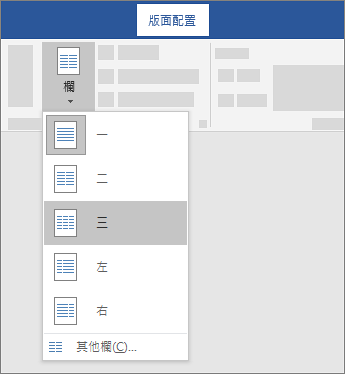
在 Word 中建立多欄
Applies To
Word for Microsoft 365
Word 2024
Word 2021
Word 2019
Word 2016
若要將整份文件排成欄,請選擇
版面
>
欄。
選擇你想要的選項,或選擇
「更多欄位
」來設定你自己的欄位格式。
將文件的一部分分成欄位
選擇你想排成欄位的段落。
選擇
版面
>
欄位
,然後選擇你想要的選項。
另請參閱
插入欄間切換
[欄] 對話方塊
Was this information helpful?
Yes
No
Thank you! Any more feedback for Microsoft?
Can you help us improve?
(Send feedback to Microsoft so we can help.)
How satisfied are you with the translation quality?
What affected your experience?
Resolved my issue
Clear instructions
Easy to follow
No jargon
Pictures helped
Translation quality
Didn't match my screen
Incorrect instructions
Too technical
Not enough information
Not enough pictures
Translation quality
Any additional feedback? (Optional)
Submit feedback
By pressing submit, your feedback will be used to improve Microsoft products and services.
Your IT admin will be able to collect this data.
Privacy Statement.
Thank you for your feedback!
×