
Microsoft is committed to advancing security standards and as such, we will start phasing out SMS as a method of authentication and account recovery for personal Microsoft accounts.
Why is SMS no longer a method of authentication and account recovery for a personal Microsoft account?
Microsoft believes that the future of authentication is passwordless, secure, and user-friendly.
SMS-based authentication is now a leading source of fraud, and by moving to passwordless accounts, passkeys, and verified email, we're helping you stay ahead of evolving threats while making account access simpler and more seamless.
What can I use instead of SMS to authenticate and verify sign-in?
When you sign in, you will be given an option to "Sign in faster" and create a passkey.
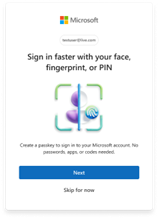
To create a passkey, select Next when prompted, or follow the steps in Signing in with a passkey.
Why are passkeys better than SMS?
Improved security: Passkeys are phishing-resistant and eliminate the risk of fraud.
Faster sign-in: No more waiting for SMS codes - sign in instantly with passkeys utilizing biometrics or device PIN or through utilizing one-click sign-in options using Apple and Google accounts.
Reduced risk: SMS is one of the most targeted vectors for account takeover. Moving away from it significantly reduces exposure.
Better account recovery: Verified email and passkeys ensure users can recover access even if they change phone numbers or lose devices.
FAQs about SMS authentication moving to Passkeys
Why is Microsoft removing SMS authentication?
Microsoft is committed to advancing security standards through secure by default experiences. By moving to passkeys and verified email, we're helping users to stay ahead of evolving threats—while making account access simpler and more seamless.
Why is SMS authentication not considered secure?
SMS authentication is vulnerable to phishing and SIM-swap attacks. We’re replacing it with passkeys and verified email for better protection and convenience.
What do I need to do?
You’ll be guided through a simple process to add a verified email and set up a passkey. This ensures you can sign in and recover your account without relying on SMS.
You can also create a passkey by following the steps in Signing in with a passkey.
Will I still be able to recover my account if I lose my phone?
Yes. With a verified email and passkey, you’ll have secure and reliable recovery options.
What are passkeys?
Passkeys are a modern, phishing-resistant way to sign in using your device’s built-in authentication (like Face ID, fingerprint, or PIN). They’re faster and more secure than passwords or SMS codes. Learn more.
Recent updates to Microsoft account sign-in now support passkeys with device biometric authentication, making phishing virtually impossible.
Need more help?
Can't sign in?
If you can't sign into your Microsoft account, most issues can be identified by our sign-in helper tool.
Contact Support
For technical support, go to Contact Microsoft Support, enter your problem and select Get Help. If you still need help, select Contact Support to be routed to the best support option.
Important
To protect your account and its contents, our support agents are not allowed to send password reset links, or access and change account details.