
Understand diagnosis specificity suggestions
Diagnosis specificity suggestions help improve documentation accuracy by recommending more specific diagnoses for the Assessment and Plan section of your note.
After a note is generated, Dragon Copilot analyzes the documented clinical information and might suggest a more specific diagnosis when it finds sufficient evidence. Each suggestion includes supporting rationale to help you evaluate the recommendation.
You can:
- Accept a suggestion and update the note.
- Dismiss a suggestion.
- Ignore a suggestion and continue working.
The note is never updated automatically. If you choose not to take action, the note remains unchanged.
Benefits of diagnosis specificity suggestions
- Improve documentation accuracy by capturing greater diagnostic specificity.
- Support more complete and consistent clinical documentation.
- Help clinicians document more accurately the first time.
- Reduce the need for documentation updates and clarification requests.
- Surface relevant diagnosis suggestions directly within your workflow.
- Simplify note review by making it easy to apply supported diagnosis recommendations.
Note
To enable or disable diagnosis specificity suggestions, contact your administrator.
How diagnosis specificity suggestions work
- Generate or review a note in Dragon Copilot.
- Look for a notification indicator in the Assessment and Plan section.
- Select the notification indicator to review any diagnosis specificity suggestions and supporting rationale.
- Select Update note to replace the diagnosis with the more specific option, or select Dismiss notification.
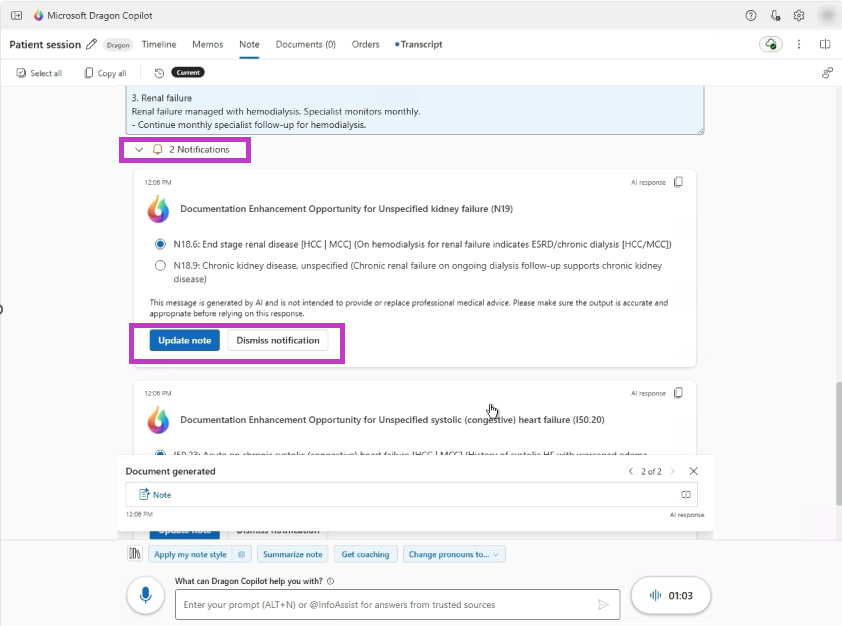
Note
If you're using an integrated version of Dragon Copilot, you'd also need to select the sync to EHR button for the note to update in the EHR as well.
Availability
- Available for ICD-10-CM coding guidance in the United States.
- Available in Dragon Copilot across supported experiences.
- Your organization must enable the feature before users can access it.