

In Excel, you can easily insert, rename, and delete worksheets in your workbook.
Insert a worksheet
- Select the New Sheet plus icon
 at the bottom of the workbook.
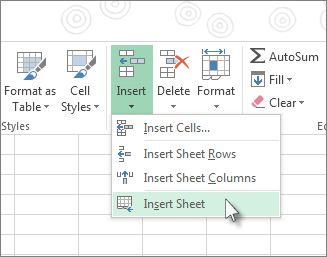
 - Or, select Home > Insert > Insert Sheet.
Rename a worksheet
- Double-click the sheet name on the Sheet tab to quickly rename it.
- Or right-click on the Sheet tab, select Rename then type a new name.
Move a worksheet
- To move the tab to the end, right-click the Sheet tab then Reorder... > (move to end) > OK
- Or click and drag to tab to any spot.
Delete a worksheet
- Right-click the Sheet tab and select
 Delete.
 - Or, in the ribbon menu, select the sheet, and then select Home > Delete > Delete Sheet.

Need more help?
You can always ask an expert in the Excel Tech Community or get support in Communities.