
MSN prioritizes high-quality content that is timely, engaging, and optimized for its platform. While all content must comply with video content guidelines and publishing requirements, some issues—though not explicitly prohibited—can significantly reduce how often content surfaces to consumers. This page outlines the most common pitfalls that can impact discoverability or user engagement on MSN. Use it as a checklist to ensure your articles and galleries are set up for success.
In this article
Content visibility report
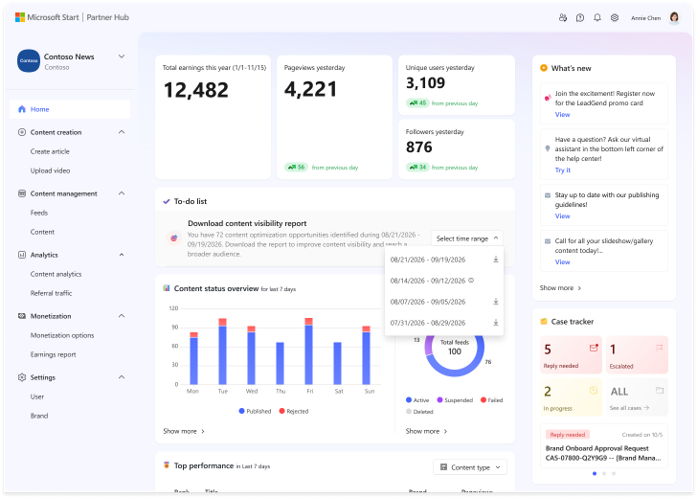
The Content Visibility Report helps you understand your recent content visibility across MSN and identify actionable opportunities to improve content quality. Available directly in MSN Partner Hub (MSPH) homepage, the report combines visibility insights with content-level optimization guidance so you can understand overall performance, identify common quality signals, and review specific content that may benefit from improvement.
How to access your Content Visibility Report
- Content Visibility Reports are available for self-service download directly from the To-do module in MSN Partner Hub.
- From Partner Home, you can access a Partner-level report covering eligible brands.
- From Brand Home, you can access a report for the specific brand you are currently viewing.
What does the Content Visibility Report include?
The report includes several metrics to help you understand your overall content visibility:
-
Content Visibility Score
Indicates the potential distribution reach of your content across MSN. The score reflects alignment with platform quality, safety and user experience guidelines.
-
Benchmark Score
Provides additional context by showing the midpoint score across all partners and brands during the reporting period.
-
Percentile Ranking
Shows how your Content Visibility Score compares with other publishers during the same reporting period and indicates your relative position within the overall distribution of scores.
The Visibility Scope Summary provides a breakdown of your content across different visibility scopes where content may be eligible to appear across MSN based on its alignment with platform quality guidelines. Reviewing this breakdown can help you better understand your overall content visibility and how it changes over time.
-
Top optimization opportunities
Partner-level reports provide an aggregated view across all brands you manage and highlight the top 10 optimization opportunities. Brand-level reports highlight the top 5 opportunities
These insights can help you:
- Understand which quality signals appear most frequently in your content.
- Identify recurring patterns that may benefit from optimization.
- Apply the recommended guidance to content improvements.
To make the recommendations more actionable, each optimization opportunity includes up to 100 affected content URLs from content published within the most recent 30-day reporting window. You can use these examples to review where a quality signal was identified and determine where improvements may be appropriate.
Invalid or misleading dates
Evergreen content may be republished on MSN, but the publication date must reflect the original publish date or clearly indicate when updates were made. Using future-dated timestamps, assigning the current date to older articles, or including an invalid or missing date can lead to content demotion or reduced visibility. Read more about acceptable date formats here.
Watch out for:
- Future-dated timestamps
- Day-of-ingestion dates (for older stories)
- Invalid or missing date formats
Link misuse
Excessive or misleading links
Content published on MSN should be designed to engage readers on the MSN platform, not redirect them elsewhere. Posts that serve primarily as gateways to the original site—especially very short articles or those with early outbound links—are likely to be demoted.
Watch out for:
- Articles with fewer than 450 characters
- Outbound links to the original site within the first three paragraphs
- Overuse of internal site links, such as “Most Read” or “Recommended Articles”
- Link-heavy layouts with minimal editorial content
Best practices:
- Keep outbound links relevant and use them sparingly to maintain a high-quality reading experience on MSN.
Misplaced related links
"Related Links” sections—such as “Read More,” “Recommended,” or similar—should only appear at the end of an article or in the right-hand sidebar (as displayed in the MSN layout). Placing these links mid-article or within the first few paragraphs can disrupt the reading experience and reduce the article’s visibility.
Watch out for:
- Inserting related links near the beginning of an article
- Embedding related links between paragraphs in the body
- Using more than one “Related Links” section per article
Best practices:
- If a post is found to have a Related Links section that is misplaced, the article may be demoted.
Readability issues
If a post is hard to read, it’s unlikely to keep a reader’s attention—and that affects performance on MSN. Before ingesting content, take a moment to ensure everything is clean, well-structured, and easy to follow.
Watch out for:
- Missing paragraph or line breaks that create walls of text
- Links that are broken, unclickable, or displayed as plain text
- Special characters that appear as gibberish due to encoding issues
These issues not only frustrate readers but can also limit the visibility of your content on MSN.
Media standards and usage
Irrelevant media
Images, slideshows, or videos should support the story you’re telling. When media isn’t clearly connected to the content, it can confuse or distract readers—and in some cases, result in the post being removed.
Watch out for:
- Embedding unrelated media just to fill space
- Using generic visuals that don’t reflect the topic
- Using your brand logo as a thumbnail image; thumbnail images should reflect the subject of the story—not the publisher.
- Including multiple media types that don’t work together
Best practices:
- Stick to visuals that enhance understanding or add meaningful context to the story.
Image quality issues
First impressions count—and blurry, poorly cropped images can make your content feel unprofessional. High-quality visuals not only look better but also boost reader trust.
Watch out for:
- Low-resolution or pixelated images
- Poorly cropped visuals that aren’t focused on the subject
- Images that don’t align with the article’s tone or content
Best practices:
- Use editorial-quality images that reflect the same care as your writing.
Wrong slideshow size
Slideshows (also called galleries) must meet MSN’s minimum and maximum slide requirements to be eligible for publishing. Submitting a gallery with too few slides—or missing images—can prevent it from surfacing altogether.
Watch out for:
- Fewer than 5 slides (except for specific regional minimums)
- Missing images (text-only slides are not supported)
Best practices:
- Global: 5–200 slides | Japan & Sweden: Minimum 2 | Spain & Portugal: Minimum 4
- Focus on quality over quantity; don’t pad a gallery to meet the minimum
- Ensure every slide contributes meaningfully to the story
- Use consistent image dimensions and aspect ratios for a smooth user experience
For technical specifications, refer to Auto-publishing requirements.
Duplicate content or elements
Duplicate links
Repeating the same link throughout an article doesn’t improve engagement—it can actually hurt it. Readers may see it as clutter or assume the post lacks substance.
Watch out for:
- Including the same link more than once in a post
- Linking repeatedly to similar articles without clear added value
Best practices:
- Use one well-placed, relevant link instead of multiple repetitions.
Duplicate media
If you’re embedding images, videos, or other media, each element should have a clear purpose and appear only once unless repetition adds value.
Watch out for:
- Using the same image or video multiple times
- Including unrelated or redundant media that doesn’t match the article’s focus
- Combining visuals that feel disconnected from each other
Best practices:
- Keep media cohesive and ensure it supports the topic of the post.
Duplicate posts
Evergreen content is welcome on MSN, but reposting without updates or context can lead to rejection. Readers—and the platform—need to know why it’s being shared again.
Watch out for:
- Reposting old content without labeling it as a repost or update
- Failing to explain why the content is relevant again
- Pushing old content as new without transparency
Best practices:
- Clearly label reposted content and explain what’s been changed or why it’s timely.
Missing or misleading content
Lack of attribution
Every image, video, or embedded asset must be properly credited. It’s not just good practice—it’s required.
Watch out for:
- Uncredited use of third-party media
- Publishing media you don’t have rights to
- Omitting attribution or relying on unclear sources
Best practices:
- Always attribute media clearly and accurately to protect your content and reputation.
Missing or withheld content
When your article promises a video or slideshow, readers expect to see it right on MSN—not hidden behind a click. Missing or incomplete content can lead to a frustrating user experience and hurt trust in your brand.
Watch out for:
- Mentioning a video or slideshow but not including it in the post
- Requiring users to click through to the original site to access core content
- Publishing summaries on MSN while the full article appears only on your site
- Media that fails to load due to feed formatting or compliance errors
Best practices:
- Double-check that all media is embedded correctly and complies with feed specifications.
Title and thumbnail quality
Low quality titles and text overlays
Headlines and thumbnail overlays are often the first thing a reader sees—so they need to look clean, accurate, and professional. Low-quality titles or cluttered overlays can reduce trust, hurt engagement, and diminish the overall experience.
For titles, avoid:
- Including URLs or shortened links in the headline
- Using misspellings, inconsistent grammar or tense shifts
- Applying excessive punctuation or unusual symbols
- Inconsistent capitalization (stick to Title Case, Sentence case, or ALL CAPS for emphasis or acronyms)
Best practices:
- Keep titles clear, concise, and relevant to the story
- Use quotes or indirect questions when appropriate but prioritize readability
For thumbnail text overlays we review only manually added text.
Avoid adding overlay text that:
- Repeats the headline or title (video content is an exception)
- Includes logos, trademarks, or brand names added for branding or promotion
- Is decorative, hard to read, or scattered across the image
- Uses speech bubbles or news ticker-style banners to simulate urgency or mimic news formats
We do not reject thumbnails containing naturally occurring text within the image, such as:
- Product labels, signs, or brand names shown in photos (e.g., a Netflix logo on a screen, text on a protest signs, or "Make America Great Again" on a hat)
- Printed materials in the background (e.g., posters, clothing, packaging)
- Partial or obscured text that appears as part of the scene
Best practices:
- Only use overlay text when it adds meaningful context to the image
- Make sure overlay text is legible, relevant, and visually balanced
- Avoid overlays that feel redundant, cluttered, or misleading
- Do not use your brand logo as the thumbnail image - thumbnail images should reflect the subject of the story—not the publisher.
Next steps
Before ingesting content into MSN, review this checklist to catch issues early. Doing so helps maximize discoverability, improve consumer engagement, and ensure compliance with MSN’s platform standards.