
Summary of core capabilities and known issues
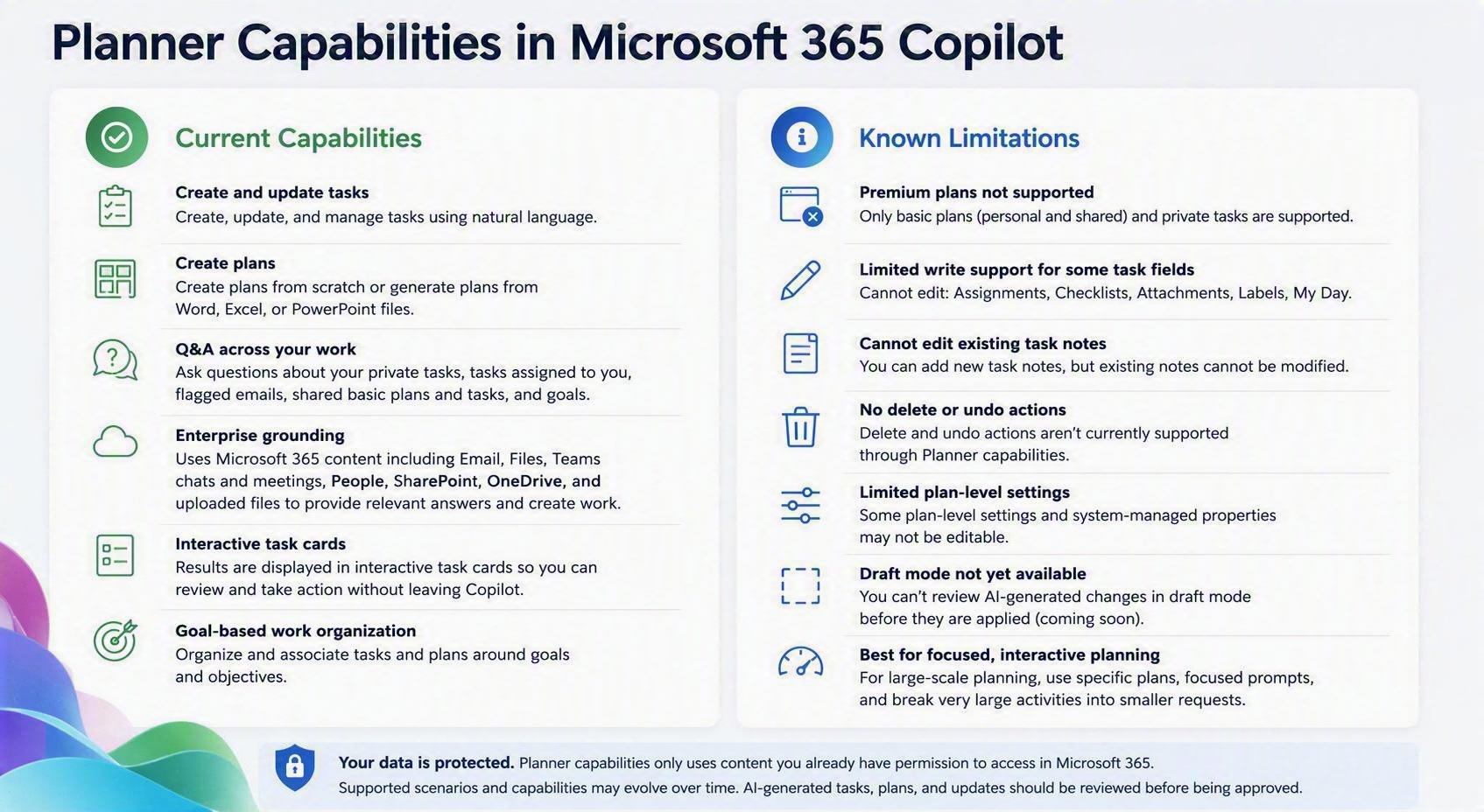
Disclaimer: The capabilities and limitations described below reflect the current state of Planner capabilities in Microsoft 365 Copilot and are subject to change as the product evolves. Features, functionality, availability, and supported scenarios may be updated, expanded, or modified over time. For the most up-to-date information, refer to the Microsoft 365 Roadmap and the Planner Blog, where new features, enhancements, and announcements are published regularly.
What plans are supported?
Planner capabilities currently support:
- Private tasks
- Personal Basic plans
- Your recently opened Meeting plans
- Your recently opened Shared Basic plans
Premium plans aren't currently supported.
Can Planner capabilities create and update tasks?
Yes. You can create and update tasks using natural language.
Supported task fields include:
- Task name
- Progress
- Start date
- Due date
- Priority
- Plan name
- Notes for new tasks
- Buckets
- Goals
Some task properties can't currently be edited, including:
- Assignments
- Checklists
- Attachments
- Labels
- My Day
- Notes on existing tasks
Can Planner capabilities create and update plans?
Yes. You can create plans and manage work within supported plans.
Depending on the scenario, some plan-level settings and system-managed properties may not be editable.
Can I review AI-generated changes before they're applied?
No. Draft mode isn't currently available, but it is planned for a future release.
Can I delete tasks or undo changes?
No. Delete and undo actions aren't currently supported.
To remove tasks or make other advanced changes, open Planner directly.
Can Planner capabilities help me organize work around goals?
Yes. You can organize work around goals using natural language.
Some advanced goal-management capabilities available in Planner may not be available in Microsoft 365 Copilot.
Are large-scale planning operations supported?
Planner capabilities are optimized for interactive planning experiences. For best results:
- Work with a specific plan when possible.
- Use focused prompts.
- Break large planning activities into smaller requests.
What enterprise grounding sources are supported?
Planner capabilities can use information from Microsoft 365 to help answer questions, create tasks and plans, generate summaries, and identify follow-up actions from your work content. Enterprise grounding uses context that you already have permission to access across Microsoft 365.
Supported enterprise grounding sources include:
- Emails: Identify action items, commitments, and follow-up work from email conversations.
- Files: Analyze content from Word, Excel, PowerPoint, PDF, and other supported files to create tasks, plans, and summaries.
- Teams chats and channel messages: Extract relevant work items and context from conversations.
- Meetings and meeting transcripts: Identify discussion outcomes, decisions, and potential action items.
- People and organizational information: Use organizational context to better understand work relationships and ownership.
- SharePoint and OneDrive content: Use files and documents stored across Microsoft 365 repositories.
- Uploaded files: Analyze files shared directly in a Copilot conversation.
- Images in supported content: Use image understanding when relevant.
Note
Planner capabilities only use content that the signed-in user already has permission to access through Microsoft 365. Supported grounding sources and capabilities may evolve over time. Review AI-generated tasks, plans, and updates for accuracy.