Saate kuvada mitu kalendrit kõrvuti või kombineerituna virnastatud ülekattevaates, et saaksite vaadata kalendrite kättesaadavust eri kalendrites.
Valige altpoolt kasutatava Outlooki versiooni vahekaart.
Milline Outlooki versioon mul on?
Märkus.
Kui selle menüü Uus Outlook juhised ei toimi, ei pruugi te uut Outlooki Windowsi versiooni veel kasutada. Valige Klassikaline Outlook ja täitke hoopis need juhised.
Kalendri avamine kõrvutivaates uues Outlookis
- Valige navigeerimisribal
 Calendar.
- Valige loendist Calendar ka teised kalendrid, mida soovite lisaks vaikekalendrile vaadata.
- Kalendri kõrvuti kuvamiseks valige jaotises Korraldamine nupp Tükeldatud vaade.

Kalendrite ülekate uues Outlookis
Mitme kalendri kuvamiseks ühes kalendrivaates tühistage jaotises Korraldamine valik Tükeldatud vaade.
Kalendrisündmused kuvatakse vaikekalendris ülekattena ja neile on määratud värv.
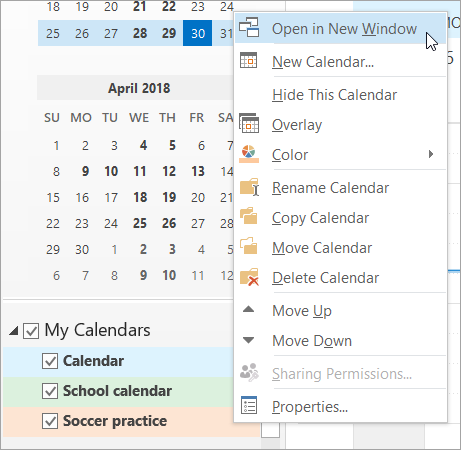
Kalendri avamine uues aknas Klassikalises Outlookis
- Paremklõpsake Calendarnavigeerimispaanil selle kalendri nime, mida soovite vaadata.
- Valige Ava uues aknas.
Kalendri avamine kõrvutivaates klassikalises Outlookis
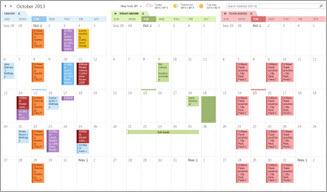
Märkige Calendarnavigeerimispaanil mõne muu kalendri märkeruut, mida soovite vaadata.
Valitud kalender avatakse juba kuvatava kalendri kõrval.
Kalendrite ülekate klassikalises Outlookis
- Märkige Calendarnavigeerimispaanil mõne muu kalendri märkeruut, mida soovite vaadata.
Valitud kalender avatakse juba kuvatud kalendri kõrval. Iga järgnev kalender avatakse viimati avatud kalendri kõrval.
- Valige menüüs Kalender käsk Kuva ülekatterežiimis.
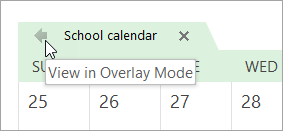
See kalender on nüüd ülekatterežiimis, mille avasite esimesena – tavaliselt vaikekalender.
- Ülekattele uue kalendri lisamiseks korrake 2. juhist.
Klassikalises Outlookis ülekattevirnast kalendri eemaldamine
Valige Calendar ülekattevirnast eemaldatava kalendri vahekaardil Kuva kõrvutirežiimis.

Vahekaart liigub tagasi paremale. Valitud kalendrit ei kuvata enam ülekatterežiimis.
Kalendri vaatest eemaldamiseks tühjendage selle märkeruut navigeerimispaanil või valige kalendri vahekaardil Sule .
Lehe algusse
Kalendri avamine kõrvutivaates Outlooki veebirakendus või Outlook.com
- Valige Outlooki veebiversiooni navigeerimisribal Calendar.
- Valige loendist Calendar ka teised kalendrid, mida soovite lisaks vaikekalendrile vaadata.
- Kalendri kõrvuti kuvamiseks valige jaotises Korraldamine nupp Tükeldatud vaade.
Kalendrite ülekate Outlooki veebirakendus või Outlook.com
Mitme kalendri kuvamiseks ühes kalendrivaates tühistage jaotises Korraldamine valik Tükeldatud vaade.
Kalendrisündmused kuvatakse vaikekalendris ülekattena ja neile on määratud värv.
Seotud artiklid
Mitme kalendri kuvamine rakenduses Outlook for Mac

