
Last updated: June 2026
For issues that are not covered on this page, we have multiple tools to help you automatically diagnose and fix a range of classic Outlook problems. Check out this article: Resolve Outlook for Windows issues with automated troubleshooting tools.
Outlook Known issues in June 2026 updates
- [INVESTIGATING] In AutoComplete, the "X" to remove individual suggested recipients might not work as expected
- [FIXED] Images are not displayed in emails, newsletters, or signatures in classic Outlook
Outlook Known issues in May 2026 updates
- [FIXED] Copilot Draft fails in classic Outlook with error "Sorry, something went wrong. Copilot is working on it."
- [FIXED] Quick Steps are grayed out in classic Outlook when they contain actions that can’t be fulfilled
- [FIXED] Office document links opened in classic Outlook might appear to be blank or open with an error
- [FIXED] Outlook 2024 LTSC crashes opening Viva Engage, Yammer, Power Automate, and other emails
Outlook Known issues in April 2026 updates
- [FIXED] Auto Translate stopped working in classic Outlook
- [FIXED] Outlook on premise Exchange web add-ins stopped loading after updating to Version 2603
- [FIXED] My Templates are missing from Outlook
- [FIXED] Classic Outlook error when sending from Outlook.com "You do not have permission to send on behalf of the specified user 0x80070005-0x0004dc-0x000524."
Outlook Known issues in March 2026 updates
- [FIXED] Classic Outlook crashes and opens in Safe Mode starting March 12 2026
- [FIXED] Users get errors 0x800CCC0E & 0x800CCC0F synchronizing Gmail and Yahoo accounts in classic Outlook
- [FIXED] Users might get the error "This is not a valid style name" in classic Outlook
- [INVESTIGATING] Users may get the error "Can't connect to the server" when creating groups in classic Outlook
- [FIXED] Classic Outlook replaces accented and extended characters with question marks
Outlook Known issues in February 2026 updates
- [INVESTIGATING] Mouse pointer disappears when hovering over classic Outlook
- [FIXED] Classic Outlook recipients are unable to open "Encrypt Only" emails
- [INVESTIGATING] Users get error "There was an error reading the rules from the server" after making changes to rules in classic Outlook
- [BY DESIGN] Users might get an error applying an encrypted sensitivity label when replying to an encrypted message sent from an external organization
- [INVESTIGATING] Users may experience an error when updating a meeting in their own or a shared calendar
- [FIXED] Classic Outlook profiles with POP accounts and PSTs hang after Windows updates on January 13, 2026
- [FIXED] Classic Outlook adds table borders to signatures after updating to Version 2512
Outlook Known issues in January 2026 updates
- [WORKAROUND] Error opening encrypted emails from classic Outlook: "Configuring your computer for Information Rights Management"
- [FIXED] Unable to report meeting items as junk in classic Outlook
Outlook Known issues in December 2025 updates
- [FIXED] Classic Outlook shows error "Contacting the server for information"
- [FIXED] Error “The text formatting command is not available” when opening emails in classic Outlook or documents in Word for Windows
- [FIXED] Contact Groups created from Outlook contacts get added with /o=ExchangeLabs
Outlook Known issues in November 2025 updates
Outlook Known issues in October 2025 updates
- [FIXED] Error opening classic Outlook: "Cannot start Microsoft Outlook. Cannot open the Outlook window. The set of folders cannot be opened. The attempt to log on to Microsoft Exchange has failed."
- [FIXED] Known issues with classic Outlook Desktop Shared Calendar Improvements
- [DEPRECATION & PRODUCT CHANGE] Outlook GPO Update for “When sending a message” policy
Outlook Known issues in September 2025 updates
- [INVESTIGATING] Classic Outlook issues with service assisted search for shared mailboxes
- [FIXED] Classic Outlook Contacts that have an X509 S/MIME certificate added to the Global Address List can no longer be edited with Operation Failed error
- [FIXED] Classic Outlook cannot open a shared calendar with a contact created from the Global Address List
- [FIXED] The Edit Contact button stopped working with Version 2507 in classic Outlook
- [WORKAROUND] The "Join" button opens a wrong URL in recurring Zoom meetings in Outlook
- [FIXED] Classic Outlook jumps in the message list when clicking an email or scrolling
- [FIXED] Cannot open the Automatic Replies setting of a shared mailbox in Classic Outlook
- [FIXED] Outlook desktop alert notifications open behind other applications
Outlook Known issues in August 2025 updates
- [WORKAROUND] Error code 30094-27 when updating Office
- [DEPRECATION] Outlook Today and Folder Home Pages deprecation
- [FIXED] Error when opening a saved .MSG file twice in classic Outlook
Outlook Known issues in July 2025 updates
- [DEPRECATION] Custom form script is now disabled by default
- [FIXED] Certain users enrolled in the Microsoft 365 Insiders Program cannot launch classic Outlook for Windows
- [FIXED] Classic Outlook crashes opening or starting a new email
- [FIXED] Classic Outlook Copilot Chat appears available for GCC-M users, when the license is unassigned or the app is blocked
Outlook Known issues in June 2025 updates
- [FIXED] Opening SMIME signed OME protected email causes error “You have changed this message”
- [FIXED] Shared mailbox folders flicker and move around when trying to move items to the folders
- [WORKAROUND] Outlook Desktop Me Control account manager does not sign in for on premise users running in a hybrid environment
- [FIXED] When trying to sign in to an Office app, users might receive a consent dialog labeled AugLoop.All (TEST Augmentation Loop MSIT)
Outlook Known issues in May 2025 updates
- [INVESTIGATING] Text predictions unexpectedly become unavailable and are missing in Outlook options
- [FIXED] Errors CAA2000B and 4usqa when trying to sign in to classic Outlook
- [FIXED] CPU spikes when typing in classic Outlook for Windows
- [FIXED] Classic Outlook mail merge hangs trying to initialize Word
Outlook Known issues in April 2025 updates
- [FIXED] Outlook Calendars render blank sections in Calendar View
- [FIXED] The paste special shortcut Ctrl+Alt+V stopped working in classic Outlook
- [FIXED] Classic Outlook jumps when scrolling Newsletter emails
- [FIXED] Users may notice that the incorrect timeslot is selected after clicking a meeting in the Calendar
- [FIXED] Word, Excel, or Outlook might stop responding after installing the KB5002700 security update for Office 2016
- [FIXED] Classic Outlook display language is English only when installed via standalone download
Outlook Known issues in March 2025 updates
- [FIXED] Classic Outlook errors on startup "The required file msls70.dll cannot be found in your path"
- [WORKAROUND] Outlook icon on the Start menu is not updated to Outlook (classic)
Outlook Known issues in February 2025 updates
- [FIXED] Unable to drag and drop emails to folders in classic Outlook
- [FIXED] Advanced Typography settings are missing in classic Outlook and Word
- [INVESTIGATING] Outlook 2016 MSI is not showing sender in search results
Outlook Known issues in January 2025 updates
- [WORKAROUND] Classic Outlook crashes on reply and forward
- [FIXED] Classic Outlook and Microsoft 365 applications crashing on Windows Server 2016
- [FIXED] Unable to add a Gmail account to classic Outlook
- [FIXED] Classic Outlook hangs when using the Copy shortcut
- [FIXED] Page Title is blank when you send a meeting from classic Outlook to OneNote
Outlook Known issues in December 2024 updates
Outlook Known issues in November 2024 updates
- [FIXED] Classic Outlook Report button not removed after setting "Use a non-Microsoft add-in button"
- [FIXED] Signatures are not syncing between Outlook Desktop and Outlook Web App
- [WORKAROUND] Classic Outlook errors opening more than sixty emails at the same time
Outlook Known issues in October 2024 updates
- [FIXED] Outlook blocks copying meetings with "Copying meetings is not supported."
- [FIXED] Outlook Junk filtering is running but the Junk Email Options settings are removed
- [FIXED] Classic Outlook reminders dialog not drawing properly and Dismiss button missing
- [FIXED] Outlook Desktop is unable to apply labels with encryption
Outlook Known issues in September 2024 updates
- [FIXED] Emails sent using Outlook Desktop results in Non-Delivery Report [0x80040305-0x00000000-0x00000000]
- [INVESTIGATING] Admins cannot enforce specific settings
- [FIXED] Unable to sign in or add a Gmail account to classic Outlook
- [FIXED] Outlook, Word, or OneNote unexpectedly close when typing
Outlook Known issues in August 2024 updates
- [FIXED] Outlook prompts security notice opening .ICS files after installing protections for Microsoft Outlook Information Disclosure Vulnerability released: Dec 12, 2023
- [FIXED] Print to PDF is blocked if Mandatory Labeling is enabled
- [WORKAROUND] Classic Outlook unexpectedly closes at start up on faulting module ucrtbase.dll
- [RESOLUTION] Teams Meeting add-in is missing in Outlook Desktop after updating to New Teams
Outlook Known issues in July 2024 updates
- [FIXED] Outlook shows conflict errors when updating or cancelling meetings
- [INVESTIGATING] Meeting request is missing from organizers calendar
- [WORKAROUND] Unable to open a shared calendar in Outlook Desktop
Outlook Known issues in June 2024 updates
- [WORKAROUND] Outlook error "The operation failed" if the message has a retention policy
- [BY DESIGN] Error when selecting Scheduling Poll in Outlook for Windows
- [FIXED] Error replying to encrypted emails from Outlook Desktop
- [WORKAROUND] Outlook sync issues cause emails to be stuck in the Outbox and undeliverable mail items
- [INVESTIGATING] Error when opening calendar events in a Room mailbox from Scheduling Assistant
- [FIXED] Outlook email is delayed while a web add-in is working on the send request
- [WORKAROUND] Modern Authentication Methods now needed to continue syncing Outlook Email in non-Microsoft email apps
- [FIXED] Outlook Desktop calendar Out of Office color indicator unexpectedly changed
Outlook Known issues in May 2024 updates
- [BY DESIGN] Contacts in the Outlook Address Book are listed multiple times
- [FIXED] Recall Message in Outlook Desktop stops working after February 2024 security updates
- [FIXED] Outlook Desktop cannot load the contact card and gets stuck at "Loading"
- [FIXED] Outlook Desktop is slow to save attachments to a network path
Outlook Known issues in April 2024 updates
Outlook Known issues in March 2024 updates
- [FIXED] Outlook replies or forwards cause non-delivery error "Your message did not reach some or all of the intended recipients"
- [FIXED] Unable to send emails from QuickBooks using Outlook Desktop after update to Version 2402
- [WORKAROUND] Outlook stops responding when you attach an email .MSG file
- [DESIGN LIMITATION] Outlook Desktop error with Advanced Find when searching online archive with auto-expanding folders
- [FIXED] VoiceMail forms do not work in Outlook Desktop
- [FIXED] Unable to edit Contacts, Appointments, Meetings, or Tasks within Outlook
- [FEATURE CHANGED] Inserting a link as an attachment has changed in Outlook Desktop
Outlook Known issues in February 2024 updates
- [FIXED] Outlook Desktop Exchange ActiveSync connections stopped working in Version 2401
- [WORKAROUND] Outlook and other apps are unable to connect to Outlook.com when using Basic authentication
- [FIXED] Characters converted to Kanji become invisible in Word and Outlook
- [FIXED] SharePoint nested folder links in Outlook Desktop open to the root folder Documents
- [FIXED] Outlook unexpectedly has an App Search bar above the message list
Outlook Known issues in January 2024 updates
- [FIXED] Searching Current Folder of an auto-mapped shared mailbox in Outlook Desktop returns no results or results from other folders
- [FIXED] Outlook error "Cannot move the items" when moving items to other folders
- [WORKAROUND] Outlook starts up slowly and hangs at splash screen when REST to MAPI is unexpectedly toggled
Outlook Known issues in December 2023 updates
Outlook Known issues in November 2023 updates
- [FIXED] Outlook Desktop crashes sending an email from Outlook.com accounts
- [RESOLUTION] Images are blocked and meeting body is read only in Outlook Desktop if calendar items are from external senders for Microsoft Outlook Spoofing Vulnerability released August 8, 2023
- [FIXED] Office file links and attachments in Outlook Desktop show to be in Protected View but do not open
- [INVESTIGATING] Error "Something Went Wrong [1001]" signing in to Microsoft 365 Desktop Applications
- [FIXED] Outlook errors "Cannot send this item." replying to an email
- [FIXED] Outlook Desktop signature auto enters when typing an email
- [FIXED] Error when opening Actionable Messages
Outlook Known issues in October 2023 updates
- [WORKAROUND] Quick Print stops printing PDF attachments in Outlook Desktop
- [FIXED] Unable to view private items in a shared calendar using MAPI in cached mode in Outlook
- [DEPRECATED] Weather is no longer displayed on the Calendar in Outlook
Outlook Known issues in September 2023 updates
- [FIXED] Outlook unexpectedly prompts to reopen items from your last session
- [FIXED] Script Error in Outlook when clicking "Microsoft Office Online" from the Shortcuts function
- [FIXED] Outlook Desktop crashes sending a meeting invite that includes a Loop component
Outlook Known issues in August 2023 updates
- [FIXED] How to add a Yahoo IMAP account to Outlook Desktop without an App Password
- [FIXED] Unable to add a Poll to emails in Outlook Desktop
Outlook Known issues in July 2023 updates
- [FIXED] Outlook prompts "Retrieving templates from server" after selecting the From field drop down
- [FIXED] Outlook errors printing tasks or contacts that exceed a page in length
Outlook Known issues in May 2023 updates
- [INVESTIGATING] Touch mode does not work when using hosted applications in Outlook Desktop
- [WORKAROUND] Outlook for Windows doesn't show all owners of a distribution group
- [FIXED] Outlook unexpectedly opens a browser window if OWA is disabled
Outlook Known issues in April 2023 updates
- [FIXED] Microsoft 365 group users may be unable to view or access group calendars and email messages in Outlook Desktop
- [FIXED] No results when searching in Outlook with Suggested Searches for specific queries
- [FIXED] Incorrect or no results when searching auto-expanding archives in Outlook
- [WORKAROUND] When creating a Quick Step for New E-mail To, Outlook does not save it
Outlook Known issues in March 2023 updates
- [FIXED] Can't sign in to Outlook with Outlook.com account
- [FIXED] Calendar Week search switches from List View to Agenda Summary View
- [FIXED] Calendar events missing in Scheduling Assistant
- [FIXED] Problems syncing shared calendars when enabling "Can view title and location" permissions
Outlook Known issues in February 2023 updates
- [FIXED] Unable to dismiss shared calendar reminders for Outlook.com accounts in Outlook Desktop
- [WORKAROUND] Extending an all-day event on a shared calendar unexpectedly shortens or lengthens the event
- [FIXED] Duplicate shared Calendar(s) after transitioning between Mail and Calendar modules
- [FIXED] No results when searching with the built-in ‘Received' filter in Outlook
- [FIXED] Flickering observed in Outlook Calendar while scrolling
Outlook Known issues in January 2023 updates
Outlook Known issues in December 2022 updates
- [WORKAROUND] Unable to use the undo keyboard shortcut with hosted applications in Outlook Desktop
- [WORKAROUND] Can't move searched items to other folders beyond the sync slider limit
Outlook Known issues in October 2022 updates
- [WORKAROUND] Can't configure Exchange Online mailbox in Outlook Desktop
- [FIXED] Outlook cannot display contacts in People View
- [WORKAROUND] Outlook IMAP or POP server unexpectedly terminated the connection, and the server was interrupted
- [WORKAROUND] Outlook closes shortly after it is opened
Outlook Known issues in September 2022 updates
- [WORKAROUND] Users can't print translated content in Outlook
- [FIXED] Junk email messages multiplying without user actions in Shared Mailboxes
- [FIXED] Shared mailbox is not automatically refreshing for new email in Outlook
Outlook Known issues in August 2022 updates
Outlook Known issues in July 2022 updates
- [WORKAROUND] Delegate can view their Manager Online Archive Calendar in Outlook and Private Items in Online Archive Mailbox
- [FIXED] Outlook hosted application displays incorrect or missing information
- [FIXED] Internet connectivity issues in M365 apps after a change to the IP address range
- [INVESTIGATING] Shorten Appointments and Meetings settings for Outlook might appear greyed out
- [FIXED] Outlook Search might not display recent emails on Windows 11
Outlook Known issues in June 2022 updates
- [FIXED] Incorrect or no results when searching the Online Archive of a Full Access mailbox
- [FIXED] Outlook 2019 sender email address missing on reply and forwards
Outlook Known issues in May 2022 updates
Outlook Known issues in April 2022 updates
- [WORKAROUND] Error expanding Contact Group in Outlook Desktop
- [RESOLVED] Outlook error creating Teams meeting "Sorry, you need to sign out of Teams and sign in again before you can schedule your meeting"
- [FIXED] Blank room lists in Room Finder for GCC Tenants
- [WORKAROUND] Outlook errors "Not Implemented" when Reply All to email on ARM devices
Outlook Known issues in March 2022 updates
- [WORKAROUND] Outlook PDF preview error: This file cannot be previewed because there is no previewer installed for it
- [FIXED] Holiday is missing and has inaccurate date in Outlook for United Kingdom
- [FIXED] Outlook stops connecting to Windows 7 and legacy Windows Server versions
Outlook Known Issues in December 2021 updates
Outlook Known Issues in November 2021 updates
Outlook Known Issues in October 2021 updates
- [FIXED] Conflicts in Outlook task
- [FIXED] Outlook cannot add guest groups in Microsoft 365
- [WORKAROUND] Hosted applications in Outlook error: We can't open the Teams App right now. Please try again later
- [FIXED] Outlook Today view is blank on Azure Active Directory joined machines
- [WORKAROUND] Outlook search does not return results after upgrade to Windows 11
Outlook Known Issues in September 2021 updates
- [FIXED] Search results for Outlook Suggested Searches are not accurate, incomplete, or missing
- [WORKAROUND] Characters are displayed as SBC (Single Byte Character Set) after using the "@" symbol when IME (Input Method Editor) is turned on
- [WORKAROUND] This browser does not support security keys - Error when adding a Gmail account to Outlook
Outlook Known Issues in July 2021 updates
Outlook Known Issues in June 2021 updates
Outlook Known issues in May 2021 updates
- [FIXED] "The properties of the message have been changed" prompt when forwarding/replying in Outlook
- [FIXED] Calendar meetings showing legacyExchangeDN instead of DisplayName
- [FIXED] 401 authentication error when opening Room Finder
- [FIXED] How to revert the Outlook Desktop WebView based Room Finder to the legacy Room Finder
- [FIXED] AutoComplete list scrolls off the screen in Outlook
Outlook Known issues in March 2021 updates
- [INVESTIGATING] Follow up flag status is incorrectly displayed in sent messages
- [FIXED] Error message when you share a calendar in Microsoft 365
Outlook Known issues in December 2020 updates
Outlook Known issues in November 2020 updates
- [INVESTIGATING] Emails deleted from Outlook.com are reverting back to the Inbox
- [FIXED] Embedded images in Rich Text formatted emails or fields are being blanked out or misaligned
Outlook Known issues in October 2020 updates
- [FIXED] Outlook and other apps won't remember password after Windows Updates
- [INVESTIGATING] Outlook errors marking task complete and sending task status report
Outlook Known issues in September 2020 updates
- [FIXED] End by field is not displayed correctly in the Appointment Recurrence dialog box
- [FIXED] Shared Calendars cannot be closed and gets cleared upon application restart
Outlook Known issues in August 2020 updates
Outlook Known issues in July 2020 updates
- [FIXED] Outlook DLP policy tips not working for certain conditions in email body and attachments
- [FIXED] Outlook fails to start and may prompt to open in Safe Mode on July 15, 2020
- [FIXED] Outlook crashes deleting three or more emails from a POP account with Download Headers Only
- [FIXED] Office Applications crash due to Nahimic audio driver
- [FIXED] Outlook crashes in OLMAPI32!CopyProps function when using applications that process emails
Outlook Known issues in June 2020 updates
- [FIXED] Translate option is missing from Outlook
- [FIXED] Something is wrong with one of your data files and Outlook needs to close
- [FIXED] Windows cannot find "c:\program files\microsoft office\root\office16\outlook.exe
Outlook Known issues in April 2020 updates
- [WORKAROUND] Outlook search folders show unexpected mail items with an empty subject
- [FIXED] "Allow Forwarding" option is missing from "Response Options" for a shared calendar
- [FIXED] Outlook stops opening .msg and .oft template files
Outlook known issues in the March 2020 updates
- [FIXED] "Access Denied" when launching an Office add-in
- [WORKAROUND] Cannot select From account in email with Outlook Desktop
Outlook known issues in the January 2020 updates
- [FIXED] Outlook prompts for credentials for on premise users with Office 365 client
- [FIXED] Unable to send emails from QuickBooks, Office applications, or all Windows applications that allow to send files as attach
- [WORKAROUND] Unable to save changes to a draft email in Draft folder for IMAP accounts
- [WORKAROUND] Japanese characters in Group emails are garbled or missing when formatted as Plain Text
- [FIXED] Unable to add a Gmail account to Outlook - Allow button grayed out
- [FIXED] Unable to add a Gmail account to Outlook "Could not sign you in to Google"
- [FIXED] Outlook users who are booking delegates that add a Room to a meeting invite may notice duplicate emails requesting responses
Outlook known issues in the November 2019 updates
- [INVESTIGATING] 'Copy to my Calendar' fails for POP/IMAP accounts
- [FIXED] The rules on this computer do not match the rules on Microsoft Exchange
- [WORKAROUND] IMAP Sent Messages are duplicated and unread in Sent Items folder
Outlook known issues in the October 2019 updates
- [FIXED] Meeting Notes to OneNote stopped working
- [FIXED] Email disappearing after being read for IMAP configured accounts
Outlook known issues in the September 2019 updates
Outlook known issues in the August 2019 updates
Outlook known issues in the July 2019 updates
- [FIXED] Error when trying to create or edit contacts in Outlook: You don't have permission to create an entry in this folder
- [WORKAROUND] Outlook errors connecting to a SharePoint Document Library
Outlook known issues in the June 2019 updates
- [FIXED] Outlook won't open or is stuck at loading profile
- [FIXED] All emails are in plain text format for POP3 accounts
Outlook known issues in the May 2019 updates
- [FIXED] Outlook prompts for phone number for Outlook.com accounts
- [FIXED] The operation cannot be performed because the item has changed
- [FIXED] Outlook Weather Service failing in calendar
- [FIXED] Text in Outlook is truncated or too large for Japanese language
Outlook known issues in the March 2019 updates
- [UPCOMING FIX] Outlook 2016 calendar not updating completely
- [WORKAROUND] Outlook errors sending from Outlook.com accounts
- [WORKAROUND] No search results for POP, IMAP, or Exchange acounts
Outlook known issues in the January 2019 updates
- [FIXED] Outlook crashes when you click the Create Rule button
- [FIXED] Problems with category shortcuts after installing Version 1901 (Build 11231.20130)
- [WORKAROUND] Can't edit the notes field for a contact
Outlook known issues in the December 2018 updates
Outlook known issues in the November 2018 updates
- [FIXED] Outlook Error: "The operation failed..." when selecting Manage Rules & Alerts
- [FIXED] Outlook 2010 crashes on startup after installing November Public Update KB 4461529
Outlook known issues in the October 2018 updates
Outlook known issues in the September 2018 updates
Outlook known issues in the June 2018 updates
- [FIXED] External applications crash sending email through Outlook
- [FIXED] Cannot connect to SharePoint Online Calendar
Outlook known issues in the March 2018 updates
- [WORKAROUND] Outlook hangs when clicking in Conversation History folder
- [WORKAROUND] Free/Busy shows slashed lines in Scheduling Assistant
- [FIXED] Outlook unexpectedly stops prompting and automatically sends Meeting updates to all attendees
- Meeting location updates are not reflected in recipient calendar in Outlook 2016
Outlook known issues in the Feb 2018 updates
- [FIXED] Outlook sends blank emails
- [FIXED] Outlook 2016 calendar printing switched from color to black and white
- [FIXED] Outlook freezes clicking the Signature button
Outlook known issues in the Jan 2018 updates
- [FIXED] Search, MailTips, and Free/Busy do not work for some Microsoft 365 users
- [FIXED] Calendar overlay does not show appointments for additional account
- [FIXED] Missing meeting location after adding new users to the meeting
- [FIXED] To-Do Bar and Task List view not displaying events
- [FIXED] No Search results found when using All Mailboxes
- [FIXED] Find Related option does not show results
- [FIXED] Outlook 2010 will not start on WinXP after January updates
Outlook known issues in the Nov 2017 updates
- [FIXED] Outlook 2016 People Pane doesn't show any results after Windows 10 Fall Creators Update
- [FIXED] "Outlook was unable to recover some or all of the items in this folder" error when you try to recover deleted items
- [WORKAROUND] Contact Groups are not searchable with Autocomplete
- [WORKAROUND] Missing View Settings button in Outlook 2016
Outlook known issues in the Oct 2017 updates
- [WORKAROUND] Outlook Home Page feature is missing in folder properties
- [WORKAROUND] Outlook 2016 prompts for credentials after disabling Modern Authentication
- [WORKAROUND] "Business Contact Manager could not complete your last action or actions" error in Outlook 2010 or 2013
Outlook known issues in the Sep 2017 updates
Outlook 2007 displays wrong languages [FIXED]
Last updated: Sep 19, 2017
ISSUE
After installing the September Public Update, Outlook 2007 displays mixed languages in the user interface.
Security update for Outlook 2007: September 12, 2017
Customers using the language in the first column may see parts of the page in the language listed in the second column:
| Arabic | Swedish |
|---|---|
| Bulgarian | Brazilian Portuguese |
| Catalan | Brazilian Portuguese |
| Czech | Swedish |
| Hungarian | Swedish |
| Italian | Brazilian Portuguese |
| Kazakh | Brazilian Portuguese |
| Korean | Brazilian Portuguese |
| Latvian | Swedish |
| Norwegian | Swedish |
| Dutch | Swedish |
| Portuguese | Brazilian Portuguese |
| Slovenian | Swedish |
| Serbian Latin | Swedish |
| Thai | Chinese Traditional Taiwan |
| Turkish | Chinese Traditional Taiwan |
STATUS: Fixed
This issue is fixed now.
Please follow the instructions in KB 4011086 to uninstall it, and then install KB 4011110.
Can't open Enterprise Vault items
Last Updated: October 13, 2017
ISSUE
This occurs because custom form script is now disabled by default.
STATUS: WORKAROUND
Please follow the steps provided in Issue #2: Custom form script is now disabled by default which is just above this issue.
Outlook issues after connecting Outlook to Outlook.com
Outlook.com email account appears as "outlook_[long series of letters and numbers]@outlook.com" in Outlook for Windows [WORKAROUND]
ISSUE
After adding an email account to Outlook for Windows (Outlook 2016, 2013, 2010 versions) you may experience the following:
- Your email account name shows up as outlook_[long series of letters and numbers]@outlook.com in the Folder Pane and when composing emails using Outlook for Windows.
- Recipients will also receive the email from the sender with the outlook_[long series of letters and numbers]@outlook.com format.
- When recipients reply to the email, the email bounces and you may receive the message “Undeliverable message when you send Internet mail in Outlook.”
This issue can occur when you register a 3rd party email address (e.g., an email address that is not Outlook.com or Hotmail.com) for your Microsoft Account and don't use Outlook.com for sending and receiving email.
If you typically use an Outlook.com account for email, this issue can occur if there are multiple aliases on the account and the 3rd party email address is the primary alias. Please see the ALTERNATIVE WORKAROUND section below.
WORKAROUND
Set up your account manually as an IMAP or POP account in Outlook.
- Close Outlook
- Use Windows Key + R then type “outlook /profiles” (omitting the quotes) in the Run window and hit “OK” Note: There is a space between outlook and the forward slash (/)
- In the launched “Choose Profile” box, select Options > New
- Type a new, unique profile name and select OK
- Choose Advanced options > Let me set up my account manually.
- Enter your account password, then choose Connect.
- If setup fails, select Change Account Settings. Update the account information with the one you received from your email provider or from the POP and IMAP server name reference topic. Choose Connect then then select Done.
- In the Choose Profile window, select Set as default profile and select OK.
ALTERNATIVE WORKAROUND
Switch your alias to an Outlook.com or Hotmail.com account.
Note: If you do not have another alias, select the link on the page to create one. Choose Add email and a new alias and then choose the option Create a new email address and add it as an alias.
- Go to https://account.live.com/names/Manage and sign in to your Outlook.com account.
- Set your Outlook.com email as the primary alias.
- In Outlook for Windows, remove and re-add the account. See the steps in this article: Add your Outlook.com account in Outlook for Windows
Sending an email from an Outlook.com connected account, Outlook sends the email as "On behalf of" your Outlook.com account [WORKAROUND]
Last updated: February 8, 2017
ISSUE
If Outlook is connected to a primary Outlook.com account that is also connected to other secondary non-Microsoft accounts (such as Gmail, Yahoo, etc.), when sending an email in Outlook, you are not able to choose the other secondary connected account as the "From" sending account.
If you manually type in the secondary connected account email address in the "From" field, the email is sent as "On behalf of" your primary Outlook.com account.
STATUS: WORKAROUND
Outlook supports sending from a secondary connected account for Microsoft owned domains such as @outlook.com, @live.com, @hotmail.com but has not implemented this functionality for third-party domains.
The Outlook team is listening to your feedback and investigating adding this functionality to future updates. To learn more about how to provide feedback, see How do I give feedback on Microsoft Office. In the meantime, please use the following workaround:
WORKAROUND
You can also add the secondary connected accounts (Gmail, Yahoo, etc.) in Outlook.com as additional accounts in the Outlook profile.
In Outlook, choose the File tab.
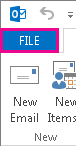
Under Account Information, choose Add Account.

On the Auto Account Setup page, enter your name, email address, and password, and then choose Next.
Note
If you receive an error message after choosing Next, double check your email address and password. If both are correct, see the next section.
Choose Finish.
For more information, please see Outlook email setup.
Cannot edit the shared Outlook.com calendar in Outlook 2016 [WORKAROUND]
Last updated: May 2, 2017
Currently, you can't use Outlook on Windows to edit calendars that are shared with your Outlook.com account, even if you've reconnected your Outlook.com account to Outlook. We're working to make it possible to edit shared calendars in Outlook 2016 for Windows.
To edit a shared calendar, go online to your own Outlook.com calendar, open Calendar for Windows 10, or use a mobile device. Read how to Add your Outlook.com account to another mail app.
Error when sharing a calendar from Outlook.com personal or home account to a Microsoft 365 business account [WORKAROUND]
Last updated: May 2, 2017
ISSUE
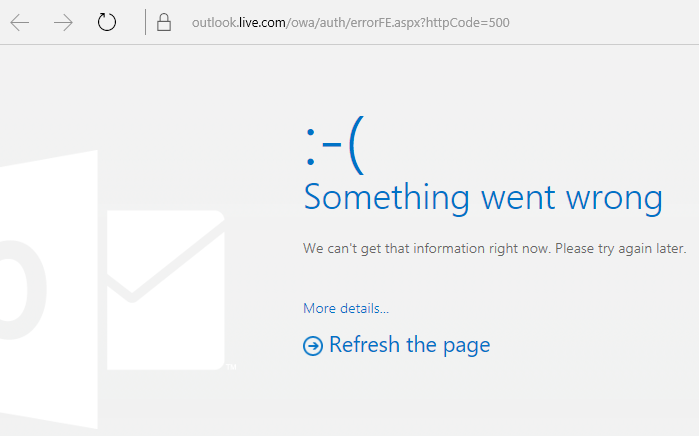
When you try to accept a shared Outlook.com calendar using your Microsoft 365 for business account in Outlook 2016, you might receive the "Something went wrong" error or your sign-in might fail.
STATUS: WORKAROUND
To access the calendar shared with your Microsoft 365 for business account, you'll need to accept the invitation from Outlook on the web, iOS, or Android. If you've already clicked the Accept button in Outlook 2016, you won't be able to re-accept the invitation from another Outlook application. The person who sent you the invitation will need to remove your permissions and then send a new invitation.
Outlook known issues in the June 2017 security updates
Last updated: July 11, 2017
The issues documented in this section have been reported after installing the recent updates listed below. We're investigating the issues and will update this page when a fix is available. In the meantime, please use the workarounds suggested for each issue.
VBScript does not run or you receive malicious code warning when using a custom form for Outlook [Fixed]
ISSUE
Last updated: Sep 17, 2017
Note
Please also see this article for an update on this issue: Custom form script is now disabled by default.
This issue affects Outlook 2007, Outlook 2010, Outlook 2013, and Outlook 2016.
When you use a custom form that you have created for Outlook, you see the following two symptoms:
- VBScript does not run.
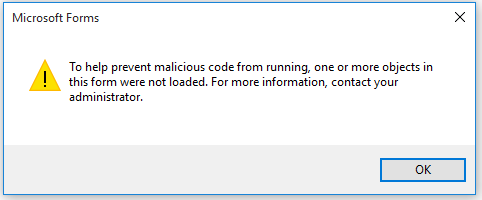
- You get a malicious code warning:
STATUS
If you're a Microsoft 365 customer, the fix is now available to Insider Fast audience.
For other channels, an update is scheduled for mid-September, in versions 16.0.8418.5703 and later. We will update this page when the fix is released.
Issue is fixed for all MSI versions. For Outlook 2007, Outlook 2010, Outlook 2013 and Outlook 2016, install the updates below to fix the issue:
Update for Outlook 2007: July 27, 2017
Update for Outlook 2010: July 27, 2017
Update for Outlook 2013: July 27, 2017
Update for Outlook 2016: July 27, 2017
"Something went wrong..." or "Search results may be incomplete" error when searching in Outlook [FIXED]
ISSUE
Last updated: August 3, 2017
This issue affects all Outlook versions on Windows 7, Windows 8, Windows 10.
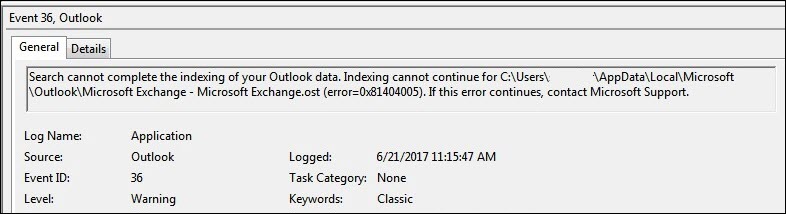
When searching in Outlook, you get this error: "Something went wrong and your search couldn't be completed.", or "Search results may be incomplete because items are still being indexed".

And you'll see this Event Log warning:
STATUS: FIXED
Windows has released fixes via Windows Updates to address a reliability issue in Windows Search. Below are the relevant KB updates for each version:
- Windows 7 - July 11, 2017 update
- Windows 8.1 - July 11, 2017 update
- Windows 10 Version 1703 - KB 4025342
- Windows 10 Version 1607 - KB4025334
- Windows 10 Version 1511 - KB4025344
- Windows 10 - KB4025338
Note
The fix for this issue has been released on June 27, 2017. If you implemented the workaround to disable Windows Desktop Search Service, you can now set the PreventIndexingOutlook registry key to DWORD: 0 to go back to using Windows Search.
WORKAROUND
If the issue is not resolved after installing the updates, please use the workaround below:
If search is not working for Exchange accounts, delete the OST files which will cause a re-sync and re-index of the account:
- OST files are typically stored at C:\Users\<your username>\AppData\Local\Microsoft\Outlook.
- To find the name and location of the OST file, click File, Account Settings, Account Settings, Data Files. Locate the correct email address, click on the name, and click Open File Location.
- Before you can delete the OST file, you need to close Outlook so the process will release the file.
- After deleting the file, restart Outlook and let the email sync again.
Another workaround is to Create a new Outlook profile, and add your accounts to the new profile. We recommend keeping the old profile until you know you have moved over any local data or PST files.
Until you can install the Windows Update fix release, you can set a registry key that will cause Outlook to stop using the local Windows Search service. When this registry key is set, Outlook will use its own built-in search engine. The built-in search will display the message below to indicate it is not using the Windows Search service.

Disable Windows Desktop Search Service for Outlook:
Note
The following steps show you how to modify the registry. However, serious problems might occur if you modify the registry incorrectly. Please make sure that you follow these steps carefully. For added protection, back up the registry before you modify it. Then, you can restore the registry if a problem occurs. For more information about how to back up and restore the registry, see this article.
- Open Registry Editor.
- Go to: Computer\HKEY_LOCAL_MACHINE\SOFTWARE\Policies\Microsoft\Windows\Windows Search
- PreventIndexingOutlook
- Set DWORD: 1
Detailed Instructions:
- Click Start, click Run, type regedit in the Open box, and then click OK.
- Locate and then click the following subkey in the registry:
HKEY_LOCAL_MACHINE\SOFTWARE\Policies\Microsoft\Windows - On the Edit menu, point to New, and then click New Key and name the key Windows Search.
- Click on the new key Windows Search.
- On the Edit menu, point to New, and then click DWORD Value.
- Type PreventIndexingOutlook for the name of the DWORD, and then press Enter.
- Right-click PreventIndexingOutlook, and then click Modify.
- In the Value data box, type 1 to enable the registry entry, and then click OK.
- Note to disable the PreventIndexingOutlook setting, type 0 (zero), and then click OK.
- Exit Registry Editor, and then restart Outlook.
iCloud fails to load properly in Outlook 2007 [WORKAROUND]
ISSUE
iCloud fails to load properly in Outlook 2007, Outlook 2010, Outlook 2013 and Outlook 2016.
When accessing Calendar, Contacts, or Tasks, you get the following error:
The set of folders cannot be opened. MAPI was unable to load the information service C:\PROGRA~2\COMMON~1\Apple\Internet Services\APLZOD.dll. Be sure the service is correctly installed and configured."

STATUS: WORKAROUND
The loading of unregistered MAPI services has been disabled by default to make Outlook more secure.
If you're using Outlook 2010, Outlook 2013 or Outlook 2016, uninstall and re-install iCloud to resolve this issue. For more information, see this page.
For Outlook 2007, use the workaround below:
Warning
This workaround may make your computer or your network more vulnerable to attack by malicious users or by malicious software such as viruses. Microsoft does not recommend this workaround but is providing this information so that you can choose to implement this workaround at your own discretion. Use this workaround at your own risk.
If you have trusted applications that depend on being loaded in this manner, you can re-enable those applications by setting the following registry key:
REG_DWORD HKEY_CURRENT_USER\Software\Microsoft\Office\12.0\Outlook\Security\AllowUnregisteredMapiServices
You can use the following registry subkey to apply the registry setting as a domain policy:
HKCU\Software\Policies\Microsoft\Office\12.0\Outlook\Security\AllowUnregisteredMapiServices
Value 0 (default): Block loading of unregistered MAPI services. This is the recommended setting to avoid unexpected execution of unknown code.
Value 1: Enable loading of unregistered MAPI services.
Important
The following steps show you how to modify the registry. However, serious problems might occur if you modify the registry incorrectly. Please make sure that you follow these steps carefully. For added protection, back up the registry before you modify it. Then, you can restore the registry if a problem occurs. For more information about how to back up and restore the registry, see this article.
To make these registry changes, follow these steps:
Click Start, click Run, type regedit in the Open box, and then click OK.
Locate and then click the following subkey in the registry:
HKCU\Software\Microsoft\Office\12.0\Outlook\Security\On the Edit menu, point to New, and then click DWORD Value.
Type AllowUnregisteredMapiServices for the name of the DWORD, and then press Enter.
Right-click AllowUnregisteredMapiServices, and then click Modify.
In the Value data box, type 1 to enable the registry entry, and then click OK.
Note
To disable the AllowUnregisteredMapiServices setting, type 0 (zero), and then click OK.
Exit Registry Editor, and then restart the computer.
Vulnerability information (applies to all versions)
MAPI does not validate that a provider's DLL that it is requested to load is registered correctly in MapiSVC.inf or even that it comes from the local machine. This can be exploited by creating a file together with an OLE object in such a way to cause MAPI to load a DLL from a network share when the OLE object is activated. This can allow arbitrary code execution to occur.
Some Web-based Outlook add-ins don't work in when using on premise Exchange 2013
Last updated: July 26, 2017
ISSUE
Some Web-based Outlook add-ins don't work in Outlook when using on premise Microsoft Exchange 2013.
This only applies to the MSI installations of Outlook 2016/Office 2016. Click-2-Run installations are not affected. The Office App add-in may show an Operation Failed error or seem to not respond to button presses or other UI choices.
Status: Investigating
We're investigating the issue and will update this page when a fix is available.
Outlook crashes after choosing File > Options and prompts to install Outlook again [FIXED]
Last updated: November 29, 2017
ISSUE
Outlook crashes when you click File > Options, and you see the error below.
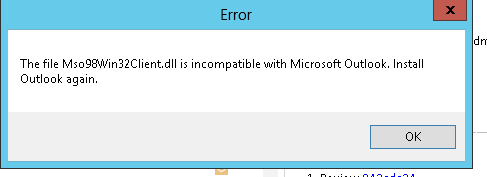
This issue only affects First Release for Deferred Channel Version 16.0.8201.2158.
Crash details:
Faulting application name: OUTLOOK.EXE, version: 16.0.8201.2158, time stamp: 0x5975d6bc
Faulting module name: KERNELBASE.dll, version: 6.1.7601.23807, time stamp: 0x5915fe14
Exception code: 0xc06d007f
Fault offset: 0x000000000001a06d
Faulting process id: 0x11fc
Faulting application start time: 0x01d307f0bc63afda
Faulting application path: C:\Program Files\Microsoft Office\root\Office16\OUTLOOK.EXE
Faulting module path: C:\windows\system32\KERNELBASE.dll
STATUS: FIXED
This issue is fixed in Semi-Annual Channel (formerly First Release for Deferred Channel) build 8201.2162 released in August 2017.
This issue is also fixed in Deferred Channel build 8201.2209 released in November 2017.
For more information about when builds are available for their respective channels, go to Update history for Microsoft 365.
Outlook crashes and slow performance
Outlook crashes after choosing File > Options and prompts to install Outlook again [WORKAROUND]
Last updated: November 29, 2017
ISSUE
Outlook crashes when you click File > Options, and you see the error below.
This issue only affects First Release for Deferred Channel Version 16.0.8201.2158.
Crash details:
Faulting application name: OUTLOOK.EXE, version: 16.0.8201.2158, time stamp: 0x5975d6bc
Faulting module name: KERNELBASE.dll, version: 6.1.7601.23807, time stamp: 0x5915fe14
Exception code: 0xc06d007f
Fault offset: 0x000000000001a06d
Faulting process id: 0x11fc
Faulting application start time: 0x01d307f0bc63afda
Faulting application path: C:\Program Files\Microsoft Office\root\Office16\OUTLOOK.EXE
Faulting module path: C:\windows\system32\KERNELBASE.dll
STATUS: FIXED
This issue is fixed in Semi-Annual Channel (formerly First Release for Deferred Channel) build 8201.2162 released in August 2017.
This issue is also fixed in Deferred Channel build 8201.2209 released in November 2017.
For more information about when builds are available for their respective channels, go to Update history for Microsoft 365.
Windows Command prompt running OfficeBackgroundHandlerRegistration task flashes every hour [FIXED]
Last updated: June 7, 2017
ISSUE
After updating Office, you may experience a brief flashing window every hour, which triggers the OfficeBackgroundHandlerRegistration task to start running.
STATUS: FIXED
This issue is now fixed in Version 1705 (Build 8201.2075). To get the update Office, open any Office 2016 app and choose File > Account > Update Options > Update.
Outlook for Windows hangs when previewing Excel files attached to email [FIXED]
Last updated: Oct 20, 2017
ISSUE
Outlook 2016 freezes when you try to preview an Excel file that's attached to an email.
Fixed
Please install the Windows 10 Fall Creators Update to fix this issue.
Other Outlook issues affecting email messages, attachments, and features
Unable to create second profile with different account on ADAL enabled tenant. [WORKAROUND]
Last Updated: March 9, 2018
ISSUE
When you try to configure a secondary account from the same Microsoft 365 tenant in Outlook 2016 (Current Channel) with ADAL enabled, you receive the following error: "An encrypted connection to your mail server is not available. Click Next to attempt using an unencrypted connection."
STATUS: FIXED
This issue is fixed in Office Insider Build 16.0.9124.2004 and higher. The fix will be available for Monthly Channel versions later in March.
The fix is currently only available in Insider build 16.0.9124.2004 and higher. It will eventually be made available to Monthly Channel versions later in March. For Semi-Annual Channel and Semi-Annual Channel (Targeted) versions, please disable ADAL on the client as a workaround. To do this, see Enable Modern Authentication for Office 2013 on Windows devices.
You can also start Outlook using the /profiles switch and create the profile. To do this:
- Right-click the Windows Start menu and choose Run.
- Type Outlook.exe /profiles and press OK.
- When Outlook starts, click New in the Choose Profile window to create a new profile.
Some Junk Mail goes to Inbox after configuring Junk Email Options to "Safe Lists Only" [FIXED]
Last updated: March 1, 2018
ISSUE
For IMAP and POP accounts, if you configure the Junk Email Options to Safe Lists Only, and send multiple emails from an unsafe email account afterwards – the initial email will go to Junk Mail, the rest will continue to arrive in your Inbox.
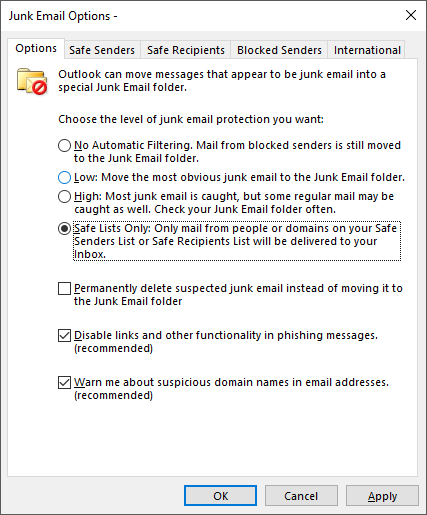
STATUS: FIXED
The issue is fixed in Monthly Channel Version 1709 (Build 8528.2139). To get the latest update immediately, open Outlook and choose File > Office Account > Update Options > Update Now.
All Mail and Unread Mail tab options no longer show in Outlook [WORKAROUND]
Last updated: June, 5 2017
ISSUE
You may notice that All, Unread , Mentioned and other sort and filtering options, such as By date, and Newest are missing in Outlook above your email list.
If your Outlook version is 1703 (Build 7967.2161) or higher, the filters and sort options were moved under the All drop down menu, to accommodate space for the new Focused inbox.
Note
If you don't know your Outlook version, go to File > Office Account to check your Outlook version.
How to filter and sort your mail
To sort your emails by Unread, Mentioned or use other filters, select the All button and choose one of the options. You can also select Arrange By and then pick one of the options such as Date, From, etc.
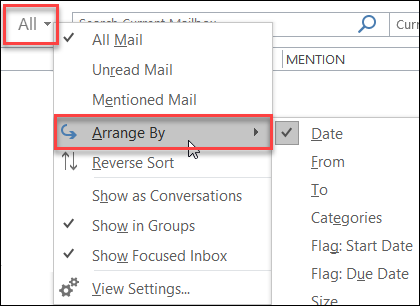
Another options is to use the Filter Email button on the ribbon. For more information, see Filter email messages.
Note that you can quickly tell how your mail is currently sorted, by the presence of a small triangle on the field headers.

Use the Quick Access Toolbar
To access the filtering options faster, add them to your Quick Access Toolbar.
For example, to add Unread to the Quick Access Toolbar:
- Click anywhere in the Search box.
- When the Search tab commands become available on the toolbar, right-click the Unread icon, and then select Add to Quick Access Toolbar.

To add Arrange by to your Quick Access Toolbar, you need to add it to the ribbon first:
- Right click the Ribbon and click Customize the Ribbon.
- Under the Customize the Ribbon Main Tabs , click the Home (Mail) > New Group.
- Select Rename, and rename the new group to Arrange.
- In the Choose commands from column, select All Commands.
- Scroll down to Arrange By, select the third Arrange By and click Add.
- Click the name of the new group (Arrange By) under Customize the Ribbon, and click the UP arrow to move it under the Respond group. You can change this later if you want to move it somewhere else.
- Click OK. This will add the new group on the Ribbon.
- To add Arrange by to your Quick Access Toolbar, right click on the new Arrange By button and click Add to Quick Access Toolbar.
For more information, see Add a command to the Quick Access Toolbar
There is currently no option to revert to the prior behavior, but we would love to hear your feedback to help us with future designs. To learn more about how to send us feedback, please see How do I give feedback on Microsoft Office.
Meeting invitations are automatically forwarded by an attendee [FIXED]
Last updated: August, 18 2017
ISSUE
Outlook forwards meeting invitations to other attendees without anyone actually sending an update or forwarding an invite. This happens to accounts that are configured in the iOS Mail app.
Status: FIXED
This issue is fixed. Please install the latest updates on your phone to resolve the issue.
You may not be able to edit shared calendars [FIXED]
Last updated: Sep 19, 2017
ISSUE
Customers on Current Channel major version 16.0.8326.2062 are not able to edit shared calendars.
You might see the following error when trying to edit or add a new item on the calendar:
You don't have permission to create an entry in this folder. Right-click the folder, and then click Properties to check your permissions for the folder. See the folder owner or your administrator to change your permissions.

If you right-click the shared folder to check permissions, you see the following error:
Cannot display the folder properties. The folder may have been deleted or the server where the folder is stored may be unavailable. Cannot display folder properties. You don't have appropriate permission to perform this operation.

Status: Fixed
The fix for this issue is being released in build 16.0.8431.2079. To install the update immediately, please go to File > Office Account > Update Options > Update Now.
Outlook 2016 issues with scrolling [PARTIAL FIX/WORKAROUND]
Last updated: August 24, 2017
ISSUE
In Outlook 2016, you may experience the following scrolling problems:
- When you scroll up or down, the view jumps to a different position after you finish scrolling.
- When you delete a message, the focus jumps elsewhere in the view instead of jumping to the message before or after the deleted message.
STATUS
- First Release for Deferred Channel: Fixed in Version 1705 (Build 8201.2171)
- Deferred Channel: Fixed in Version 1701 (Build 7766.2099)
- Current Channel: See workaround below.
WORKAROUND
For Current Channel, set these two registry keys that will disable the flight that is causing the scrolling issue:
HKEY_CURRENT_USER\SOFTWARE\Wow6432Node\Microsoft\Office\16.0\Common\ExperimentEcs\Overrides
DWORD: ofsatqrgsry3ri0
Value: 0
HKEY_CURRENT_USER\SOFTWARE\Microsoft\Office\16.0\Common\ExperimentEcs\Overrides
DWORD: ofsatqrgsry3ri0
Value: 0
Or you can open Notepad and paste the text below and save the file as .reg extension and then double click the file to import it into the registry:
Windows Registry Editor Version 5.00
[HKEY_CURRENT_USER\SOFTWARE\Wow6432Node\Microsoft\Office\16.0\Common\ExperimentEcs\Overrides]
"ofsatqrgsry3ri0"=dword:00000000
[HKEY_CURRENT_USER\SOFTWARE\Microsoft\Office\16.0\Common\ExperimentEcs\Overrides]
"ofsatqrgsry3ri0"=dword:00000000
Outlook 2007 and Outlook 2010 display wrong languages [FIXED]
Last updated: Sep 19, 2017
ISSUE
After installing the September Public Update, Outlook 2007 displays mixed languages in the user interface.
Security update for Outlook 2007: September 12, 2017
Customers using the language in the first column may see parts of the page in the language listed in the second column:
| Arabic | Swedish |
|---|---|
| Bulgarian | Brazilian Portuguese |
| Catalan | Brazilian Portuguese |
| Czech | Swedish |
| Hungarian | Swedish |
| Italian | Brazilian Portuguese |
| Kazakh | Brazilian Portuguese |
| Korean | Brazilian Portuguese |
| Latvian | Swedish |
| Norwegian | Swedish |
| Dutch | Swedish |
| Portuguese | Brazilian Portuguese |
| Slovenian | Swedish |
| Serbian Latin | Swedish |
| Thai | Chinese Traditional Taiwan |
| Turkish | Chinese Traditional Taiwan |
STATUS: Fixed
This issue is fixed now.
Please follow the instructions in KB 4011086 to uninstall it, and then install KB 4011110.
Need more help?

|
Talk to support. If you have a Microsoft 365 for home subscription, or you purchased a one-time download of Office 2016, click the Contact Us link at the bottom of this page. |
|---|---|

|
Ask the community Get help from experts in our forums: Office on Windows forum for personal, home, or university users Microsoft 365 community forum for business users |

|
Provide feedback in Office app You can send feedback directly to our Office teams:. In Office 2016 on Windows 10, open an Office app, and click File > Feedback. |
Have a feature request?

|
We love reading your suggestions on new features and feedback about how you use our products! To learn more about how to share feedback, see How do I give feedback on Microsoft Office. We're listening. |
|---|
