
Microsoft Teams helps users stay aware of common online fraud and scam risks by displaying a high-risk warning banner in certain communication experiences.
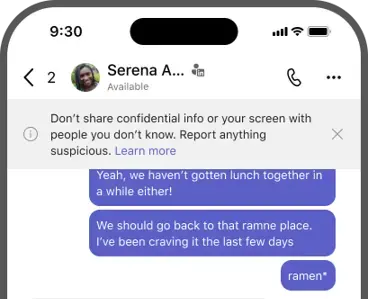
The high-risk warning banner is an informational security notice designed to increase awareness and encourage safe communication practices. The banner reminds users to exercise caution when sharing personal, financial, or sensitive information online.
This banner does not indicate that a specific chat, call, meeting, or participant is malicious. Instead, it serves as a general security reminder to help users recognize common fraud risks and make informed decisions during communications.
Availability
The high-risk warning banner is available only for Teams users located in China using iOS and Android devices. It won't appear on Teams desktop or Teams web. The feature is enabled by default and is currently available in the Microsoft Teams mobile app for:
- iOS
- Android
What the high-risk warning banner looks like
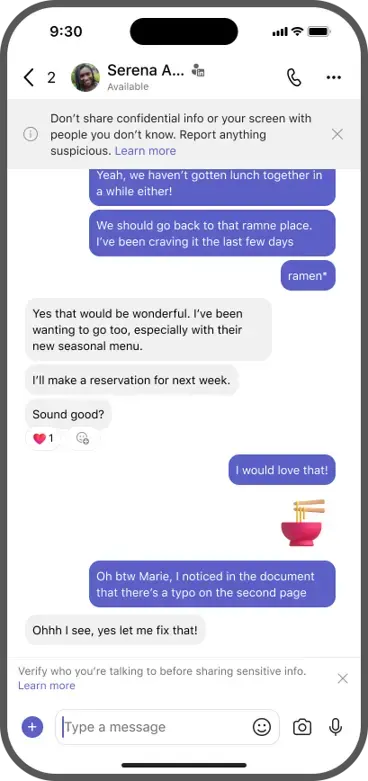
When the banner is displayed, you'll see a warning message at the top of the Teams mobile experience reminding you to remain cautious when communicating online. The message may advise you to:
- Verify the identity of people you communicate with.
- Avoid sharing sensitive personal information.
- Be cautious of requests involving money or financial transactions.
- Watch for signs of scams, fraud, or social engineering attempts.
What to do when you see the banner
The high-risk warning banner is intended to help increase awareness and promote safer communication habits. When you see the banner:
Verify identities before sharing information
Before sharing sensitive information:
- Confirm the identity of the other person.
- Use trusted communication channels when appropriate.
- Be cautious of unexpected requests.
Protect your information
Don't share:
- Passwords
- Verification codes
- Financial information
- Government-issued identification numbers
- Corporate confidential information
Be cautious of urgent requests
Fraudulent communications often attempt to create a sense of urgency. Take additional care if someone asks you to:
- Transfer money
- Purchase gift cards
- Share authentication codes
- Provide account credentials
- Take immediate action without verification
Frequently asked questions
Does the banner mean a chat, call, or meeting is unsafe?
No. The banner is a general awareness notification and does not indicate that a specific communication or participant has been determined to be fraudulent.
Was a scam or fraud attempt detected?
No. The appearance of the banner does not mean that Microsoft Teams has detected a scam, fraud attempt, or malicious activity associated with a specific communications session.
Can I continue using Teams when the banner appears?
Yes. The banner is informational only and doesn't prevent you from participating in chats, calls, or meetings.
Why do I see this banner on mobile but not on desktop?
The high-risk warning banner is currently available only in the Microsoft Teams mobile app for Teams users in China.
Best practices for staying safe on Microsoft Teams
Use these tips to protect yourself from fraud and scams:
- Verify unexpected requests through another trusted communication channel.
- Never share passwords or authentication codes.
- Be cautious of requests involving money, financial transactions, or sensitive information.
- Carefully review links and attachments before opening them.
- Follow your organization's security policies and guidance.
- Report suspicious activity according to your organization's processes.
Related topics
Accept, block, or delete chat or meeting requests from people outside your organization