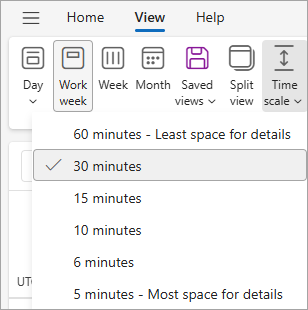
Kuigi kõige levinumad kalendriintervallid on 15 minutit ja 30 minutit, saate muuta ka kalendri ajaskaala intervalliks 5, 6, 10 või 60 minutit.
Valige altpoolt kasutatava Outlooki versiooni vahekaart. Milline Outlooki versioon mul on?
Märkus.
Kui selle menüü Uus Outlook juhised ei toimi, ei pruugi te uut Outlooki Windowsi versiooni veel kasutada. Valige Klassikaline Outlook ja täitke hoopis need juhised.
Kalendri ajaskaala intervalli muutmiseks uues Outlooki Windowsi versioonis tehke järgmist.
- Valige kalendris menüü Vaade .
- Valige Ajaskaala ja seejärel valige ripploendist ruudustiku intervall.