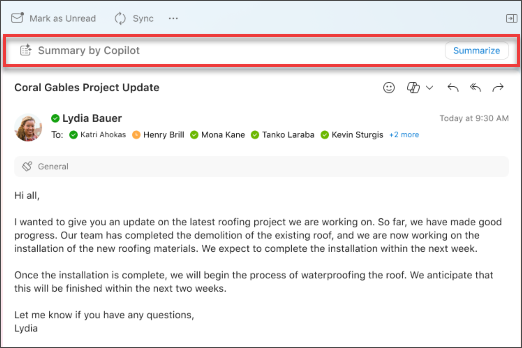
- V klasičnem Outlooku ali novem Outlooku izberite želeni pogovor.
- Izberite »Povzetek po storitvi Copilot « (ali » Povzemi«) na vrhu niti e-poštnih sporočil. Copilot bo pregledal nit, da poišče ključne točke in ustvari povzetek namesto vas.
- Povzetek bo prikazan na vrhu e-poštnega sporočila in lahko vključuje tudi oštevilčene citate, ki vas, če jih izberete, odpeljejo do ustreznega e-poštnega sporočila v niti.
- Če uporabljate nov Outlook in so e-poštnemu sporočilu priložene priloge (PDF, PowerPoint ali Word), lahko izberete možnost Povzemi datoteko. Počakajte, da se ustvarijo povzetki, nato pa si jih oglejte, da si lahko hitro ogledate, kaj ste prejeli.
- V Outlooku v spletu izberite pogovor, ki ga želite.
- Izberite »Povzetek po storitvi Copilot « (ali » Povzemi«) na vrhu niti e-poštnih sporočil. Copilot bo pregledal nit, da poišče ključne točke in ustvari povzetek namesto vas.
- Povzetek bo prikazan na vrhu e-poštnega sporočila in lahko vključuje tudi oštevilčene citate, ki vas, če jih izberete, odpeljejo do ustreznega e-poštnega sporočila v niti.
- Če so v e-poštnem sporočilu priloge (PDF, PowerPoint ali Word), lahko izberete možnost »Povzemi datoteko«. Počakajte, da se ustvarijo povzetki, nato pa si jih oglejte, da si lahko hitro ogledate, kaj ste prejeli.
Opomba
Microsoft 365 Copilot v Outlooku je na voljo le v najnovejši različici Outlooka za Mac. Starejši Outlook ni podprt. Oglejte si Outlook za Mac.
- V aplikaciji Outlook for Mac izberite želeni pogovor.
- Izberite »Povzemi« v polju »Povzetek po storitvi Copilot « na vrhu niti e-pošte. Copilot bo pregledal nit, da poišče ključne točke in ustvari povzetek namesto vas.
- Povzetek bo prikazan na vrhu e-poštnega sporočila in lahko vključuje tudi oštevilčene citate, ki vas, če jih izberete, odpeljejo do ustreznega e-poštnega sporočila v niti.
Opomba
V računalnikih Mac je funkcija povzemanja privzeto izbran za jezik e-poštnega sporočila, ki ga povzema. Jezik povzemanja lahko spremenite tako, da se bo ujemal z jezikom Outlookovih menijev in gumbov, vendar se ta sprememba ne ohrani. Ko znova zaženete povzemanje v Outlooku, se vrne funkcija povzemanja v jeziku e-poštnega sporočila.
Opomba
Prikazane slike so primeri za iOS, navodila pa veljajo za naprave s sistemom iOS in Android.
- V aplikaciji Outlook za iOS ali Outlook za Android izberite pogovor, ki ga želite. Izberite ikono storitve
 v orodni vrstici.
- Copilot bo pregledal nit, da poišče ključne točke in ustvari povzetek namesto vas.
- Ko je postopek dokončan, si lahko povzetek ogledate v e-poštnem sporočilu.
Opomba
V sistemih iOS in Android je funkcija povzemanja privzeto izbrala jezik e-poštnega sporočila, ki ga povzema. Jezik povzemanja lahko spremenite tako, da se bo ujemal z jezikom Outlookovih menijev in gumbov, vendar se ta sprememba ne ohrani. Ko znova zaženete povzemanje v Outlooku, se vrne funkcija povzemanja v jeziku e-poštnega sporočila.
Več informacij
Osnutek e-poštnega sporočila s funkcijo Copilot v Outlooku
Mentorstvo za e-pošte s storitvijo Copilot v Outlooku
Kje lahko dobim storitev Microsoft Copilot?
Microsoft Copilot pomoč & učenju