

If you can't see any OneDrive icons, it could be that the icons have moved out of the taskbar notification area, or OneDrive isn't running.
On a Windows PC, you should see a white or blue OneDrive cloud icon in the notification area, at the far right of the taskbar.
You might need to click the Show hidden icons arrow
 next to the notification area to see the OneDrive icon.
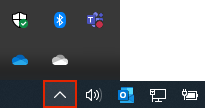
If the icon doesn't appear in the notification area, OneDrive might not be running.
Select Start, type OneDrive in the search box, and then select OneDrive in the search results.
Important
To make sure you're getting the latest features and fixes, download and install the latest OneDrive app for free.
Need more help?
Account support. For help with your Microsoft account and subscriptions, visit Account & Billing Help.
Technical support. For technical support, select Contact Microsoft Support below, enter your problem and select Get Help.
Mobile users can contact Support by opening the OneDrive app and gently shaking your device.
Community support. Communities help you ask questions, give feedback, and hear from experts with rich knowledge. Ask the Microsoft Community. Do not disclose personal or sensitive information in public forums.