
Use Copilot to create, refine, format, summarize, and reorganize content directly in your document.
Note
If you don’t see Copilot in Word, Excel, PowerPoint, or OneNote, it might not be included with your Microsoft 365 subscription or available based on your organization’s settings. Learn which Copilot license you have.
Try it
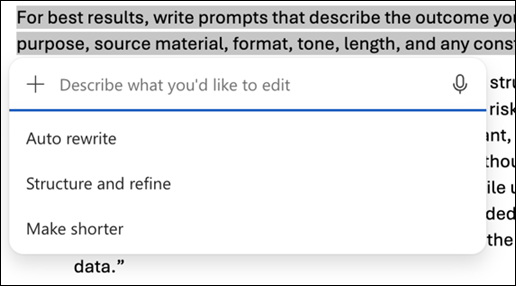
Select the text you want to edit.
Select Copilot from the mini toolbar or open Copilot from the document.
Choose an option such as Auto Rewrite or describe how you want the content rewritten, reorganized, formatted, summarized, or updated.
Review the result.
Choose:
Replace to use the revised text.
Insert below to add the revision below the original text.
Regenerate to create another version.
Prompt examples
Rewrite for tone Make this section sound concise and professional for an executive audience.
Summarize content Summarize this document in five bullet points and add a short conclusion.
Convert to a table Turn this text into a table with columns for task, owner, due date, and status.
Generate and insert an image Create and add an infographic image about [topic/selected content] in [location].