
En este artículo se describen la sintaxis de la fórmula y el uso de la función TANH en Microsoft Excel.
Descripción
Devuelve la tangente hiperbólica de un número.
Sintaxis
TANH(número)
La sintaxis de la función TANH tiene los siguientes argumentos:
- Número Obligatorio. Es cualquier número real.
Observación
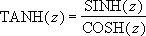
La fórmula para la tangente hiperbólica es la siguiente:
Ejemplo
Copie los datos de ejemplo en la tabla siguiente y péguelos en la celda A1 de una hoja de cálculo nueva de Excel. Para que las fórmulas muestren los resultados, selecciónelas, presione F2 y luego ENTRAR. Si lo necesita, puede ajustar el ancho de las columnas para ver todos los datos.
| Fórmula | Descripción (resultado) | Resultado |
|---|---|---|
| =TANH(-2) | Tangente hiperbólica de -2 (-0,96403) | -0,964028 |
| =TANH(0) | Tangente hiperbólica de 0 (0) | 0 |
| =TANH(0,5) | Tangente hiperbólica de 0,5 (0,462117) | 0,462117 |