
If you see an error that says, "Try that again" or "Error 0x80131500" when using or trying to open Microsoft Store on Windows, try the following solutions.
Expand a section to learn more:
Reset the Microsoft Store app
- Press and hold the Windows Logo Key
 then press R to open a Run dialog box.
 - Enter wsreset.exe and then select OK.
Note
A blank Command Prompt window will open, and after about ten seconds the window will close, and Microsoft Store will open automatically.
Check for updates
Make sure Windows has the latest updates.
Note
If your Windows 10 version is lower than 15063, you'll need to update Windows or go to www.microsoft.com/store. To check your Windows version, look here for the field labelled "OS Build".
Update the Microsoft Store app to the latest version.
Check your time and location settings.
Run the Store troubleshooter (Windows 10 only)
Windows 10 users can run a Store app troubleshooter.
Select Additional troubleshooters.
Scroll down to select
 Windows Store Apps.
Select Run the troubleshooter.
Update your internet TLS settings
Select the Windows icon
to open the Start menu, and search for Run.Enter inetcpl.cpl into the Run dialog box and press OK.
Select the Advanced tab and scroll to the bottom.
Inspect the Use TLS settings:
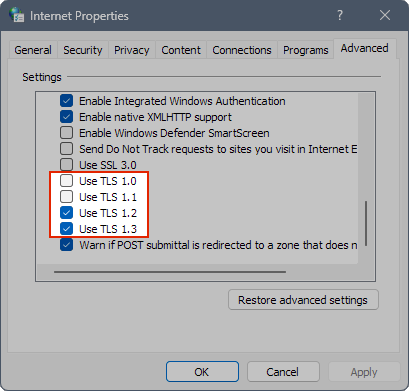
Ensure that Use TLS 1.0 and Use TLS 1.1 are unchecked.
Ensure that Use TLS 1.2 and Use TLS 1.3 are checked.
Note
Your settings may say "Use TLS 1.3 (experimental)". That's fine, just ensure that it's checked.
Press OK to save your settings.
Need more help?
Contact Support
For technical support, go to Contact Microsoft Support, enter your problem and select Get Help. If you still need help, select Contact Support to be routed to the best support option.
For pre-sales support, or issues with purchasing, contact Sales support.