If you purchased a product from Microsoft, you may be able to request a refund, exchange or a return. Select 'Personal account' or 'Work account' tab below for your account type.
If you purchased a product from Microsoft, you may be able to request a refund, exchange or a return.
You can enjoy peace of mind with up to 60-day returns on physical Microsoft products, and if we lower the price within 60 days, contact Sales support and we'll refund you the difference. * Selected products & markets, terms apply.
Items that may be eligible for a return, refund, or exchange include physical goods like a Surface, Xbox controller, virtual reality headset, or packaged software.
You can request a return or exchange on your Microsoft account Order history page.
Find the relevant item and select Request a return.
Note
- Online returns are not available in all markets. If you don't see Request a return, or cannot request a return online, please contact Sales support.
- If you don't see an item listed, you may not have been signed in during the purchase. Use the Guest Order Lookup instead.
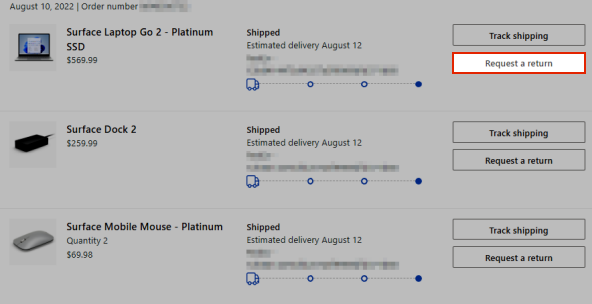
Follow the instructions on the screen to get a prepaid shipping label for the return.
When we receive your item and find it eligible for a return, we'll either ship you a replacement or issue you a refund. When you make a qualifying return, we'll credit the full amount, less the original shipping and handling charges.
Refunds are generally processed within 3–5 business days after we receive your item and find it eligible for a return. Refunds are applied to the original payment option.
You can see the status of your refund on the Order history page.
Note
- Online returns are not available in all markets. If you cannot request a return online, please contact Sales support.
- Single items from within a bundle cannot be returned.
- Return labels expire after a certain time, contact Sales support for assistance.
- If you haven't received your product, do not initiate a product return but contact Sales support.
- In Australia, this return information does not affect any remedy you may have under the Australian Consumer Law. Please refer to Microsoft and the Australian Consumer Law for details of your rights under the Australian Consumer Law.
- If you see we've issued the refund, but the money hasn't been credited back to your payment provider, please wait a few days. Refunds are generally processed within 3–5 business days and are applied to the original payment option.
- Microsoft will not accept returns of purchases of Microsoft products or other products purchased from another retailer.
- Microsoft is not responsible for any games and/or storage devices left in a returned product.
Need more help?
Contact Support
For pre-sales support, or issues with purchasing, contact Sales support.
Return policy for work account orders
Damaged or defective items
Note
- You have 60 days from delivery to return Surface devices and accessories purchased through the Microsoft Store with your work account. Items should be in original packaging and like-new condition.
- Report damage or defects as soon as possible. Don't wait until the return window is about to close.
- Microsoft 365 subscription returns vary by subscription status. Contact Microsoft Support for details.
If your item arrived damaged or is defective:
- Document the damage with photos of the item and packaging.
- Visit Microsoft 365 admin center and sign in with your work account.
- Initiate a return and select the reason as "arrived damaged" or "defective".
- Once your return is processed, you can place a new order for a replacement.
How to return an item
- Sign in with your work account and visit Microsoft 365 admin center.
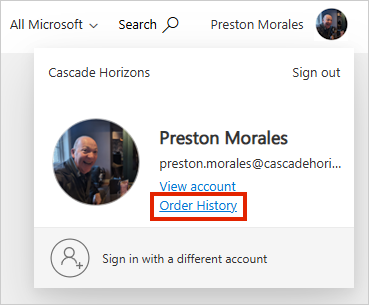
- Click on initials and select Order History.
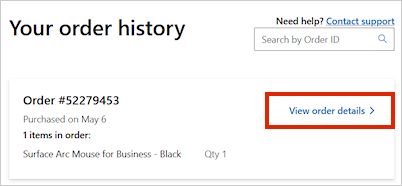
- Click View order details to expand its details.
Note
You will return items at product level, not order level.
- Go to your order and select Manage this item for the item you want to return.
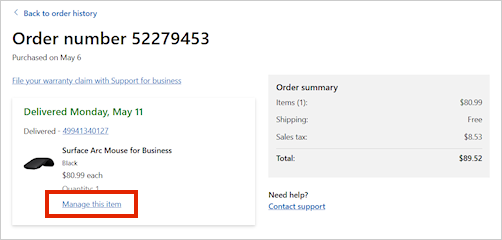
- This takes you to the Order Product details page. Click Return items.
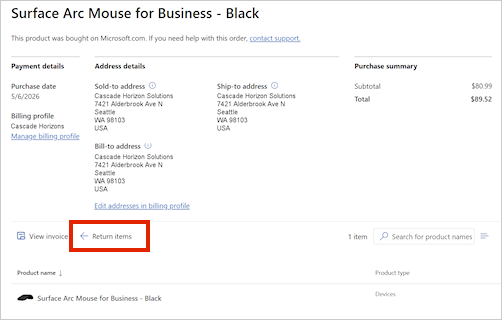
- Popup modal will display on the right.
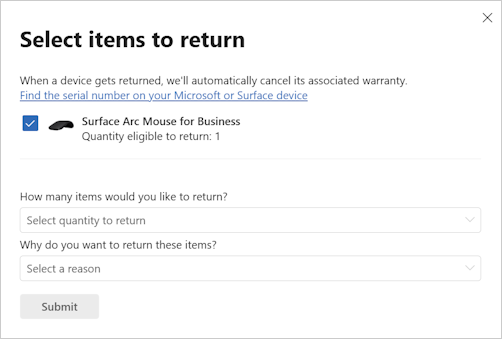
- Answer the questions from the dropdown, and then click Submit.
- You will get a confirmation displayed on the page, and a prepaid return label will be emailed to you. You can also print a label from your account.
Note
If self-service returns are not yet available for your order, call Microsoft Sales Support at 1-800-642-7676 to initiate the return.
Ship your return
- Pack items securely in original packaging (if available).
- Include all accessories, cables, and documentation.
- Attach the prepaid shipping label.
- Drop off at the designated carrier location.
- Keep your tracking receipt.
Track your return
- Find tracking for your return package in Order history.
- Find your refund or credit status in Order history or MAC.
Exchanges
To exchange an item for a different configuration in two separate transactions, you can go through the return process and purchase the new device or call Microsoft Sales Support at 1-800-642-7676 to initiate the exchange.
Refunds
After your return is received and inspected, your refund is processed to the original payment method.
Here's what to expect:
- We'll notify you when we receive your return.
- We'll follow up when your refund has been processed.
- Refunds are returned to the original payment method used for the purchase.
Note
Check your return status in Order History. Bank processing times vary - if your refund hasn't appeared, contact your bank first, then Microsoft Support.
What can't be returned
- Items outside the 60-day return window.
- Items that are damaged, modified, or missing parts.
- Items without proof of purchase.
After the return window
| Situation |
What to do |
| Within 60 days, any reason |
Return the item |
| Defective, under manufacturer warranty |
Contact Surface Support |
| After 60 days, not defective |
Not eligible for return |
Troubleshooting
I need a new return label
- Print another label for your request through your Order history.
I missed the 60-day return window
My refund is taking longer than expected
- Verify the return was delivered using your carrier tracking number.
- Allow time for inspection after receipt.
- Contact Microsoft Support if there's been no update.
Need more help?

