

Frequently asked questions
How do I check out as a guest?
Guest checkout is available in select markets and for selected items added to your cart. Some products and payment and shipping methods may not be available with guest checkout. If eligible, you will see a Check out as a guest option in the Cart.
Does guest checkout have alternative payment method and shipping options?
No. For more payment methods and shipping options, check out with a Microsoft account.
Can I get the discount for students, parents, teachers and military when checking out as guest?
To receive a student, parent, teacher, or military discount, you will need to check out with a Microsoft account.
Sign in to check your eligibility.
Can I use a Microsoft or Xbox Gift Card when checking out as guest?
To use your gift card, you will need to check out with a Microsoft account.
Am I eligible for the low price promise if I check out as a guest?
Yes, orders placed as a guest are eligible for the low price promise.
Where can I view or manage an order purchased as a guest?
You can view, track, cancel, and return your guest order through Guest Order Lookup.
I checked out as a guest, but I also have a Microsoft account. Why do I not see my order in account.microsoft.com?
Orders placed as a guest can only be managed through Guest Order Lookup and are not linked to your Microsoft account.
How do I know if I checked out as a guest?
If your order number starts with a "G" you have checked out as a guest. Please view and manage order details through Guest Order Lookup.
If your order number does not start with a "G", you can view and manage order details through your Microsoft account order history page.
What is the refund policy for products purchased as a guest?
Microsoft’s return policy applies to all orders. Under the return policy if you purchased a hardware product from Microsoft, you may be able to request a refund. For detailed info about the return and refund policy, see Microsoft Terms of Sale.
You can start a return through Guest Order Lookup. You will need the email address used and your order number.
Find the relevant order and select Start a return.
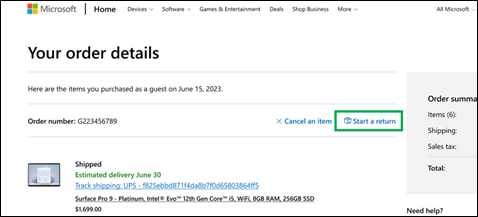
Follow the instructions on the screen to get a prepaid shipping label for the return.
Note
If you can't get a prepaid shipping label for the return, contact support.
Once we receive your item, a refund will be issued in 3-5 business days.
For more information about hardware refunds, please see Returning items you bought from Microsoft for exchange or refund.
For all other questions or assistance with guest checkout, please reach out to the Microsoft Store Customer Support team in your region and they'll be glad to assist you.
Need more help?
Contact Support
For technical support, go to Contact Microsoft Support, enter your problem and select Get Help. If you still need help, select Contact Support to be routed to the best support option.