
The Study and Learn Agent is an AI-powered agent in Microsoft Copilot purpose-built for learning. It helps learners understand, practice, study, and master content through scaffolded chat conversations and interactive learning activities — including flashcards, quizzes, matching, and fill-in-the-blank exercises. Unlike a general-purpose AI chatbot, the Study and Learn Agent is grounded in learning science research: the learner does the thinking, and the agent coaches them through the process.
The Study and Learn Agent works with the student's own materials — uploaded documents, slides, PDFs, and more — as well as any topic the student wants to explore. It is pre-installed for all Education license users at no extra cost and is available in the Microsoft Copilot app via the left navigation pane and the Chat dropdown.
Who it's for: Middle and high school students (ages 13+), higher education students, and adult learners who want to learn and master content more effectively. Study and Learn works across subjects and topics.
Requirements
Accessing the Study and Learn Agent: The Study and Learn Agent is available to Education users aged 13+ with a Microsoft 365 Education license (A1, A3, or A5). No additional license or purchase is required — the agent comes pre-installed with all Education SKUs at no extra cost.
Available to all users with Copilot Chat enabled: Copilot Chat needs to be enabled for users to access Study and Learn. Copilot Chat is enabled for all adults in education SKUs. IT admins need to enable Copilot Chat using age-gating controls for learners 13-17 years of age. For step by step instructions, watch the video Microsoft Copilot Chat for Students 13+: Setup Guide for IT Admins. Learn more:
Supported platforms: The Study and Learn Agent is available in the Microsoft Copilot app on Web and Windows Desktop. You can access it from the left navigation pane (where it is readily visible) or from the Chat dropdown in Microsoft Copilot.
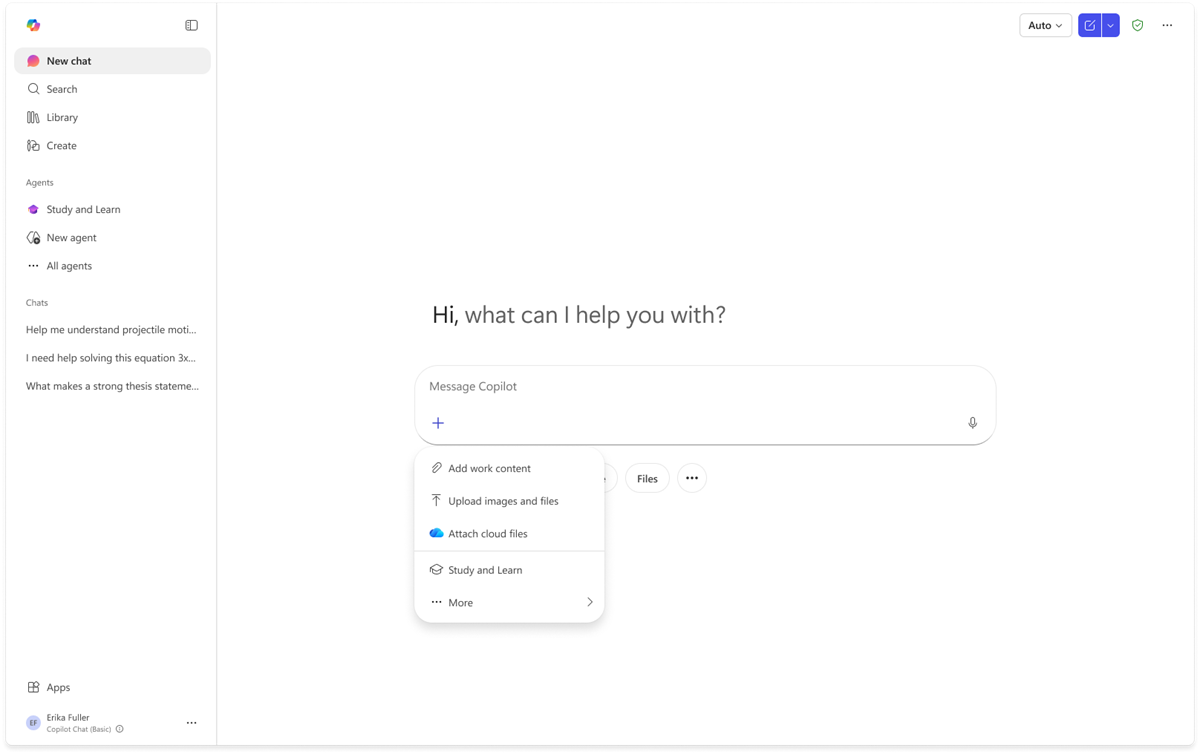
Note: Support for additional platforms (including mobile and other Microsoft 365 apps) is planned for future releases.
Supported grounding sources
You can upload or reference the following file types to ground your conversations in your own study materials:
| File Type | Supported |
|---|---|
| Word documents (.docx) | Yes |
| PowerPoint presentations (.pptx) | Yes |
| PDF files (.pdf) | Yes |
| URLs / web pages | Yes |
| Copilot Pages | Yes |
When you provide files, the agent uses them as context for its responses and activities. Citations are included so you can trace any piece of information back to your original materials.
Supported activities
| Activity | Description |
|---|---|
| Scaffolded conversations | Adaptive chat that leads with questions and builds understanding step by step |
| Writing support | Coaching through the writing process without writing for you |
| Images | Web-searched visual aids woven into explanations |
| Flashcards | Interactive Q&A cards from your materials or any topic |
| Quizzes | Scored self-assessment with per-answer explanations |
| Matching | Pair related terms, concepts, and definitions |
| Fill in the blanks | Recall key terms from sentences with blanked-out words |
Localized experience in Study and Learn Agent
Study and Learn Agent uses the user’s language settings to provide a localized experience in the Microsoft Copilot app.
How language is selected
- The Microsoft Copilot app respects the user’s browser/operating system locale.
- The Study and Learn Agent UX follows the same browser/operating system locale.
- Chat responses match the user’s browser/operating system locale unless the user explicitly changes the language.
Learning activities and quizzes
- Learning activities and quizzes match the language of the conversation.
- If a user uploads documents in a different language, activities match the language of the uploaded content.
- This supports practice in another language, such as reviewing vocabulary from content written in a new language.
Supported languages
Study and Learn Agent supports:
Albanian; Arabic; Chinese (Simplified); Chinese (Traditional); Croatian; Czech; Danish; Dutch; English (United Kingdom); English (United States); Estonian; Filipino; Finnish; French (France); French (Canada); German; Greek; Hungarian; Icelandic; Italian; Japanese; Korean; Latvian; Norwegian (Bokmål); Polish; Portuguese (Brazil); Portuguese (Portugal); Romanian; Russian; Serbian (Cyrillic); Serbian (Latin script); Slovenian; Spanish (Mexico); Thai; Turkish; Ukrainian; Vietnamese; Welsh.
Error handling and limitations
File size limits: Very large files or collections of files may result in reduced activity quality. If files exceed processing limits, the agent will still provide conversational support but may not be able to generate all activity types.
Protected files: Files with a sensitivity label of Confidential or Highly Confidential may not be fully processed for learning activities.
Language: The Study and Learn Agent is optimized for English (US) at launch. The agent can respond in other languages supported by Microsoft Copilot, but the quality of experience, learning scaffolding and activities needs improvement. Support for additional languages will expand over time.
Topics outside scope: The agent is designed for educational content. It will decline requests for conversations that violates Microsoft's Responsible AI and content safety standards.