A table of contents in Word is based on the headings in your document.
Create the table of contents
- Put your cursor where you want to add the table of contents.
- Go to References > Table of Contents. and choose an automatic style.
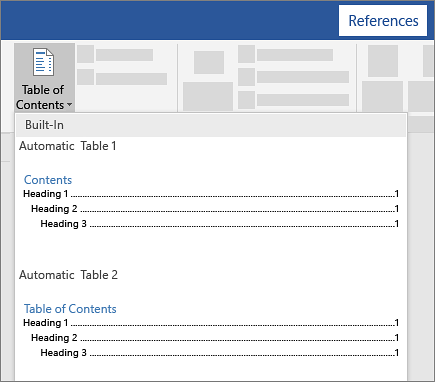
- If you make changes to your document that affect the table of contents, update the table of contents by right-clicking the table of contents and choosing Update Field.
To update your table of contents manually, see Update a table of contents.
If you have missing entries
Missing entries often happen because headings aren't formatted as headings.
For each heading that you want in the table of contents, select the heading text.
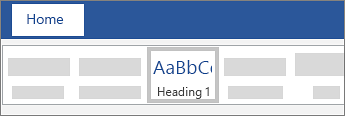
Go to Home > Styles, and then choose Heading 1.
Update your table of contents.
To update your table of contents manually, see Update a table of contents.
Create the table of contents
Word uses the headings in your document to build an automatic table of contents that can be updated when you change the heading text, sequence, or level.
Click where you want to insert the table of contents – usually near the beginning of a document.
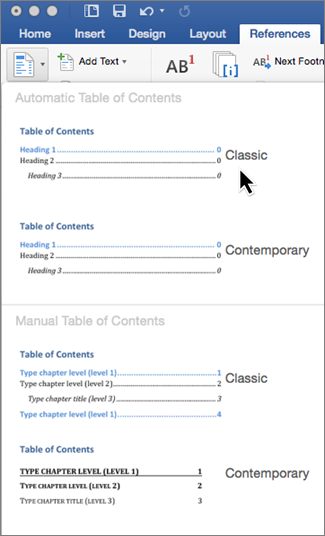
Select References > Table of Contents and then choose an Automatic Table of Contents style from the list.
Note
If you use a Manual Table of Contents style, Word won't use your headings to create a table of contents and won't be able to update it automatically. Instead, Word will use placeholder text to create the look of a table of contents so you can manually type each entry into the table of contents. To update your manual table of contents, see Update a table of contents.
If you want to Format or customize your table of contents, you can. For example, you can change the font, the number of heading levels, and whether to show dotted lines between entries and page numbers.
If you have missing entries
Missing entries often happen because headings aren't formatted as headings.
For each heading that you want in the table of contents, select the heading text.
Go to Home > Styles and then choose Heading 1.
Update your table of contents.
To update your table of contents manually, see Update a table of contents.
Word uses the headings in your document to build an automatic table of contents that can be updated when you change the heading text, sequence, or level.
- Click where you want to insert the table of contents—usually near the beginning of the document.
- On the toolbar ribbon, select References.
- Select Insert Table of Contents. The table of contents is inserted, showing the headings and page numbering in your document.
If you make changes to your document that affect the table of contents, you can update it by right-clicking the table and selecting Update Table of Contents.
Try inserting a table of contents into your documents in Word for the Web.
Go to the tutorial
In desktop Word, go to File > New, and search for table of contents.
See Also
Update a table of contents

