

There are two ways you can renew your Microsoft 365 subscription:
Enter a new product key or download code for another year's subscription. See below.
Tip
Need a code? Go to www.microsoft.com/microsoft-365/buy/microsoft-365 to compare plans, buy a subscription, or talk to an expert.
Turn on recurring billing for your existing subscription. Learn how.
Tip
This will also show you how much renewal will cost.
Renew your Microsoft 365 subscription with a product key
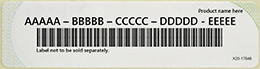
Your product key is a combination of letters and numbers in this format:
Important
- If you enter more than one product key, you extend the amount of time for that subscription. Buying or "stacking" more than one product does not increase the number of available installations and does not increase the amount of online storage you get.
- You can extend the duration of a Microsoft 365 subscription for a maximum of 5 years. Always check you are signed in with the correct Microsoft account when redeeming.
- For more information, talk to an expert at microsoft365.com/renew.
Tip
- If you have a physical box or card, look inside for your 25-character product key. Your product key might be concealed with silver foil, which you scratch off to reveal the letters and numbers.
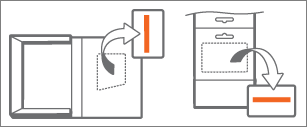
- If you didn't get a physical box or card, check your email for a receipt that includes the product key.
Go to microsoft365.com/setup and, if prompted, sign in using the Microsoft account that's associated with your Microsoft 365 subscription.
Important
Always check you are signed in with the correct Microsoft account when redeeming.
Enter the 25-character product key. When selecting your country or region, we recommend that you choose the country or region where you live or do your banking.
Follow the steps to complete the renewal process. Once completed, your subscription will be renewed and your new expiration date will be shown.
See also
Add a payment method to your Microsoft account
Share your Microsoft 365 subscription
Change your Microsoft subscription payment method and options
Turn recurring billing on or off for a Microsoft subscription
Cancel a Microsoft 365 subscription
Tax invoices, breakdowns, and registration numbers for Microsoft Store
Need more help?
Problems renewing? For issues with purchasing or renewing, contact Sales support.
Contact Support
For technical support, go to Contact Microsoft Support, enter your problem and select Get Help. If you still need help, select Contact Support to be routed to the best support option.
For pre-sales support, or issues with purchasing, contact Sales support.
Microsoft 365 for business admins should read see Renew Microsoft 365 for business.