Your work or school account is the email account your organization assigned to you. If you were also assigned a Microsoft 365 license, it will be associated with this account.
For help with the username or password, or to manage your work or school account, select from the options below:
Contact your admin who can retrieve the username and reset the password for your work or school account.
Open Word, Excel, or PowerPoint app to see your username
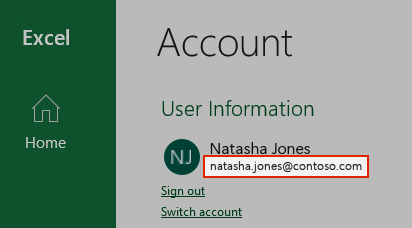
If you have Microsoft 365 or Office 2016 or newer installed, in most cases you can view the work or school account associated with Microsoft 365 or Office by opening a desktop application like Word, Excel, or PowerPoint.
Open an app such as Word, Excel, or PowerPoint.
Select File. If you didn't open an existing document, you may need to create a new document to see the File menu.
From the navigation on the left, select Account.
Under Product Information is the name of your product and the name of the account the product is licensed to.
Managing your account
You know your username, but forgot the password and need to reset it
If your admin has given you permission to reset your password go to, passwordreset.microsoftonline.com/. Contact your admin if you don't have permission to change your password.
If your admin has given you permission to reset your password go to, passwordreset.activedirectory.windowsazure.cn/. Contact your admin if you don't have permission to change your password.
If your admin has given you permission to reset your password go to, passwordreset.microsoftonline.com/. Contact your admin if you don't have permission to change your password.
You know your password, but you want to change it
You can only do this if your admin has given you permission to update your password in Microsoft 365.
Go to www.microsoft365.com/signin and sign in with your work or school account username and existing password.
Go to login.partner.microsoftonline.cn and sign in with your work or school account username and existing password.
Go to portal.office.de and sign in with your work or school account username and existing password.
Go to Settings
 > Change your password.
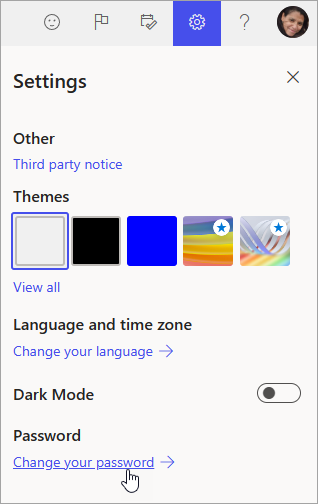
You'll only see this option if your admin has given you permission to reset your password. Contact your admin if you don't have permission to change your password.
Make your changes and click Save.
Sign in to Microsoft 365
The sign in location for Microsoft 365 is, www.microsoft365.com/signin.
The sign in location for Office 365 operated by 21Vianet in China is, login.partner.microsoftonline.cn/.
The sign in location for Office 365 Germany is, portal.office.de.
If you're signing in to the correct location, but still can't remember your username and password, contact your admin.
Sign in with a personal account instead of a work or school account
If you're trying to sign in with your personal Microsoft account, but you're already signed in with your work or school account, you need to sign out and then sign in with the correct Microsoft account (or vice versa).
Another option is to open a private browsing session in a new browser window. (Search your browser's help if you don't know how to do this.) When you open a private browsing session your browsing data such as history, temporary internet files, and cookies isn't saved, so you can sign in with a different account.
Need more help?
Can't sign in?
If you can't sign into your Microsoft account, most issues can be identified by our sign-in helper tool.
Contact Support
For technical support, go to Contact Microsoft Support, enter your problem and select Get Help. If you still need help, select Contact Support to be routed to the best support option.
Important
To protect your account and its contents, our support agents are not allowed to send password reset links, or access and change account details.

