
Where you can access Learning Agent
Learning Agent helps you discover, practice, and build skills without leaving the flow of work. Available across supported Microsoft 365 experiences, it brings personalized learning opportunities closer to where you work, communicate, and collaborate.
The experiences available to you may vary based on your organization's configuration, licensing, and feature availability.
| Microsoft 365 experience | Access point |
|---|---|
| Microsoft Copilot & Teams | Desktop app and web app |
| Microsoft Word/Excel/PowerPoint | Desktop app and web app* |
Start using Learning Agent
If Learning Agent is available in your organization, and not deployed direclty by admin, you can add it in Microsoft Copilot or Microsoft Teams and start using it as part of your everyday work.
Open Microsoft Copilot or Microsoft Teams.
In Microsoft Copilot, select All Agents, search Learning, and then select Add.
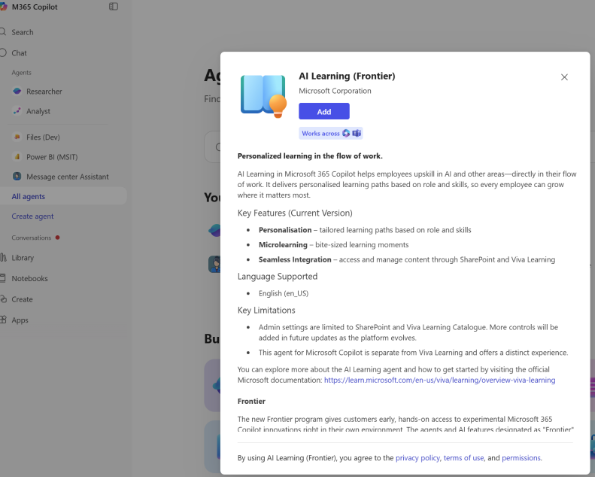
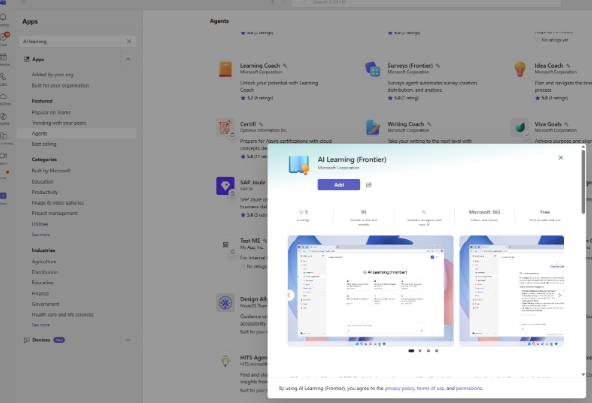
In Microsoft Teams, select Copilot > Agents, find Learning Agent, and then select Add.
After the Agent is added, it appears in your Copilot Agent list or Teams sidebar so you can open it directly.
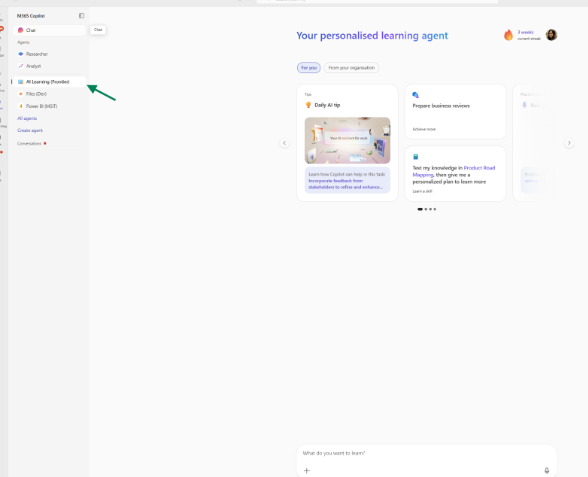
You can also use it in Copilot Chat Prompt. To start using it, open the Agent and begin a chat, or type @Learning Agent in a supported Microsoft 365 chat surface.
Prequisites-Licensing at a glance
The licenses available to you can affect which Copilot Learning Agent experiences you can access. Some experiences may be available as part of Microsoft Copilot, while others can depend on Viva Learning or your organization’s setup.
Microsoft Copilot provides access to the main Learning Agent experience.
Viva Learning affects access to some learning content and related experiences (see the table below for details).
Some features and experiences may vary depending on how your organization has enabled Learning Agent.
Feature availability
Learning Agent experiences may vary depending on how your organization has configured Learning Agent and the Microsoft 365 services available to you.
If a feature or experience is not available, contact your Microsoft 365 administrator for more information.
Explore more
- To explore key capabilities such as role play, assessments, and learning plans, see Learning Agent capability overview.