
The Dragon Copilot application for web, desktop, and mobile helps you generate narrative-style nurse notes directly from recorded patient interactions. This feature helps you complete documentation more efficiently while maintaining control over the final content.
Note
- The features and functionality you see might vary based on your organization's configuration and whether you're using Dragon Copilot for Epic Rover, the Dragon Copilot web/desktop/mobile app, or both.
- The features in this article pertain to the Dragon Copilot web/desktop/mobile experience for nurses only.
Start from Recent patient interactions
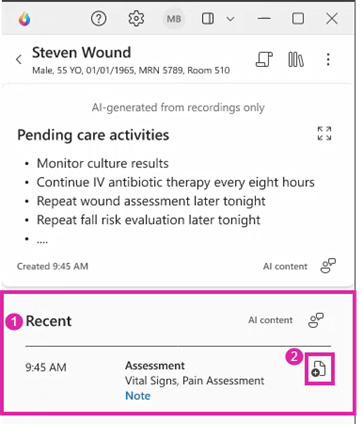
Generate nurse notes from the Recent patient interactions section in the patient view. Each interaction represents a recorded session for the selected patient during the current shift. Each interaction includes a short AI-generated recap to help you identify interactions that might require documentation.
Each interaction acts as the entry point for nurse note creation. This process ensures notes are always tied to a specific patient interaction rather than a general session or timeline.
How to generate a nurse note
To generate a nurse note:
- Select a patient and locate the relevant interaction under Recent patient interactions.
- Select
 to create a nurse note for that interaction.
Dragon Copilot generates a single narrative-style nurse note based on the transcript from that interaction.
Note
The generated nurse notes don't include flowsheet data, EHR fields, or information from other sessions or shifts.
How does it work?
The system generates nurse notes exclusively from transcript content associated with the selected patient interaction. If you don't speak about certain information during the interaction, that information doesn't appear in the note.
Each generated nurse note includes a link back to the source transcript, so you can verify the original content used to generate the note.
Important
Each recorded patient interaction supports a maximum of 10 nurse notes. When an interaction reaches 10 notes, the Add Note action is disabled for the associated interaction. Delete an existing note from the interaction to re-enable the action.
Review and edit nurse notes
Generated nurse notes appear inline in the patient’s view, right where you’re already reviewing patient interactions.
Before using the note, review and edit it to make sure it reflects your clinical judgment and documentation standards. You can add, remove, or adjust content as needed.
The original AI-generated note is always preserved for reference.
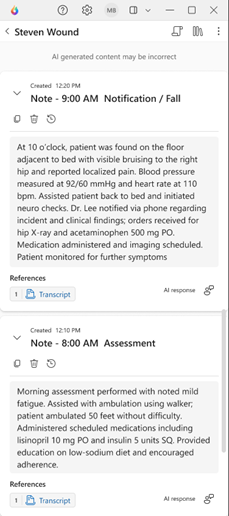
When you finish editing, select the copy icon to copy the note into the EHR.
Note
Nurse notes aren't filed automatically, so you stay in control of what gets added to the patient's record.
Availability of nurse notes
Nurse notes stay associated with the patient for the duration of the current shift. If you make additional recordings after generating a note, the existing note doesn't update automatically. To reflect new information, generate a new nurse note from the appropriate interaction.
Related topics
Query and summarize the transcript in the web/desktop experience for nurses
Use information assist in web/desktop experience for nurses
To refresh your knowledge or find a specific training topic, open the Dragon Copilot learning library for the nursing experience.