
Note
- The features and functionality available to you might vary based on your organization's configuration.
- AI functionality for accessing trusted clinical information through Copilot chat is available exclusively in the Dragon Copilot app.
- Screenshots in this article show the iOS experience. Screens may look slightly different on Android, but the workflow is the same on both operating systems.
Copilot chat overview
Copilot chat is an AI-powered knowledge tool built into Dragon Copilot. It delivers quick, evidence-based answers to clinical questions without interrupting your workflow. Simply type a question in natural language to access trusted medical sources instantly. Copilot chat acts like a “second brain,” giving you instant, evidence-based answers backed by real references. It saves time, reduces searching, and supports safer, more consistent patient care.
Answers based on trusted sources. Preconfigured by Microsoft, answers come from vetted, healthcare‑specific sources like CDC, FDA, MedlinePlus, MSD Manuals, Daily Med, Clinical Coder references, and safeguarded global search (when enabled), with citations included in every response.
Administrators manage access and source availability. You can further select which sources to use for relevant answers via the Settings menu.
Internal sources Internal sources let you ask Copilot chat questions about your organization’s approved hospital policies, protocols, procedures, and internal reference documents. Copilot chat can use this organizational knowledge alongside trusted external clinical sources to help you find information relevant to your workplace.
For example, external sources can provide general clinical information, while internal sources can answer questions about your hospital’s own sepsis bundle protocol or blood transfusion policy.
The internal sources available to you depend on the documents your organization has made available for your role, unit, or group. When an answer uses an internal source, it includes a reference so you can review the supporting document. The usefulness of the answer depends on the quality and clarity of the source content.
Example questions:
- "What is our sepsis bundle protocol?"
- "What is our blood transfusion policy?"
Ask about the local policy or procedure you need, then review the source reference in the response for the full guidance.
Type questions in natural language. You can ask questions the same way you would ask a colleague.
Example: How should we manage this patient’s anticoagulation around the time of surgery, and does he need antibiotic prophylaxis for his mechanical valve? Copilot chat returns an answer grounded in trusted sources and includes citations, so you can review the original references.
Verified answers with citations. Every response includes a citation link for full details.
How to use Copilot chat
Copilot chat is available within the patient-centric experience:
- Select a patient from the homepage. This opens the patient view for the current shift.
- Select the Copilot chat icon at the bottom of the page.
- In the prompt box, type in a clinical knowledge question in natural language. If your question can’t be answered using patient transcripts, Dragon Copilot automatically routes it to Copilot chat.
- Review the response.
- Select Copy to quickly transfer the answer into your documentation, handoff notes, or charting.
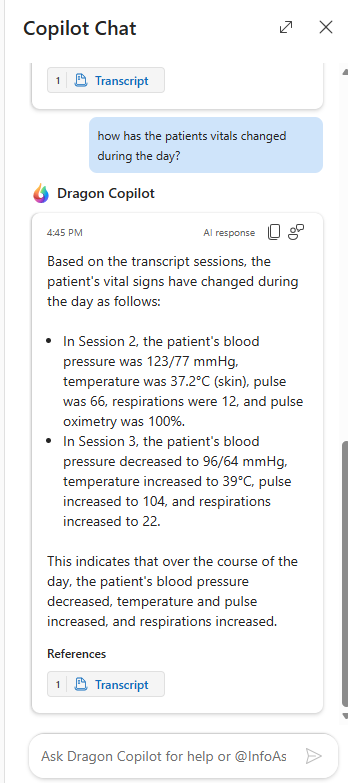
How Copilot chat works with patient context
Copilot chat intelligently routes questions based on intent:
- Patient specific questions (for example, when did the patient say their family would visit?) are answered using recorded transcripts.
- General clinical knowledge questions are answered using Copilot chat and trusted sources.
If transcript data cannot answer a question, Dragon Copilot automatically uses Copilot chat; no separate action is required.
Multi-intent questions
Copilot chat supports multi-intent queries. This feature lets you ask compound questions that require information from multiple sources in a single request.
Example: What are the patient identification procedures before administering blood transfusion, and what documentation is required? Copilot chat breaks the question into parallel intents and returns a combined response, so you don't need to ask follow-up questions.
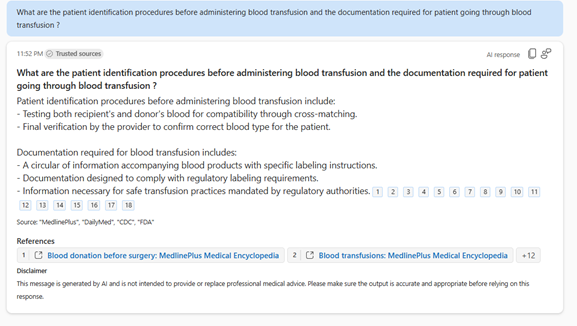
Safeguarded global search
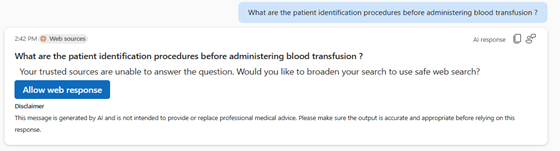
If trusted sources can't answer a question, Copilot chat can prompt you to allow safeguarded global search. When enabled:
- Copilot chat broadens the search beyond configured sources.
- Responses stay grounded, with citation links.
- Safeguards maintain clinical and compliance standards. You see a prompt asking whether you want to allow web search before results are shown.
Clinical Coder integration
Provides read-only access to transcript-based context with links back to original spoken documentation to support downstream coding review and audit needs. It doesn't assign codes or modify nurse notes.
Related topics
Query and summarize the transcript in the web/desktop experience for nurses
To get a refresher or find a specific training topic, open the Dragon Copilot learning library for the nursing experience.