
When enabled by your administrator, Microsoft Dragon Copilot can capture nurse-patient conversations conducted in Spanish (US) or a combination of English and Spanish (US) during a patient encounter. You can review the transcript in the language spoken, while Dragon Copilot generates flowsheet updates, summaries, and notes in English.
Note
The features and functionality available to you may vary based on your organization's configuration and whether you're using Dragon Copilot for Epic Rover, the Dragon Copilot web/desktop/mobile app, or both.
Recording is done exclusively in Dragon Copilot for Epic Rover.
To record conversations in Spanish (US)
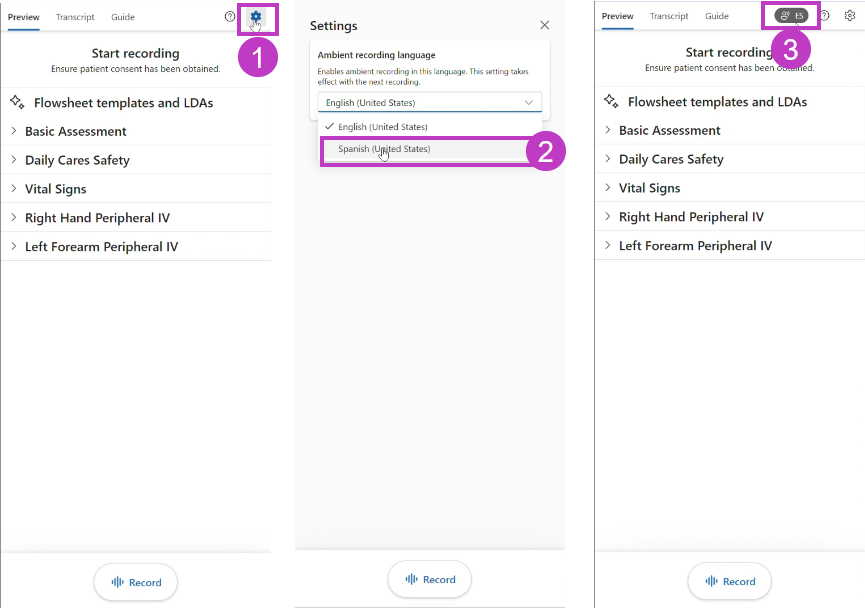
- Select the gear icon to open Settings.
- Under Ambient recording language, select Spanish (United States) from the dropdown menu.
- The ES symbol beside the gear and help icons indicates that Spanish recording is on.
- Record your patient conversation as usual.
Here's a short video on how to capture encounter using Spanish or English or a combination of both
Important considerations
- The selected language applies to future recordings, including recordings within the same patient interaction, and remains selected across sessions and patient encounters until you change it again.
- Dragon Copilot captures conversations and assists with documentation workflow. It doesn't translate conversations or provide AI-assisted translation.
- When Spanish (US) is selected as the ambient recording language, Dragon Copilot supports conversations conducted in Spanish (US), English, or a combination of both. The conversation does not need to remain in a single language. Speech is transcribed in the language spoken, allowing switching between Spanish and English throughout the conversation. Flowsheet updates, summaries, and notes are generated in English.
- Ensure you and your patient are fluent in the selected recording languages to help prevent misunderstandings and documentation inaccuracies. Spanish (US) support is not a substitute for interpreter services and should be used only when all participants are confirmed Spanish and/or English speakers.
- Check for accuracy. Review flowsheet and documentation generated after the encounter carefully and make any necessary edits to ensure it accurately reflects the patient encounter.