
DAX Copilot helps you create and manage orders during patient encounters. It captures verbal instructions from ambient recordings and suggests them as orders, helping you initiate or update orders directly in your EHR.
Note
The Orders section appears only if this feature is enabled for your organization. Direct order integration with your EHR also requires additional configuration by your internal EHR support team.
DAX Copilot can identify a variety of order types based on your encounter discussions, including:
- Medications
- Immunizations
- Follow-up appointments
- Consults and referrals
- Procedures
- Imaging and diagnostic tests
- Labs
Orders in DAX Copilot
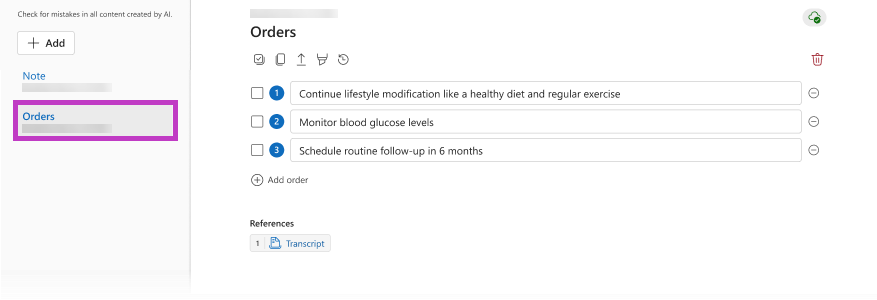
If DAX Copilot identifies potential orders based on the combined transcript of your encounter, the Orders section appears in the patient session.
Review your order suggestions
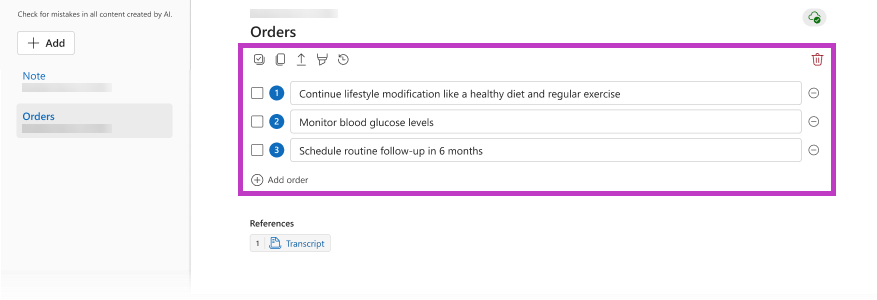
Select the Orders section. Each suggested order appears in its own numbered row. The suggested order text is formatted to help you quickly find the appropriate order in your EHR.
You have several options when working with suggested orders:
- Edit the order text to add details or clarification.
- Copy the order text by using keyboard shortcuts, the Copy icon
 , or a voice command.
 - Use the suggested order text as search terms to find the appropriate order in your EHR.
- Add an order.
- View order history
 .
.
Important
- Order suggestions are intended as memory aids to help improve accuracy and efficiency.
- DAX Copilot uses specific criteria to identify order suggestions from your ambient recordings. Verbalize a clear intent to place an order during the ambient recording to ensure DAX Copilot generates the appropriate order suggestions for your encounter.
Integrated order suggestions
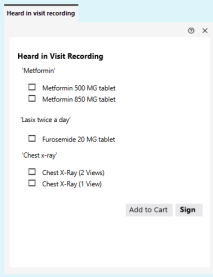
DAX Copilot sends order information to your EHR, where the orders appear as suggested orders in a separate screen or tab.
Your EHR matches the suggested order to one or more order options in your system. Then, your EHR displays a list so you can quickly select and place the orders according to your organization's guidelines.
Important
Integrated orders are only available if your EHR support team enables and configures the feature. Please confirm availability with your designated EHR representative. If you expect to see matching orders in your EHR, and they do not appear, please contact your EHR admin or support team.
Related topics
Get started with DAX Copilot for Epic