
DAX Copilot is your AI assistant for the clinical workflow. Here's what's new in version 5.0.
DAX Copilot for Epic 5.0
DAX Copilot for Epic has a new look and feel, driven by clinician feedback. This release includes a streamlined workspace, improved recording and editing experiences, enhanced templates, and new ways to provide feedback that helps improve DAX Copilot over time. Overall, DAX Copilot for Epic 5.0 is designed to help you document more efficiently, customize your workflows, and access AI-powered assistance where you work.
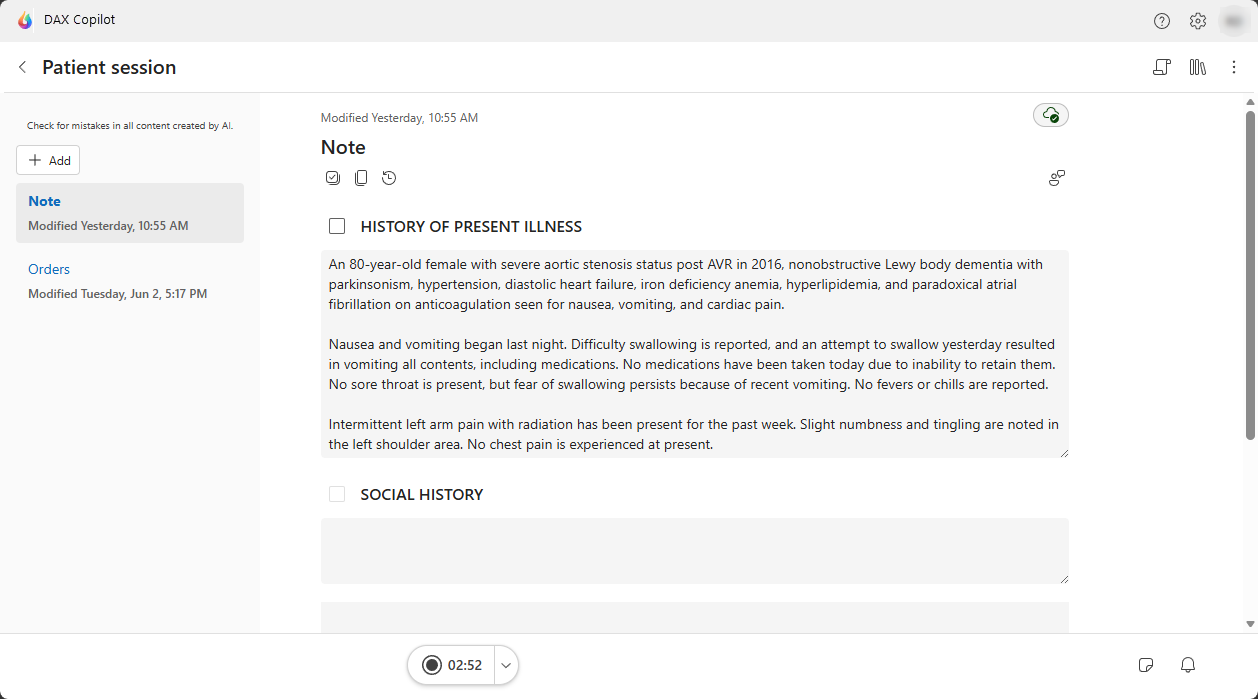
Simplified patient view
All patient session information is now together in one view for a clean, streamlined way to find everything you need.
- View your note, patient context, and generated clinical content all in one place.
- Your session content is front and center. Key functions like transcript
 , notifications
  , and library
  are available when you need them. Access and work through these capabilities alongside your generated clinical content.
 - Show or hide the transcript anytime by using the transcript icon
on the toolbar. On larger screens, your transcript displays alongside your note without borrowing screen space.
- Find all your library items when you’re in a patient session with the library icon
.
New template capabilities
Templates are now organized in a central location. You can now find, manage, and use note templates, note section templates, and clinical document templates from the same place.
Access note style settings and configure default templates
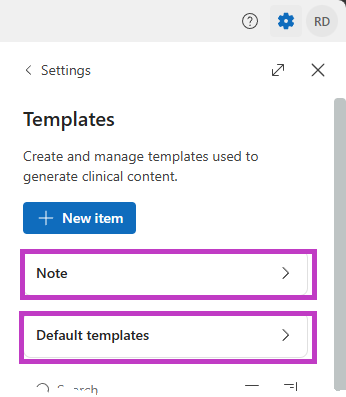
To access note style settings or configure default templates, open the templates section in DAX Copilot by selecting Settings  and then Templates. You can also access templates through the Library.
Select Note to set your style and formatting preferences and configure note section templates for specific sections of a note.
Select Default templates to configure document templates that are available when you create a new session and automatically generate after each recorded patient session.
Simplified feedback
Updated feedback workflows make it easier to provide feedback on AI-generated content throughout DAX Copilot. Your feedback helps improve the accuracy and relevance of future AI-generated outputs.