
When you'd like to delete one or more of your Class Notebooks stored in OneDrive, follow these steps. This applies to notebooks you've created using the Class Notebook app.
Note
Class Notebooks you create for classes in Microsoft Teams are not stored in OneDrive. They can only be deleted by deleting the team and all its contents. Archiving a team that's no longer active may be a good solution instead. For Class Notebooks created via the Microsoft 365 LTI, we recommend archiving the linked site.
Sign into Microsoft 365 with your school account.
Select OneDrive.

From My files, select Class Notebooks.

Select the check box next to the Class Notebook you'd like to delete, then select Delete.
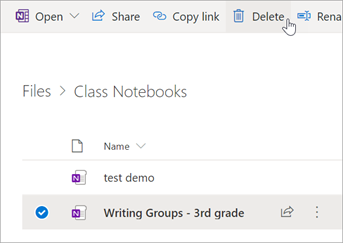
When prompted, confirm that you'd like to Delete the notebook. Your Class Notebook and all its contents are deleted permanently.
Learn more
Recover deleted Class Notebook files from the OneDrive Recycle bin
Create a Class Notebook in OneNote
Use OneNote Class Notebook in Teams
Additional resources for educators
OneNote Class Notebook training