기본적으로 Outlook에 대부분의 계정 유형을 추가하면 메시지가 대화에 표시됩니다. 대화에는 동일한 제목 줄을 가진 동일한 스레드의 모든 메시지가 포함됩니다.
아래에서 사용 중인 Outlook 버전의 탭 옵션을 선택합니다.
내가 사용 중인 Outlook 버전은 무엇인가요?
참고
이 새 Outlook 탭의 단계가 화면과 일치하면 아직 새 Windows용 Outlook을 사용하고 있지 않을 수 있습니다.
클래식 Outlook을 선택하고 대신 다음 단계를 수행합니다.
새 Outlook에서 대화별로 그룹화된 메시지 보기
페이지 위쪽에서 설정 >메일>읽기 창을 선택합니다.
메시지 organization에서 메시지 목록을 구성하는 방법 아래에서 기본 설정에 따라 옵션을 하나 선택합니다.
- 대화별로 그룹화된 전자 메일을 보려면 대화별 메시지 그룹화 를 선택합니다.

또한 대화 내의 분기별 메시지 그룹화 옵션을 선택하여 전자 메일을 대화 내의 분기로 보거나 메시지를 그룹화하지 않음을 선택하여 전자 메일이 대화별로 그룹화되지 않도록 할 수도 있습니다.
클래식 Outlook에서 대화 보기 사용
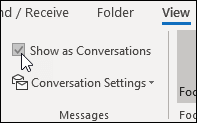
- 받은 편지함과 같은 메일 폴더에서대화로 표시보기>를 선택하여 대화 보기를 켜거나 끕니다.
-
모든 사서함 또는 이 폴더를 선택합니다.

- 메시지 목록에서 여러 메시지가 포함된 대화는 삼각형 확장/축소 아이콘 축소
 축 아이콘을 선택하여 대화를 확장하거나 축소합니다.
- 각 대화 내에서 메시지는 최신 메시지가 맨 위에 오도록 정렬됩니다. 이 정렬 순서는 변경할 수 없습니다.
- 대화의 일부인 새 메시지를 받으면 전체 대화가 메시지 목록의 맨 위로 이동합니다.
- 읽지 않은 메시지가 포함된 모든 대화에는 제목이 굵게 표시되고 읽지 않은 메시지 수가 제목 옆에 표시됩니다. 대화를 펼치면 읽지 않은 메시지의 제목이 굵게 표시됩니다.
클래식 Outlook에서 대화 옵션 변경
변경할 수 있는 몇 가지 대화 옵션이 있습니다.
받은 편지함과 같은 전자 메일 폴더에서대화 설정보기>를 선택합니다.
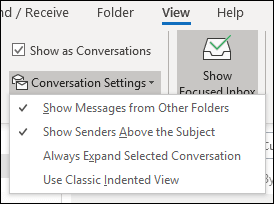
사용 가능한 옵션 중 하나를 선택합니다.
-
다른 폴더의 메시지 표시 이 옵션을 사용하면 다른 폴더로 이동된 대화의 메시지와 보낸 편지함 폴더에 저장된 메시지를 표시합니다.
-
제목 위에 보낸 사람 표시 이 옵션을 선택하면 대화 제목이 아닌 보낸 사람 이름이 대화의 맨 위에 표시됩니다.
-
선택한 대화 항상 확장 이 옵션은 현재 선택한 대화에만 적용됩니다. 이 상자를 검사할 때 선택한 대화는 항상 확장된 상태로 표시됩니다.
-
클래식 들여쓰기 보기 사용 클래식 들여쓰기 보기에서는 대화 내에서의 위치에 따라 들여쓰기된 메시지가 표시됩니다.
웹용 Outlook 또는 Outlook.com 에서 대화별로 그룹화된 메시지 보기
페이지 위쪽에서 설정>메일>읽기 창을 선택합니다.
메시지 organization에서 메시지 목록 구성 방법에서 기본 설정에 따라 옵션을 선택합니다.
- 대화별로 그룹화된 전자 메일을 보려면 대화별 메시지 그룹화 를 선택합니다.
또한 대화 내의 분기별 메시지 그룹화 옵션을 선택하여 전자 메일을 대화 내의 분기로 보거나 메시지를 그룹화하지 않음을 선택하여 전자 메일이 대화별로 그룹화되지 않도록 할 수도 있습니다.
관련 문서
Mac용 Outlook에서 대화별 전자 메일 메시지 보기
