
Você pode aplicar rótulos de sensibilidade a seus arquivos e emails para mantê-los em conformidade com as políticas de proteção de informações da sua organização.
Os rótulos de confidencialidade são configurados pelo administrador e, como são publicados para usuários em vez de locais como sites e caixas de correio, os usuários da mesma organização podem ver rótulos de confidencialidade diferentes para aplicar. Os rótulos de confidencialidade ajudam a classificar e proteger os dados da sua organização sem comprometer a produtividade ou a colaboração. Os administradores devem ter configurado os rótulos de confidencialidade anteriormente e publicado-os para você.
Observação
Esse recurso está disponível apenas para pessoas com conta corporativa ou de estudante e uma assinatura qualificada do Microsoft 365. Para obter mais informações, consulte Minha versão do Office dá suporte a rótulos de confidencialidade?
Selecione uma opção de guia abaixo para a versão do Outlook que você está usando. Qual versão do Outlook eu tenho?
Observação
Se as etapas na guia Novo Outlook não funcionarem, talvez você ainda não esteja usando o novo Outlook para Windows. Selecione Outlook Clássico e siga estas etapas.
Aplicar um rótulo de confidencialidade no novo Outlook
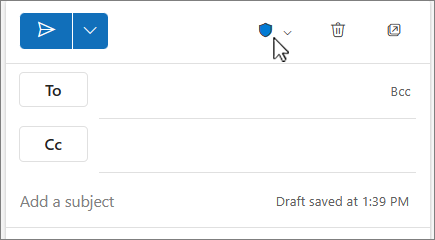
- Ao redigir um email no novo Outlook, selecione
 Sensibilidade na guia Mensagem no grupo Marcas .
 - Escolha o rótulo de confidencialidade que se aplica ao seu email.

Para remover um rótulo de confidencialidade existente, desmarque-o no menu Confidencialidade .
Você não poderá remover um rótulo se sua organização exigir rótulos em todas as mensagens de email.
Observação
A proteção do Gerenciamento de Direitos de Informação (IRM) não pode ser aplicada a uma mensagem que já esteja assinada ou criptografada usando S/MIME. Para aplicar a proteção IRM, a assinatura S/MIME e a criptografia devem ser removidas da mensagem. O mesmo se aplica a mensagens protegidas por IRM; os usuários não podem assiná-los ou criptografá-los usando S/MIME. Para obter mais informações sobre S/MIME, consulte Criptografar emails com S/MIME ou Criptografia de Mensagens do Microsoft 365 no Outlook.
Como os rótulos de confidencialidade aparecem para outras pessoas no novo Outlook
No novo Outlook, você verá o botão de confidencialidade no canto superior direito da página da mensagem.
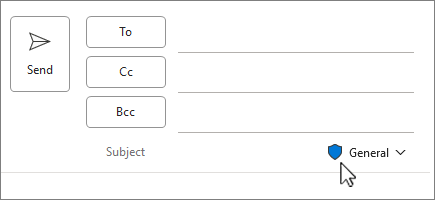
Ao exibir uma mensagem, o rótulo de confidencialidade aparece em uma linha acima da mensagem.
Tópicos relacionados
Aplicar rótulos de confidencialidade a seus arquivos e email
Aplicar rótulos de confidencialidade às suas reuniões do Outlook