
Use the Contributors dialog box to identify radiologists other than the Attending/Consultant and Resident/Registrar who contributed to creating the report.
To add a contributor to your report:
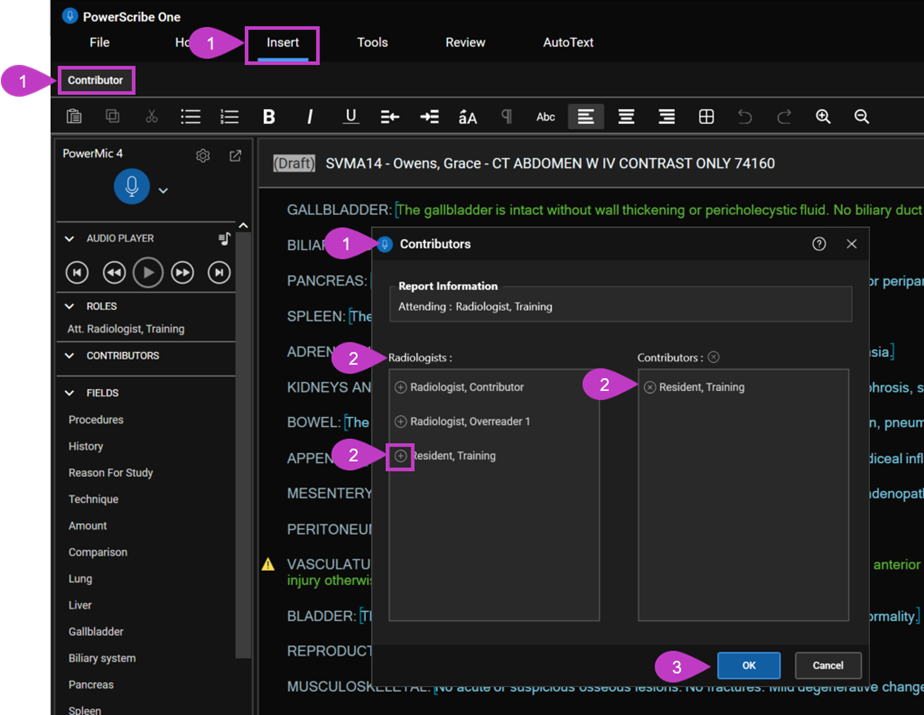
- In the Report Editor, select Insert from the menu bar, and then select Contributor. The Contributors dialog box opens.
- From the Radiologists list, select the Add icon (+) next to the radiologist you want to add. The selected name appears in the Contributors list.
- When the contributors list is complete, select OK.
Note
A radiologist appears as a contributor only after making edits to the report.
Remove a contributor
In the Contributors list, select the Remove icon (×) next to the radiologist’s name.
The radiologist is removed from the Contributors list and returned to the Radiologists list.
Note
The contributor’s name appears under the Contributors section in the navigation pane. To view the list, select the expand arrow.