
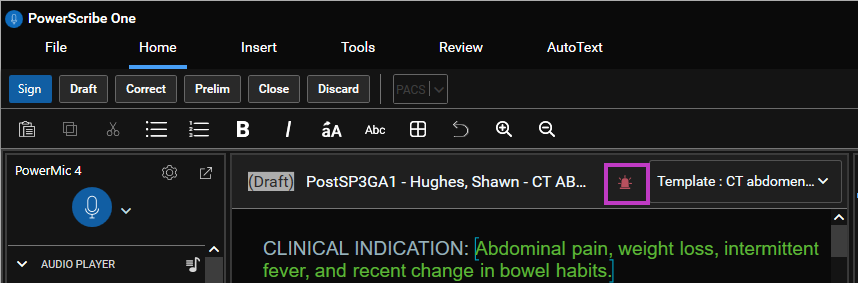
The STAT icon in PowerScribe One is a visual indicator displayed in the report header within the Report Editor and in the results grid on the Explorer screen to highlight reports or actions that require urgent attention. This feature is designed to streamline workflow prioritization for radiologists and administrative staff, ensuring that critical cases are addressed promptly.
What to do
- Use the STAT icon to mark reports that need immediate review or action.
- Monitor the STAT icon in your workflow to quickly identify and prioritize urgent cases.
Why
- The STAT icon helps users efficiently manage high-priority cases, reducing delays in patient care and improving operational efficiency.
Note
When editors are monitoring their queues, reports marked as STAT in PowerScribe One are automatically filtered to the top of the worklist.
How
- When a report is flagged as STAT, the icon appears prominently in the PowerScribe One interface.
- Radiologists and admins should check for the STAT icon during their workflow and address these cases before routine reports.
- The STAT icon can be set by authorized users when creating or editing a report, depending on site configuration.
Best practices
- Always review STAT marked reports first to ensure timely patient care.
- Use the STAT icon judiciously to avoid overuse and maintain workflow integrity.
- Ensure all team members are trained to recognize and respond to the STAT icon.
Troubleshooting
- If the STAT icon does not appear as expected, verify user permissions and site configuration.
- For technical issues, consult the PowerScribe One User Documentation or contact support.