
Use the Contact Task List to quickly take actions related to your contacts in PowerShare. This feature helps you manage connections, share images, and complete common tasks efficiently.
What is the contact task list?
The Contact Task List provides quick access to common actions you can perform with your contacts.
- You can access key contact-related tasks in one place.
- You can perform actions without going through multiple steps.
- You can streamline your daily workflows.
Access the contact task list
Go to the Contacts tab after you sign in to PowerShare.
Locate the contact you want to work with.
Select the drop-down menu next to the contact. This menu displays the available actions you can perform for that contact.
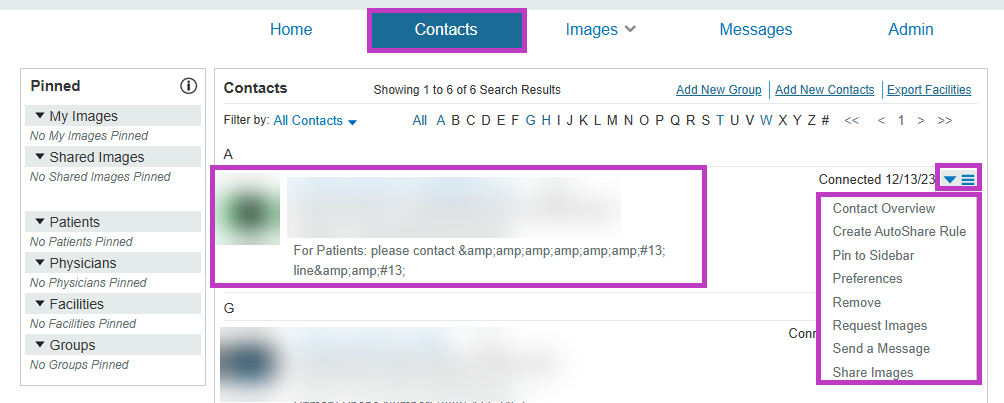
Available contact actions
From the contact task list, you can perform actions such as:
- Request images from the contact.
- Share images with the contact.
- Send a message.
- View the Contact Overview.
- Manage preferences or rules related to the contact.
Use the contact task list
Use the contact task list to complete tasks quickly:
- Select Request Images to retrieve studies from a contact.
- Select Share Images to send studies.
- Select Send a Message to communicate with the contact.
- Select Contact Overview to view or update details.
Using these options helps you reduce the number of steps needed to complete common tasks.
Next up: Use contact notes in PowerShare Image Sharing Network
Add and manage contact notes to capture important details and improve communication with your network. Let's go