Viva Engage julkinen sisältö on ollut käytettävissä Microsoft 365 Copilot pohjalähteenä toukokuusta 2025 lähtien. Nyt, kesäkuusta 2026 alkaen, Viva Engage yksityinen sisältö on myös yleisesti saatavilla Microsoft 365 Copilot -käyttökokemusten pohjalähteenä. Viittaamalla koko organisaatiosi keskustelutietoon tämän integroinnin avulla Copilot voi tarjota monipuolisempia ja asiayhteyteen liittyviä vastauksia.
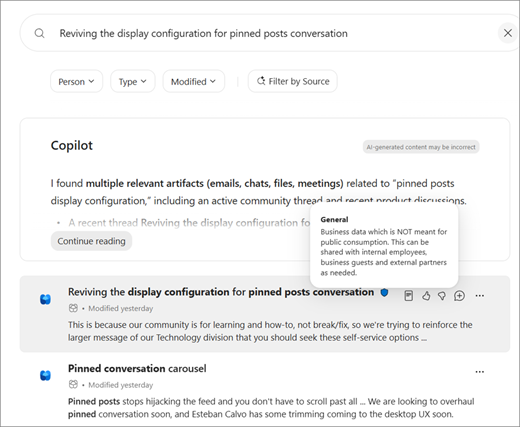
Lisäksi kun käyttäjät hakevat yrityshakuympäristöissä, kuten office.com-, sharepoint.com- tai Copilot-haussa, he saavat tuloksia Microsoft Viva Engage, joihin heillä on käyttöoikeus. Tulokset näkyvät lomitettuina tuloksina hakusivulla. Copilot-haun käyttäminen edellyttää Copilot-käyttöoikeutta.
Pakettiin sisältyvä sisältö
Julkisten yhteisöjen, yksityisten yhteisöjen ja vastausten, tapahtumien ja juonien julkaisut
Vihje
Vain sisältö, jota käyttäjillä on oikeus tarkastella, on oikeutettu perustamiseen.
Miten se toimii
Microsoft 365 Copilot -kokemukset, mukaan lukien Microsoft 365 Copilot ja Copilot-haku, voivat käyttää Viva Engage -sisältöä tekoälypohjaisten vastausten perustana lähteenä. Copilot Chat (ilmainen versio) ei tue tätä ominaisuutta.
Yrityshaun tulokset näyttävät vastaavan sisällön Engage-julkaisuista.
Käyttöoikeusvaatimukset
✅ Microsoft 365 Copilot -käyttöoikeus tarvitaan, jotta käyttäjät voivat käyttää Microsoft 365 Copilot- ja Copilot-hakua, mutta sitä ei tarvita yrityshakuun.
❌Viva Engage -käyttöoikeuksia ei tarvita, jotta käyttäjät voivat käyttää Copilot-vastauksia, jotka perustuvat Engage-sisältöön, eikä niitä tarvita Engage-tulosten näkemiseen yrityshaussa tai Copilot-haussa.
Käyttöoikeudet &
Copilot perustaa vastaukset vain Viva Engage -sisällössä, johon käyttäjällä on käyttöoikeus.
Käyttäjät voivat hakea vain sisältöä, jota heillä on oikeus tarkastella yrityshaussa ja Copilot-haussa. Tämä auttaa ylläpitämään organisaation tietoturvakäytäntöjen mukaisuutta.
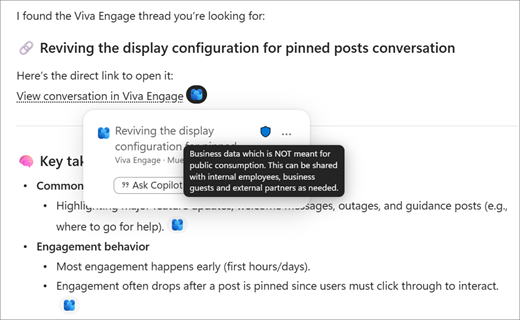
Viva Engage -lainaukset ja hakutulokset näyttävät myös yhteisön luottamuksellisuustunnisteen, kun sellaista käytetään, kuten alla:
Microsoft 365 Copilot -keskustelu
Microsoft 365 Copilot -hakutulokset