
Use foot pedals to control selected Dragon Copilot actions without a keyboard or mouse. They help you stay in your workflow when your hands are occupied, especially in documentation-heavy specialties such as pathology.
Assign keyboard shortcuts to Dragon Copilot actions, and map those shortcuts to individual foot pedals. When you press a pedal, the action runs automatically. For example, use a pedal to start or stop recording or move to the next field in a document.
What can you do with a foot pedal?
Program keyboard shortcuts to complete actions in Dragon Copilot. Then, assign those keyboard shortcuts to individual foot pedals, so when you press the foot pedal, the action completes. For example, program a foot pedal to start or stop recording, or to go to the next field in a document.
How to configure a foot pedal
- Follow the manufacturer's instructions to connect and configure your foot pedal.
- In foot pedal settings, assign a keyboard shortcut to each pedal, such as Ctrl+F10, Ctrl+F11, and Ctrl+F12.
- In Dragon Copilot, go to Settings
 > General > Keyboard shortcuts, and assign the actions you want each shortcut to perform.
 - Test the pedals to make sure they trigger the expected actions.
Dragon Copilot supports a variety of keyboard shortcut combinations. Here are some examples of shortcuts you can assign to foot pedals:
- Ctrl+F10
 Start or stop recording.
 - Ctrl+F11
Go to next field.
- Ctrl+F12
Go to previous field.
Tips for using foot pedals
- Stay in your workflow. Foot pedals trigger keyboard shortcuts that let you perform actions in Dragon Copilot without leaving your current task.
- Most keyboard shortcuts are supported. Use a compatible foot pedal to trigger most Dragon Copilot actions.
- Configure, then test. Verify your foot pedal assignments and Dragon Copilot settings before you begin dictating.
- Use your familiar setup. If you already use a foot pedal with another Dragon solution, you might be able to reuse the same keyboard shortcuts in Dragon Copilot.
Which foot pedal should you use?
The recommended device for Dragon Copilot is the Start-Stop Power Foot Pedal. It generates supported keyboard shortcuts so you can set it up easily.
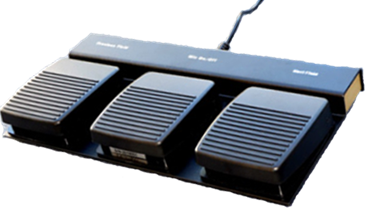
Dragon Copilot also supports Digital Accessory Corp (DAC) USB Foot Pedals and VEC / Infinity-3 USB Foot Pedals.