
Safe web search provides timely, evidence‑linked answers when your trusted external sources don’t contain the information you need. Results are delivered directly inside Dragon Copilot, so you can stay focused without leaving your workflow. All web‑derived responses are clearly labeled, always making the source of the information transparent.
What makes safe web search "safe"?
Dragon Copilot uses safe web search after it checks your trusted and selected clinical sources. When those sources can't answer your question, you can choose to expand your search by using safe web search. This process ensures you use web content intentionally, transparently, and only when needed.
Clinical and security safeguards
- The system verifies evidence and validates clinical codes for every web source.
- It uses HTTPS only and blocks potentially unsafe HTTP websites.
- It performs SSL certificate checks to exclude websites with invalid or expired certificates.
- It provides provenance assurance by including direct links to verified, up‑to‑date sources in every response, so you can see where the information comes from and review the underlying evidence.
- Safe web search uses Microsoft Bing’s built‑in protection mechanisms to filter out harmful, non‑clinical, restricted, or unauthorized content sources.
PHI protection
- It uses query minimization by sending only a short keyword query - never full patient data or encounter text.
- It removes your user and organization identifiers before the query leaves the system boundary.
- It uses TLS encryption to secure all transmitted traffic.
Enable safe web search
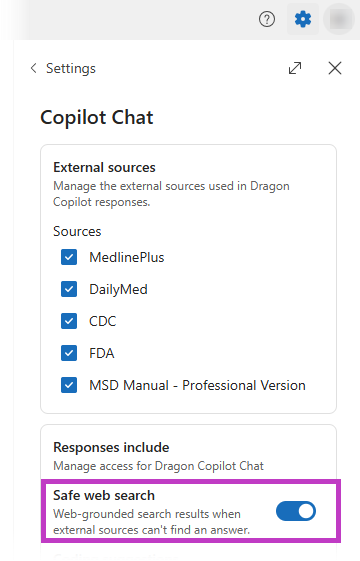
To enable safe web search, go to Settings  > Copilot Chat. Toggle the switch to enable it.
How safe web search works
When you turn on safe web search, you can use it to find information outside of your note, transcript, and external sources.
- Dictate or type your clinical question in Dragon Copilot Chat
 .
. - If your trusted or curated sources can't answer your question, Dragon Copilot uses safe web search to find the information you need.
- The response clearly indicates it came from Web sources, and it includes reference citations and links. Follow the reference links to validate the content if necessary.
- Review the response to your safe web search.
Allow safe web response
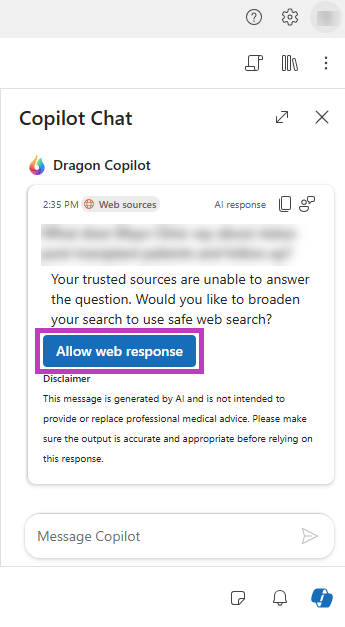
If you don't turn on safe web search and your trusted sources can't answer your question, Dragon Copilot prompts if you want to broaden your search by using safe web search. If you choose to proceed, select Allow web response to perform a safe web search.
Tip
Verify your trusted source selections in Settings
to ensure Dragon Copilot Chat
queries and requests use the sources you prefer.
Safe web search enables you to access a wider range of information while maintaining the security and privacy of your data.