跳到主要內容
Microsoft
支持
支持
支持
Home
Microsoft 365
Office
產品
Microsoft 365
Outlook
Microsoft Teams
OneDrive
Microsoft Copilot
OneNote
Windows
更多信息 ...
设备
Surface
PC Accessories
Xbox
PC Gaming
HoloLens
Surface Hub
硬件保修
Account & billing
资源
社区论坛
Microsoft 365 管理员
开发人员
教育
上报支持欺诈
Product safety
更多
Buy Microsoft 365
Microsoft 所有
Global
Microsoft 365
Azure
Windows
Surface
XBOX
支援
軟件
軟件
Windows Apps
OneDrive
Outlook
從 Skype 轉用 Teams
Microsoft Teams
PC 及 裝置
PC 及 裝置
PC 與平板電腦
配件
娛樂
娛樂
XBOX Game Pass Ultimate
XBOX Live 金會員
電腦遊戲
企業
企業
Microsoft AI
Microsoft 安全性
Azure
Dynamics 365
商務用 Microsoft 365
Microsoft Power Platform
Windows 365
數位主權
開發人員與資訊科技人員
開發人員與資訊科技人員
Microsoft 開發人員
Microsoft 學習
AI 市集 App 支援
Microsoft 科技社群
Microsoft Marketplace
軟件公司
Visual Studio
其他
其他
Microsoft Rewards
免費下載項目與安全性
教育
查看網站地圖
搜尋
Search for help
沒有結果
Cancel
登入
Sign in with Microsoft
Sign in or create an account.
Hello,
Select a different account.
You have multiple accounts
Choose the account you want to sign in with.
Related topics
Related topics
×
開始使用
下載 OneDrive
在行動裝置上使用 OneDrive
上傳 & 儲存檔案
共用與共同作業
使用個人保存庫保護檔案
新增 OneDrive 即服務
重新安裝 OneDrive。
備份
備份您的資料夾
同步處理檔案和資料夾
選擇要同步處理的資料夾
暫停同步處理
正在備份播放清單檔案
停止或取消同步處理
管理檔案
變更檢視 OneDrive.com
刪除檔案或資料夾
使用 OneDrive 匯入雲端檔案
上傳相片和檔案
變更 OneDrive 資料夾的位置
下載檔案和資料夾
將檔案下載到您的行動裝置
使用 Android 版 OneDrive 手動上傳檔案或相片
如何啟用自動儲存?
將檔案複製、傳輸或匯入到您的個人 OneDrive
勒索軟體偵測和復原
在外部磁碟機上安裝 OneDrive
管理相片
自動儲存相片
在 Windows 上瀏覽您的相片
整理和尋找相片
依人員將相片分組
三星媒體瀏覽器
OneDrive 中的 HEIF 和 HEVC 檔案
使用 AI 重新設計 OneDrive 影像的樣式
共用
共用檔案和資料夾
與 Android 共用
與 iOS 共用
新增共用資料夾的捷徑
查看您共用的檔案
查看與您共用的檔案
使用家庭或 Outlook 群組共用
無法共用 OneDrive 檔案
Copilot
開始使用 Copilot
摘要您的檔案
比較您的檔案
詢問有關檔案的問題,但不開啟檔案
產生音訊概觀
在 OneDrive 中共用 AI Agent
使用操作功能表檢閱 PDF
關於 OneDrive 中的 Copilot 的常見問題
還原
還原檔案
還原整個 OneDrive
還原舊版
刪除或還原 Android 或 iOS 上的檔案
儲存空間
什麼是 Microsoft 雲端儲存空間?
Microsoft 儲存空間配額
我的 OneDrive 表示已滿
在 Windows 中節省磁碟空間
在 macOS 上節省磁碟空間
在 Android 中節省磁碟空間
管理公司或學校儲存空間
Microsoft 儲存空間常見問題集
如何從 OneDrive 中移除 Outlook pst 資料檔案
Microsoft 365 儲存空間的變更
帳戶
OneDrive 帳戶遭到凍結?
重新啟用已封鎖的帳戶
新增帳戶
移除帳戶
什麼是公司用或學校用 OneDrive?
疑難排解
-- 同步處理問題 --
修正同步處理問題
重設 OneDrive
修正上傳至 OneDrive.com 的問題
同步處理擱置中錯誤
無法同步處理捷徑
改善同步處理效能
處理變更錯誤
檔案無法同步錯誤
修正太長而無法在 OneDrive 中同步處理的路徑
無法同步處理至 SD 記憶卡或 USB 磁碟機
-- 檔案問題 --
尋找遺失或遺漏的檔案
檔案已封存錯誤
無法共用 OneDrive 檔案
為什麼我的檔案名稱有所變更
Files will be erased 訊息
無法開啟檔案錯誤
-- 帳戶問題 --
無法登入 OneDrive
取消連結和重新連結 OneDrive
同步處理另一個帳戶錯誤
來自 OneDrive 的電子郵件
-- 安裝問題 --
OneDrive 無法啟動
關閉、停用或解除安裝
已安裝較新版 OneDrive 錯誤
macOS 上的兩個版本 OneDrive
-- 其他問題 --
疑難排解手機相簿備份問題
近期問題的修正或因應措施
OneDrive 錯誤碼
OneDrive 圖示
我看不到 OneDrive 圖示
無法從 [插入] 功能表存取 OneDrive
疑難排解 OneDrive 中的「無法開啟檔案」錯誤
Get help with Copilot
如何排除「無法開啟檔案」錯誤的問題?
向我展示如何下載 OneDrive。
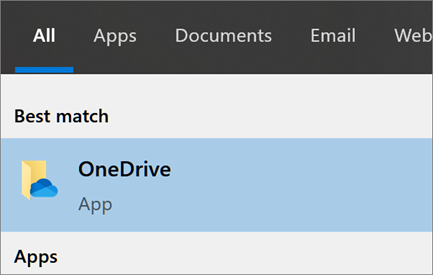
如果 Windows 顯示「無法開啟檔案」或「請確定 OneDrive 正在執行」的錯誤訊息,請遵循下列步驟:
選取
[開始]
按鈕,搜尋 [OneDrive],然後開啟它。
選取
OneDrive
傳統型應用程式。
Was this information helpful?
Yes
No
Thank you! Any more feedback for Microsoft?
Can you help us improve?
(Send feedback to Microsoft so we can help.)
How satisfied are you with the translation quality?
What affected your experience?
Resolved my issue
Clear instructions
Easy to follow
No jargon
Pictures helped
Translation quality
Didn't match my screen
Incorrect instructions
Too technical
Not enough information
Not enough pictures
Translation quality
Any additional feedback? (Optional)
Submit feedback
By pressing submit, your feedback will be used to improve Microsoft products and services.
Your IT admin will be able to collect this data.
Privacy Statement.
Thank you for your feedback!
×