Important
L’expérience d’événement en direct Teams sera mise hors service le 30 juin 2026.
Basculez vers les assemblées Teams pour bénéficier des dernières fonctionnalités et expériences d’événement. Pour plus d’informations, veuillez lire ce billet de blog.
En tant que présentateur, vous ferez partie des personnes qui travaillent en coulisses pour assurer le succès de l’événement.
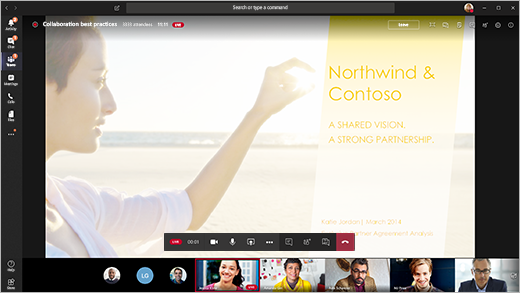
Dans Teams, sélectionnez Rejoindre pour participer à l’événement en tant que présentateur. En dehors de Teams, sélectionnez le lien Rejoindre pour ouvrir l’événement en direct dans Teams.
En tant que présentateur, vous partagez la plupart des compétences de base d’un producteur, mais vous n’avez pas autant de contrôle sur les flux vidéo ou sur l’événement en direct lui-même.
| Fonctionnalité |
Producteur |
Présentateur sur ordinateur de bureau |
| Sélectionnez les flux vidéo d’autres présentateurs et envoyez-les à l’événement |
Oui |
Non |
| Démarrer l’événement en direct |
Oui |
Non |
| Mettre fin à l’événement en direct |
Oui |
Non |
| Afficher l’aperçu de l’événement (flux envoyé aux participants) |
Oui |
Non |
| Gérer les enregistrements et les rapports |
Oui |
Oui |
| Rejoindre en tant que participant |
Oui |
Oui |
| Afficher le nombre de participants en direct |
Oui |
Non |
| Chat avec d’autres producteurs et participants |
Oui |
Oui |
| Partager l’écran dans l’événement en direct |
Oui |
Oui |
| Partager le système audio |
Oui |
Oui |
| Inviter des utilisateurs à rejoindre la réunion en tant que présentateurs |
Oui |
Oui |
| Désactiver le son de tous les autres présentateurs |
Oui |
Oui |
| Modérer une foire aux questions |
Oui |
Oui |
Contenu de cet article
Avant de commencer
Fonctionnalités du présentateur
Participer à l’événement et présenter du contenu
Avant de commencer
- Votre iPad doit exécuter iOS 10 ou version ultérieure.
- Pour une résolution vidéo de 1280x720, un débit binaire minimal de 2 000 kilobits par seconde (Kbits/s) est requis.
- Nous recommandons les versions iPad suivantes pour la présentation : n’importe quel iPad Pro, n’importe quel iPad Air.
- L’iPad 4 et l’iPad Mini 2 sont pris en charge mais non recommandés.
- Les éléments suivants ne sont pas pris en charge pour cette fonctionnalité : iPad 1, iPad 2, iPad 3, iPad Mini 1.
Important
Vous devez disposer du rôle de présentateur de réunion pour pouvoir présenter.
Le rôle de producteur n’est actuellement pas pris en charge sur iPad. Cela signifie que toute personne qui rejoint la réunion sur un iPad, à l’exception des présentateurs, n’aura que les capacités de participant . Pour plus d’informations sur les fonctionnalités des participants, consultez Rôles dans une réunion Teams.
Fonctionnalités du présentateur
En tant que présentateur sur un iPad, vous pouvez effectuer les opérations suivantes lors d’un événement en direct :
- Chat avec d’autres présentateurs et producteurs
- Partagez votre vidéo
- Partager votre écran dans l’événement en direct
- Inviter d’autres participants à se joindre à vous en tant que présentateurs
- Désactiver le son de tous les autres présentateurs
Restrictions en cours
Les présentateurs ne peuvent pas :
- Afficher les sessions Q&R ou y participer. Pour participer, quittez la réunion, puis rejoignez-la, en sélectionnant Rejoindre en tant que participant sur l’écran pré-joint.
- Partagez plusieurs flux à la fois. Par exemple, vous ne pouvez pas partager votre vidéo en même temps que votre écran.
- Partager l’audio système lors de la présentation.
Participer à l’événement et présenter du contenu
Dans Teams, sélectionnez Rejoindre en tant que présentateur. En dehors de Teams, sélectionnez le lien Rejoindre pour ouvrir l’événement en direct dans Teams.
Si vous souhaitez présenter une vidéo en direct, activez votre caméra en sélectionnant Activer la  dans les contrôles de réunion. Teams vous invite à faire pivoter votre iPad pour donner aux participants une meilleure vue.
• Si l’événement n’a pas encore commencé, vous verrez « PRE-LIVE » sur votre vidéo avec une bordure jaune.
• Si l’événement a commencé, vous verrez « FILE D’ATTENTE » avec une bordure jaune.
• Si l’événement a commencé et que le producteur diffuse déjà votre vidéo, vous verrez « EN DIRECT » avec une bordure rouge.
Pour présenter du contenu ou passer du partage d’un type de contenu à un autre, sélectionnez le bouton Partager le contenu dans les contrôles de réunion, puis sélectionnez ce que vous souhaitez partager.

Conseil
Si vous partagez votre écran, modifiez le status de votre Teams sur Ne pas déranger pour éviter l’affichage des notifications. Pour obtenir des instructions, consultez Modifier votre status.
Si vous choisissez de partager votre écran, sélectionnez Démarrer la diffusion.
Lorsque vous avez terminé votre présentation, sélectionnez Arrêter le partage.
Vous souhaitez en savoir plus ?
Événements en direct Teams
